
I need to connect my new iPhone to my hearing aids.
I recently replaced my old iPhone with a 14+ and I am having difficulty connecting my hearing aid. I made sure that it is turned on in my Privacy setting.
iPad mini 4, iPadOS 15
I recently replaced my old iPhone with a 14+ and I am having difficulty connecting my hearing aid. I made sure that it is turned on in my Privacy setting.
iPad mini 4, iPadOS 15
Hi bionicdonut,
You started from a helpful article: Pair a third-party Bluetooth accessory with your iPhone or iPad
Be sure your device is listed in the article here: List of Made for iPhone hearing devices
If listed test the steps below found in the article here: Use Made for iPhone hearing devices - Apple Support
"Pair and connect your hearing device
After checking compatibility and putting your hearing device in pairing mode, follow these steps to pair and connect it to your Apple device. If you previously paired a different hearing device, your new hearing device replaces the previous one.
iPhone or iPad
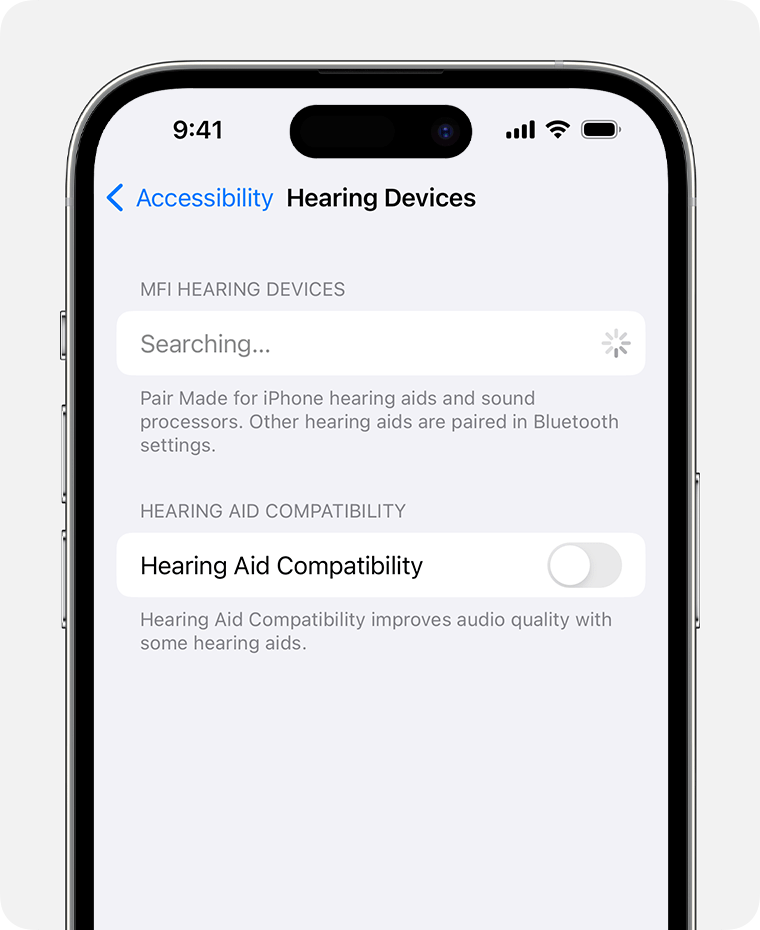 4. When your hearing device appears in settings, tap its name.
5. Tap Pair when you see one or more Bluetooth pairing requests."
You can also check out helpful information in the articles below.
Hearing accessibility features in iOS - Apple Support
Use hearing devices with iPhone - Apple Support
If you continue to have an issue reach out to Apple Support directly to further assist. Get Support
Best.
Hi bionicdonut,
You started from a helpful article: Pair a third-party Bluetooth accessory with your iPhone or iPad
Be sure your device is listed in the article here: List of Made for iPhone hearing devices
If listed test the steps below found in the article here: Use Made for iPhone hearing devices - Apple Support
"Pair and connect your hearing device
After checking compatibility and putting your hearing device in pairing mode, follow these steps to pair and connect it to your Apple device. If you previously paired a different hearing device, your new hearing device replaces the previous one.
iPhone or iPad
4. When your hearing device appears in settings, tap its name.
5. Tap Pair when you see one or more Bluetooth pairing requests."
You can also check out helpful information in the articles below.
Hearing accessibility features in iOS - Apple Support
Use hearing devices with iPhone - Apple Support
If you continue to have an issue reach out to Apple Support directly to further assist. Get Support
Best.
I need to connect my new iPhone to my hearing aids.

