temporary iphone backup failed
tried to backup iphone 14 in order to transfer files etc to iphone 15 error message "the last backup could not be completed" how do i proceed?
iPhone 14 Pro
tried to backup iphone 14 in order to transfer files etc to iphone 15 error message "the last backup could not be completed" how do i proceed?
iPhone 14 Pro
Hello jtewart,
Please check out this link, which explains the correct process to create a temporary backup of your current iPhone, so we can make sure there aren't any issues there: Get temporary iCloud storage when you buy a new iPhone or iPad
To get temporary iCloud storage, here's what you need
* If you buy a new iPhone or iPad and don't have enough iCloud storage to back up your current device using iCloud Backup, you're eligible to get temporary iCloud storage.
* Update your current iPhone or iPad to the latest version of iOS or iPadOS.
* Make sure that you know the Apple ID and password that you use with iCloud. Learn what to do if you don't know your Apple ID.
How to create a temporary backup of your current iPhone or iPad
1. Go to Settings > General.
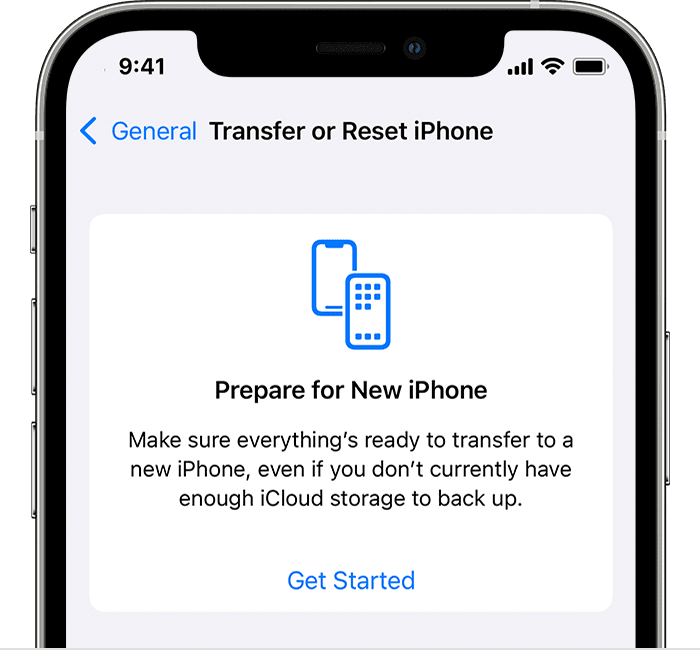
2. Scroll down and tap Transfer or Reset [Device].
3. Under "Prepare for New [Device]," tap Get Started.
4. If you see "iCloud Backup is Turned Off," tap Turn On Backup to Transfer.
5. If you don't have enough iCloud storage, you'll see a message that says you're eligible to get free extra iCloud storage. Tap Continue.
If you don't see this message, then you have enough iCloud storage to back up your iPhone or iPad to iCloud.
6. Wait for the backup to complete.
If you can't back up to iCloud, please check out this link, which has some information that may be helpful: If you can't back up to iCloud
Thanks!
Hello jtewart,
Please check out this link, which explains the correct process to create a temporary backup of your current iPhone, so we can make sure there aren't any issues there: Get temporary iCloud storage when you buy a new iPhone or iPad
To get temporary iCloud storage, here's what you need
* If you buy a new iPhone or iPad and don't have enough iCloud storage to back up your current device using iCloud Backup, you're eligible to get temporary iCloud storage.
* Update your current iPhone or iPad to the latest version of iOS or iPadOS.
* Make sure that you know the Apple ID and password that you use with iCloud. Learn what to do if you don't know your Apple ID.
How to create a temporary backup of your current iPhone or iPad
1. Go to Settings > General.
2. Scroll down and tap Transfer or Reset [Device].
3. Under "Prepare for New [Device]," tap Get Started.
4. If you see "iCloud Backup is Turned Off," tap Turn On Backup to Transfer.
5. If you don't have enough iCloud storage, you'll see a message that says you're eligible to get free extra iCloud storage. Tap Continue.
If you don't see this message, then you have enough iCloud storage to back up your iPhone or iPad to iCloud.
6. Wait for the backup to complete.
If you can't back up to iCloud, please check out this link, which has some information that may be helpful: If you can't back up to iCloud
Thanks!
temporary iphone backup failed