Charging was on hold due to iPhone temperature

Whenever plugged out charging around 80% my iPhone 15 rather than showing last charged data, shows this message “Charging was on hold due to iPhone temperature”. This happens every time when the charger is plugged before 100%. Is it normal?


[Re-Titled by Moderator]

iPhone 15, iOS 17

Posted on Oct 10, 2023 9:04 PM

Reply
Question marked as Top-ranking reply

Posted on Oct 12, 2023 9:22 AM

Hello Yusuf980,


You can find information about this alert in this resource: If a Charging On Hold notification appears on your iPhone or iPad


If a Charging On Hold notification appears on your iPhone or iPad

If your iPhone or iPad is in a very hot or cold environment, it might not be able to charge. Find out what to do.

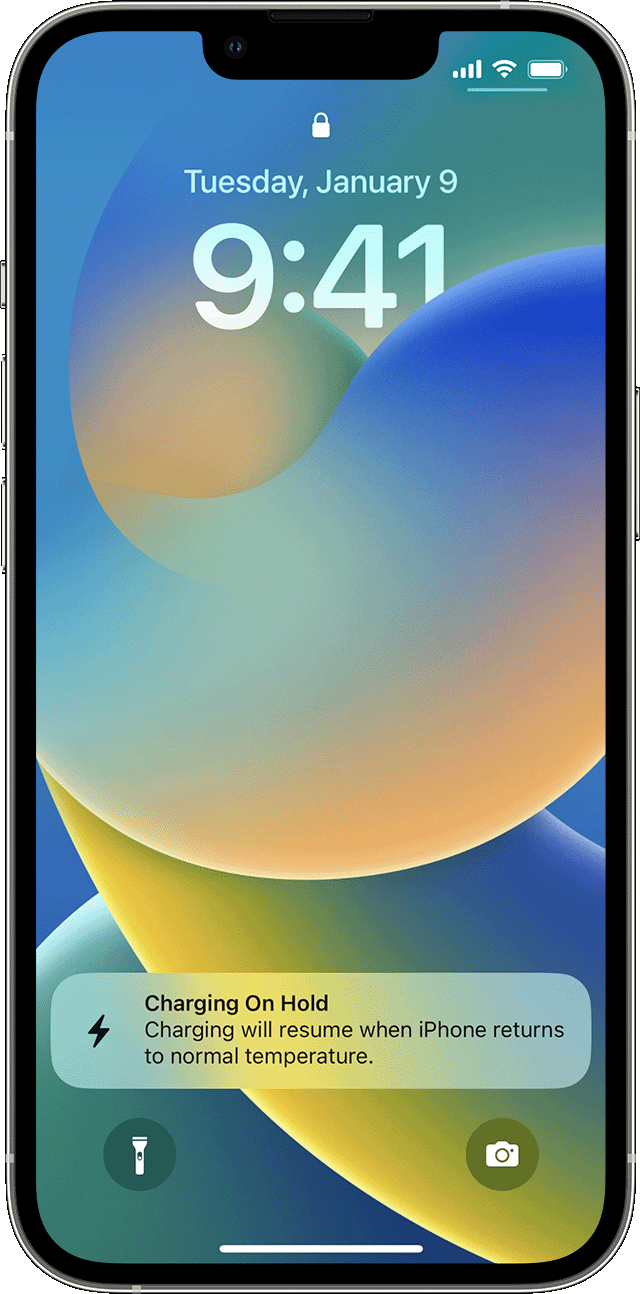
With iOS 16 and iPadOS 16, charging is put on hold when your device becomes too hot or too cold. This message appears on your Lock Screen and in Settings > Battery: "Charging On Hold. Charging will resume when [device] returns to normal temperature." 

Follow these guidelines to resume charging your device as quickly as possible. If your device:

* Is too hot, move it to a cooler place, including away from direct sunlight.

* Is too cold, move it to a warmer place.

* Is in use, lock the screen or put it to sleep.

iPhone Lock Screen with the Charging on Hold notification.

Learn more about managing the temperature of your iPhone or iPad


You can also see when these would be expected behavior here: If your iPhone or iPad gets too hot or too cold


Let us know if that helps out.


Cheers!

3 replies
Question marked as Top-ranking reply

Oct 12, 2023 9:22 AM in response to Yusuf980

Hello Yusuf980,


You can find information about this alert in this resource: If a Charging On Hold notification appears on your iPhone or iPad


If a Charging On Hold notification appears on your iPhone or iPad

If your iPhone or iPad is in a very hot or cold environment, it might not be able to charge. Find out what to do.

With iOS 16 and iPadOS 16, charging is put on hold when your device becomes too hot or too cold. This message appears on your Lock Screen and in Settings > Battery: "Charging On Hold. Charging will resume when [device] returns to normal temperature." 

Follow these guidelines to resume charging your device as quickly as possible. If your device:

* Is too hot, move it to a cooler place, including away from direct sunlight.

* Is too cold, move it to a warmer place.

* Is in use, lock the screen or put it to sleep.

iPhone Lock Screen with the Charging on Hold notification.

Learn more about managing the temperature of your iPhone or iPad


You can also see when these would be expected behavior here: If your iPhone or iPad gets too hot or too cold


Let us know if that helps out.


Cheers!

This thread has been closed by the system or the community team. You may vote for any posts you find helpful, or search the Community for additional answers.

Charging was on hold due to iPhone temperature

Welcome to Apple Support Community
A forum where Apple customers help each other with their products. Get started with your Apple Account.