Apple smdy Stole my AirPods And Stuff like that when I was hooping When I wasn’t looking they stole one of them Can u Text them they mines and come to my house and bring em to me man

I was playing basketball cause I hoop Thne I got fouled right I said I’m finna Go put my left AirPod up Then When I was looking I look at My Find Location it was there smbdy stole while I was cooking up so Yea Apple pls

iPhone 12 Pro Max, iOS 16

Posted on Oct 11, 2023 4:06 AM

Reply
Question marked as Top-ranking reply

Posted on Oct 12, 2023 6:45 AM

Greetings Jorden215,


We understand that one of your AirPods is missing. At this time, the only way it can be located is by using Find My. We've included the steps below that can assist you.


"Find your lost AirPods with Find My

Find My can show your AirPods on a map, play a sound to help find them, and even help find their precise location when they're nearby.


  1. On your iPhone, open Find My.
  2. In Devices, choose your AirPods. If your AirPods are out of the case, you might have to pick the left bud or right bud. With AirPods Pro (2nd generation) or later, you can also pick the case.
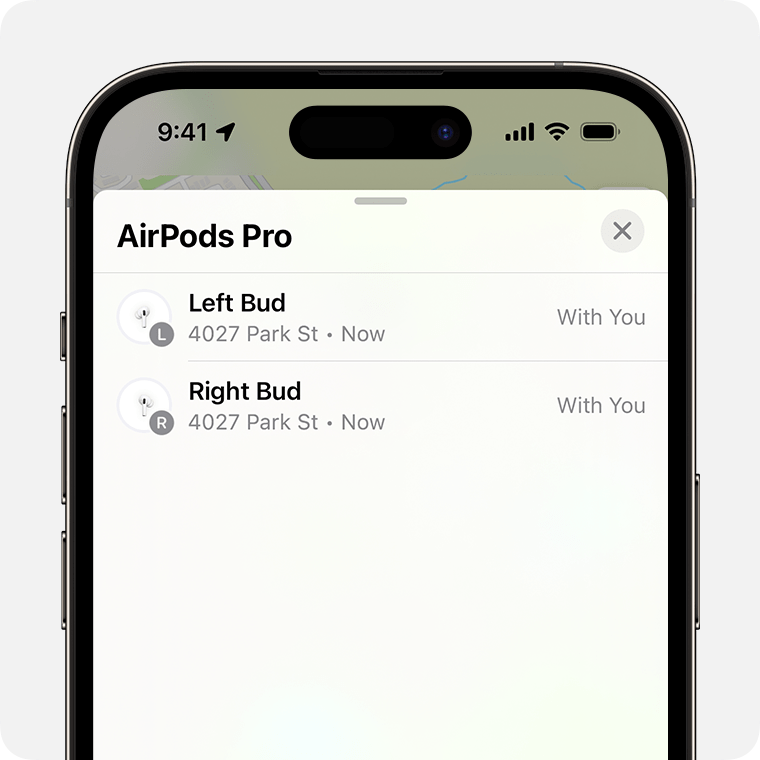
If your AirPods are separated, choose which bud that you want to find.


3. Find your AirPods on the map.


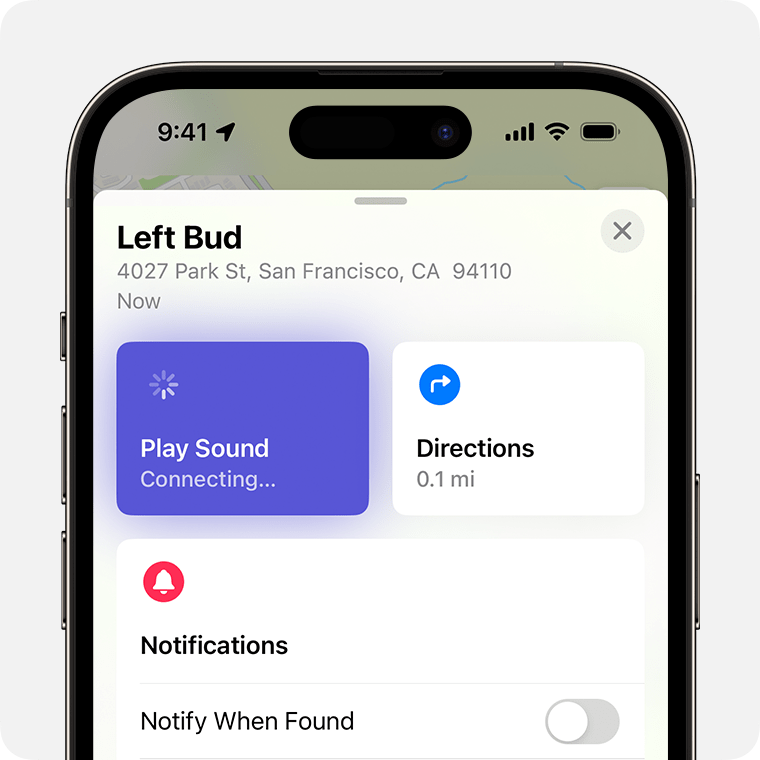
When your AirPods are nearby, tap Play Sound and listen for the series of beeps.


    • If they aren't near you, tap Get Directions to open their location in Maps.
    • If you're nearby, tap Play Sound and listen for the series of beeps.
    • Depending on your AirPods and iPhone, you might also see an option to Find Nearby. Tap it, wait for your AirPods to connect to your iPhone, then follow the prompts to find your AirPods.

Your iPhone might take longer than expected to connect to your AirPods to play a sound or find nearby.

If you don't have an iPhone or other Apple device to use Find My, you can also find your AirPods at iCloud.com/find — but the experience might be different and some functionality might not be available.


If your AirPods are "Offline" or show "No location found"

  • If your AirPods are out of range or need to charge, you might see their last known location. You might also see "Offline" or "No location found."
  • You might be able to get directions to their last known location — but you won't be able to play a sound or use Find Nearby.
  • If they come back online, you get a notification on your iPhone (or other Apple device that you use them with).


If you can't find your AirPods

  1. In Find My, choose your AirPods and swipe up.
  2. Under Mark as Lost, tap Activate.
  3. Follow the onscreen steps to display your contact information to someone who finds your AirPods.
  4. Select Activate.


Be ready next time with the Find My network and Notify When Left Behind

Want to help make sure that you find your AirPods next time?

  • The Find My network is an encrypted, anonymous network of hundreds of millions of Apple devices that can help you find your AirPods, even if they're offline. Nearby devices securely send the location of your missing AirPods to iCloud, so that you can find where they are. It's all anonymous and encrypted to protect everyone's privacy. To make sure it's turned on: On iPhone, open Settings > Bluetooth. Tap the More Info button  next to your AirPods, then scroll down to Find My network and make sure that it's turned on.
  • With Notify When Left Behind, your iPhone or Apple Watch can alert you when you leave your supported AirPods at an unknown location.

Learn more about the Find My network and your AirPods

Turn on Notify When Left Behind to get notifications if you leave your AirPods behind"


We hope this helps.

Have a wonderful day!

1 reply
Question marked as Top-ranking reply

Oct 12, 2023 6:45 AM in response to jorden215

Greetings Jorden215,


We understand that one of your AirPods is missing. At this time, the only way it can be located is by using Find My. We've included the steps below that can assist you.


"Find your lost AirPods with Find My

Find My can show your AirPods on a map, play a sound to help find them, and even help find their precise location when they're nearby.


  1. On your iPhone, open Find My.
  2. In Devices, choose your AirPods. If your AirPods are out of the case, you might have to pick the left bud or right bud. With AirPods Pro (2nd generation) or later, you can also pick the case.

If your AirPods are separated, choose which bud that you want to find.


3. Find your AirPods on the map.


When your AirPods are nearby, tap Play Sound and listen for the series of beeps.


    • If they aren't near you, tap Get Directions to open their location in Maps.
    • If you're nearby, tap Play Sound and listen for the series of beeps.
    • Depending on your AirPods and iPhone, you might also see an option to Find Nearby. Tap it, wait for your AirPods to connect to your iPhone, then follow the prompts to find your AirPods.

Your iPhone might take longer than expected to connect to your AirPods to play a sound or find nearby.

If you don't have an iPhone or other Apple device to use Find My, you can also find your AirPods at iCloud.com/find — but the experience might be different and some functionality might not be available.


If your AirPods are "Offline" or show "No location found"

  • If your AirPods are out of range or need to charge, you might see their last known location. You might also see "Offline" or "No location found."
  • You might be able to get directions to their last known location — but you won't be able to play a sound or use Find Nearby.
  • If they come back online, you get a notification on your iPhone (or other Apple device that you use them with).


If you can't find your AirPods

  1. In Find My, choose your AirPods and swipe up.
  2. Under Mark as Lost, tap Activate.
  3. Follow the onscreen steps to display your contact information to someone who finds your AirPods.
  4. Select Activate.


Be ready next time with the Find My network and Notify When Left Behind

Want to help make sure that you find your AirPods next time?

  • The Find My network is an encrypted, anonymous network of hundreds of millions of Apple devices that can help you find your AirPods, even if they're offline. Nearby devices securely send the location of your missing AirPods to iCloud, so that you can find where they are. It's all anonymous and encrypted to protect everyone's privacy. To make sure it's turned on: On iPhone, open Settings > Bluetooth. Tap the More Info button  next to your AirPods, then scroll down to Find My network and make sure that it's turned on.
  • With Notify When Left Behind, your iPhone or Apple Watch can alert you when you leave your supported AirPods at an unknown location.

Learn more about the Find My network and your AirPods

Turn on Notify When Left Behind to get notifications if you leave your AirPods behind"


We hope this helps.

Have a wonderful day!

This thread has been closed by the system or the community team. You may vote for any posts you find helpful, or search the Community for additional answers.

Apple smdy Stole my AirPods And Stuff like that when I was hooping When I wasn’t looking they stole one of them Can u Text them they mines and come to my house and bring em to me man

Welcome to Apple Support Community
A forum where Apple customers help each other with their products. Get started with your Apple Account.