Stopping "Cellular Data is Turned Off Turn on cellular data or use Wi-Fi to access data."

after updating to ios17 i have started getting this message "Cellular Data is Turned Off Turn on cellular data or use Wi-Fi to access data." I disable my wifi and data network for certain apps. This prompt is now constantly showing up every 5-10 minutes intervals the app is trying to connect online. I do not want to go airplane mode, i want phone calls to work.

Posted on Oct 11, 2023 3:23 PM

Reply
Question marked as Top-ranking reply

Posted on Oct 12, 2023 12:35 PM


Hello drewex,


Thanks for visiting the Apple Support Communities. Sounds like something is attempting to access data when you are not on Wi-Fi or allowing cellular.


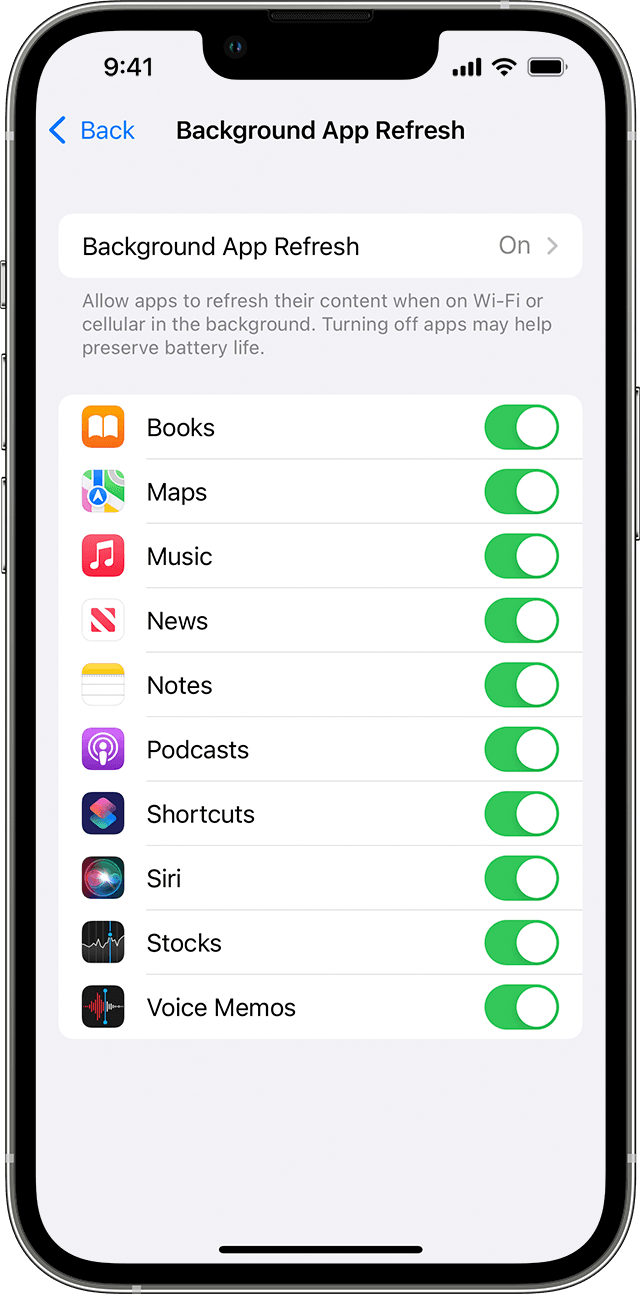
Try this, close the apps when not in use, or turn off background app refresh. Switch apps on your iPhone, iPad, or iPod touch - Apple Support


"Use Background App Refresh

After you switch to a different app, some apps run for a short period of time before they're set to a suspended state. Apps that are in a suspended state aren’t actively in use, open, or taking up system resources. With Background App Refresh, suspended apps can check for updates and new content. 

If you want suspended apps to check for new content, go to Settings > General > Background App Refresh and turn on Background App Refresh. If you quit an app from the app switcher, it might not be able to run or check for new content before you open it again."


Thanks.

Similar questions

17 replies
Question marked as Top-ranking reply

Oct 12, 2023 12:35 PM in response to drewex


Hello drewex,


Thanks for visiting the Apple Support Communities. Sounds like something is attempting to access data when you are not on Wi-Fi or allowing cellular.


Try this, close the apps when not in use, or turn off background app refresh. Switch apps on your iPhone, iPad, or iPod touch - Apple Support


"Use Background App Refresh

After you switch to a different app, some apps run for a short period of time before they're set to a suspended state. Apps that are in a suspended state aren’t actively in use, open, or taking up system resources. With Background App Refresh, suspended apps can check for updates and new content. 

If you want suspended apps to check for new content, go to Settings > General > Background App Refresh and turn on Background App Refresh. If you quit an app from the app switcher, it might not be able to run or check for new content before you open it again."


Thanks.

Oct 13, 2023 1:04 PM in response to drewex

Contact the app developer. The app is designed to be connected to the Internet when in use. You have chosen to deny it access to data. It’s going to complain until you allow it to connect.


I seriously doubt they will change the behavior of their app, in which case you can either deal with it the errors, allow it access, or delete it and find an alternative that doesn’t do that.

Oct 13, 2023 12:46 PM in response to drewex

Hi Drewex,


Got it. We understand exactly what you mean. We suggest completing the following steps to ensure that the feature is working as expected:


1. Restart your iPhone. This may seem like a simple step to take but can often resolve several issues.


2. Be sure you're running the latest version of iOS 17. Completing this step ensures that your device has the latest fixes. (Secure your data with a backup): Update your iPhone or iPad


If the issue persists, we suggest that you reach out to Apple. They will be able to look further into this with you: 

Get Support


All the best.

Have a wonderful day!

Oct 13, 2023 8:40 AM in response to Eric--F

actually the app is active at the point i am getting this message. I know its trying to connect online but i have limited data (including wifi, i know its idiotic but it is what it is). At times i do not want the app trying to access online costing me money. I knowingly disable the data and wifi before starting the app so it doesnt connect online. How can I prevent this message since its a new thing wasnt here for ios16 and its keeps coming up on is17.

Oct 13, 2023 9:29 AM in response to drewex

Hey drewex,


Just to make sure we're on the same page with, you are wanting the app to only access data when it is in use and active, correct? If that is the case, the steps above will disable it so that it will not attempt to connect to Wi-Fi or cellular data unless it is open and active. Are you able to disable it and it enables back again? Let us know more details.


Cheers.

Apr 1, 2024 7:25 AM in response to drewex

I use a receiver device connected to my iPad via Wifi and the device's interface is rendered in the Safari browser. The device is not connected to the internet and I have cellular data turned off. I've turned off all possible options in Safari, but still get the message. I understand what iPad is trying to do, and it's not a huge deal - just one more 'Tap' to clear the alert, but I'd really love to disable it!

This thread has been closed by the system or the community team. You may vote for any posts you find helpful, or search the Community for additional answers.

Stopping "Cellular Data is Turned Off Turn on cellular data or use Wi-Fi to access data."

Welcome to Apple Support Community
A forum where Apple customers help each other with their products. Get started with your Apple Account.