Itunes
I have purchased songs on ITunes and they will not download. I have plenty of storage on my phone. Please help!
iPhone 14 Pro Max, iOS 16
I have purchased songs on ITunes and they will not download. I have plenty of storage on my phone. Please help!
iPhone 14 Pro Max, iOS 16
Hello becky0211,
Thank you for reaching out in Apple Support Communities. When you attempt to download music from the iTunes Store to your iPhone, are you seeing an error message? If so, what does the error message say?
If you haven't tried yet, we recommend to restart your iPhone and see if you can download music on both Wi-Fi and cellular data. This is a step that can help resolve unexpected behavior. If needed, here's how:
How to restart your iPhone X, 11, 12, 13, or later
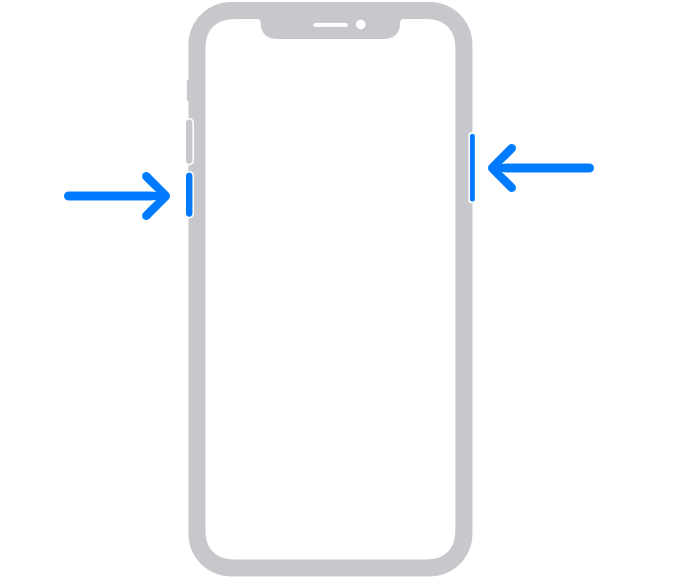
1. Press and hold either volume button and the side button until the power-off slider appears.
2. Drag the slider, then wait 30 seconds for your device to turn off. If your device is frozen or unresponsive, force restart your device.
3. To turn your device back on, press and hold the side button (on the right side of your iPhone) until you see the Apple logo.
Following these steps may help and is outlined in this article: Restart your iPhone - Apple Support
We look forward to hearing back from you with an update.
Kind regards.
Hello becky0211,
Thank you for reaching out in Apple Support Communities. When you attempt to download music from the iTunes Store to your iPhone, are you seeing an error message? If so, what does the error message say?
If you haven't tried yet, we recommend to restart your iPhone and see if you can download music on both Wi-Fi and cellular data. This is a step that can help resolve unexpected behavior. If needed, here's how:
How to restart your iPhone X, 11, 12, 13, or later
1. Press and hold either volume button and the side button until the power-off slider appears.
2. Drag the slider, then wait 30 seconds for your device to turn off. If your device is frozen or unresponsive, force restart your device.
3. To turn your device back on, press and hold the side button (on the right side of your iPhone) until you see the Apple logo.
Following these steps may help and is outlined in this article: Restart your iPhone - Apple Support
We look forward to hearing back from you with an update.
Kind regards.
Itunes