How to tell if someone is logged into ur account
How do you tell if someone has logged into ur account I’m already family sharing but I think iv had a string applied to my phone how do u tell
iPhone 14, iOS 17
How do you tell if someone has logged into ur account I’m already family sharing but I think iv had a string applied to my phone how do u tell
iPhone 14, iOS 17
Hello Loanstar1989,
Thank you for reaching out in Apple Support Communities. You can review a list of devices that's signed into your Apple ID account. This will help determine if you need to remove an unknown device. Here's how:
Find where your devices are connected
Follow these steps to find the devices that you're currently signed in to with your Apple ID.
Use your iPhone, iPad, or Apple Watch to find where you're signed in
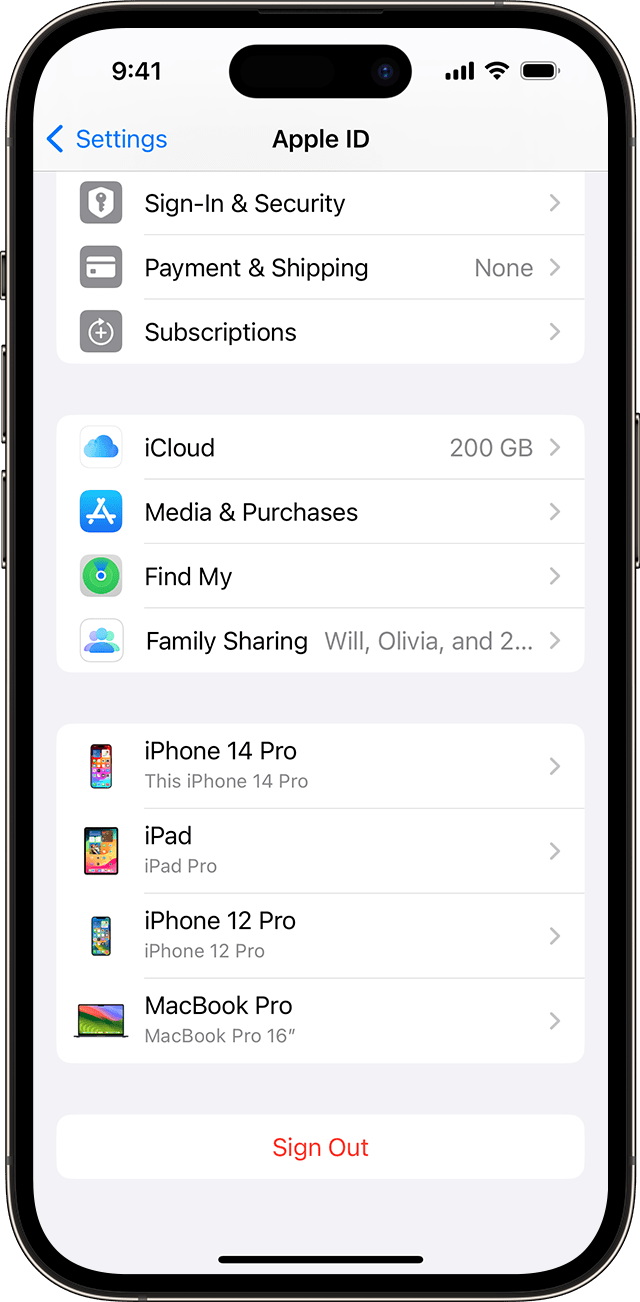
1. Tap Settings > [your name], then scroll down.
2. Tap any device name to view that device's information, such as the device model, serial number, OS version, and whether it's a trusted device that can be used to receive Apple ID verification codes. The information might vary depending on the device type. You might need to answer your security questions to view device details.
Following these steps can help and is outlined in this article: Check your Apple ID device list to find where you're signed in
You can also take a look at this page, if you ever feel that your Apple ID may have been compromised:
If you think your Apple ID has been compromised - Apple Support
Kind regards.
Hello Loanstar1989,
Thank you for reaching out in Apple Support Communities. You can review a list of devices that's signed into your Apple ID account. This will help determine if you need to remove an unknown device. Here's how:
Find where your devices are connected
Follow these steps to find the devices that you're currently signed in to with your Apple ID.
Use your iPhone, iPad, or Apple Watch to find where you're signed in
1. Tap Settings > [your name], then scroll down.
2. Tap any device name to view that device's information, such as the device model, serial number, OS version, and whether it's a trusted device that can be used to receive Apple ID verification codes. The information might vary depending on the device type. You might need to answer your security questions to view device details.
Following these steps can help and is outlined in this article: Check your Apple ID device list to find where you're signed in
You can also take a look at this page, if you ever feel that your Apple ID may have been compromised:
If you think your Apple ID has been compromised - Apple Support
Kind regards.
How to tell if someone is logged into ur account