Ringtones won’t go onto my iPhone 14
I just upgraded my iPhone from 11 to 14 the in use ringtones work but none of my ringtones are there and won’t go back on no matter what I do
I just upgraded my iPhone from 11 to 14 the in use ringtones work but none of my ringtones are there and won’t go back on no matter what I do
Hello JamesL01,
Thank you for reaching out in Apple Support Communities. Just to be sure, are you referring to purchased ringtones that are not appearing in your settings? If so, let's ensure that we're following these steps:
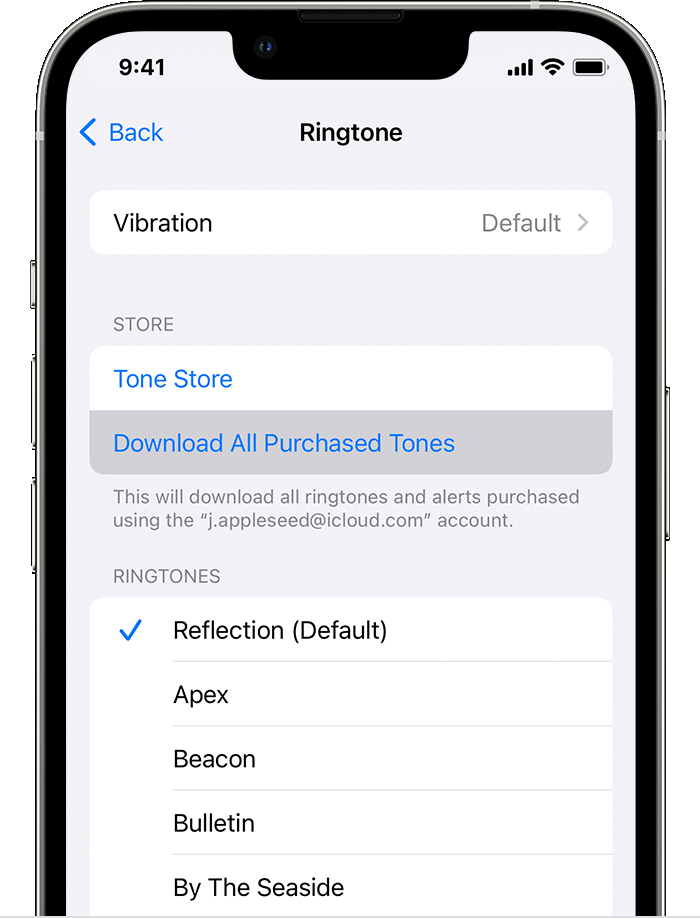
Redownload ringtones purchased with your Apple ID
1. Go to Settings > Sounds & Haptics.
2. Under Sounds and Haptic Patterns, tap any sound.
3. Tap Download All Purchased Tones. You might not see this option if you already downloaded all the tones that you purchased or if you haven't purchased any tones.
This information is outlined in this article and may help: Use tones and ringtones with your iPhone or iPad - Apple Support
We look forward to hearing back from you with an update.
Kind regards.
Hey JamesL01,
Try using a built in ringtone. If you're able to use built in ringtones, we recommend contacting Apple Support for further assistance. You can reach out to them here: Get Support.
Take care.
Hi JamesL01, We appreciate you reaching out to us. Are you referring to some of the built-in ringtones?
If yes, please reach out to us using the support link below so we can take a closer look into the issue.
Take care!
No ringtones I made and got off of friends but when I recently upgraded my iPhone to the 14 I tried to put the ringtones back on but they will not go back on I have been told it has something to do with the newest iso 17 update blocking them
No they are my free ringtones I’ve used for at least 5 years and now you guys changed something to make them not work this is why people leave and go with androids
Ringtones won’t go onto my iPhone 14