why won't my send and receive connect to my phone number

My phone died and when I got back and charges it my iMessages were not working and it says that my send and receive through my phone number won't connect. Is this an apple problem or my phone carrier problem? how do I fix this?

Posted on Oct 14, 2023 8:22 PM

Reply
Question marked as Top-ranking reply

Posted on Oct 15, 2023 4:19 PM

Hi alexismalin05,


If you're unable to send or receive messages, please check out this link, which can help resolve some Messages issues: If you can't send or receive messages on your iPhone or iPad


Just to clarify, are you also being prompted to add your phone number for Messages? If so, please check out this link, which explains how to do that, and will guide you through that process: Add or remove your phone number in Messages or FaceTime


Set up your phone number

On your iPhone:

1. Go to Settings > Messages and make sure that iMessage is on. You might need to wait a moment for it to activate.
2. Tap Send & Receive. If you see "Use your Apple ID for iMessage," tap it and sign in with the same Apple ID that you use on your Mac, iPad, and iPod touch.
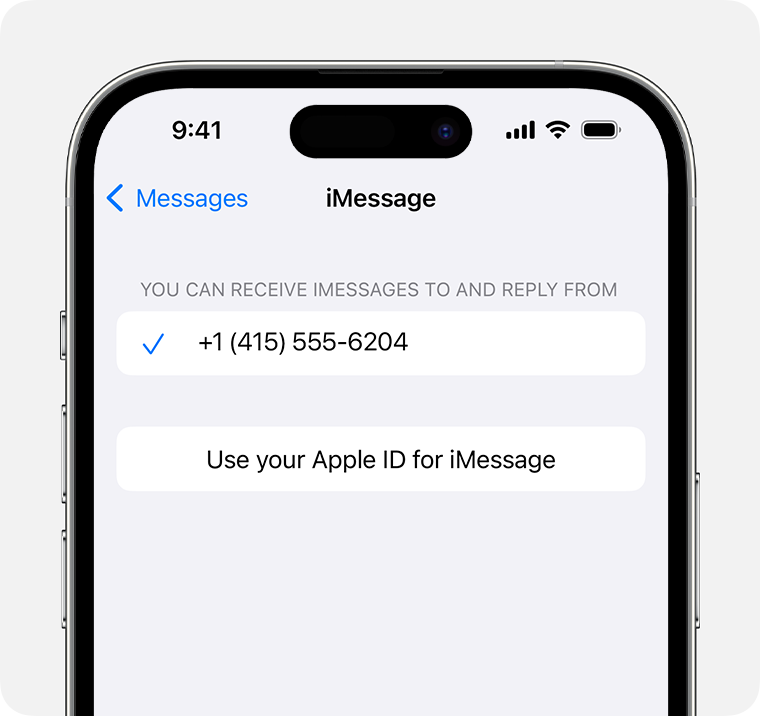
When you first set up Messages on your iPhone, you can sign in with your Apple ID to use Messages across all your devices.
3. In the "You can receive iMessages to and Reply From" section, make sure that your phone number and Apple ID are selected.
4. Go to Settings > FaceTime and make sure that your phone number and Apple ID are selected in the "You can be reached by FaceTime at" section.

On your other devices, you can now turn on the phone number that you just set up:

* Turn on your phone number for your Mac
* Turn on your phone number for your iPad or iPod touch


Thanks!

Similar questions

1 reply
Question marked as Top-ranking reply

Oct 15, 2023 4:19 PM in response to alexismalin05

Hi alexismalin05,


If you're unable to send or receive messages, please check out this link, which can help resolve some Messages issues: If you can't send or receive messages on your iPhone or iPad


Just to clarify, are you also being prompted to add your phone number for Messages? If so, please check out this link, which explains how to do that, and will guide you through that process: Add or remove your phone number in Messages or FaceTime


Set up your phone number

On your iPhone:

1. Go to Settings > Messages and make sure that iMessage is on. You might need to wait a moment for it to activate.
2. Tap Send & Receive. If you see "Use your Apple ID for iMessage," tap it and sign in with the same Apple ID that you use on your Mac, iPad, and iPod touch.
When you first set up Messages on your iPhone, you can sign in with your Apple ID to use Messages across all your devices.
3. In the "You can receive iMessages to and Reply From" section, make sure that your phone number and Apple ID are selected.
4. Go to Settings > FaceTime and make sure that your phone number and Apple ID are selected in the "You can be reached by FaceTime at" section.

On your other devices, you can now turn on the phone number that you just set up:

* Turn on your phone number for your Mac
* Turn on your phone number for your iPad or iPod touch


Thanks!

This thread has been closed by the system or the community team. You may vote for any posts you find helpful, or search the Community for additional answers.

why won't my send and receive connect to my phone number

Welcome to Apple Support Community
A forum where Apple customers help each other with their products. Get started with your Apple Account.