Is it possible to have the wallpaper cycle in order rather than just a random shuffle?
I want to have a wallpaper that cycles between multiple photos in order instead of a random shuffle. Is it possible to do this?
iPhone 4s, iOS 9
I want to have a wallpaper that cycles between multiple photos in order instead of a random shuffle. Is it possible to do this?
iPhone 4s, iOS 9
Hey CheddarGuy,
You can choose the photos that you want to shuffle and adjust the frequency wit Photo Shuffle, but you won't be able to determine the order the photos are displayed.
Rotate multiple photos as your Lock Screen wallpaper
1. In the Settings app, tap Wallpaper.
2. Tap Add New Wallpaper.
3. Select Photo Shuffle from the top row of options.
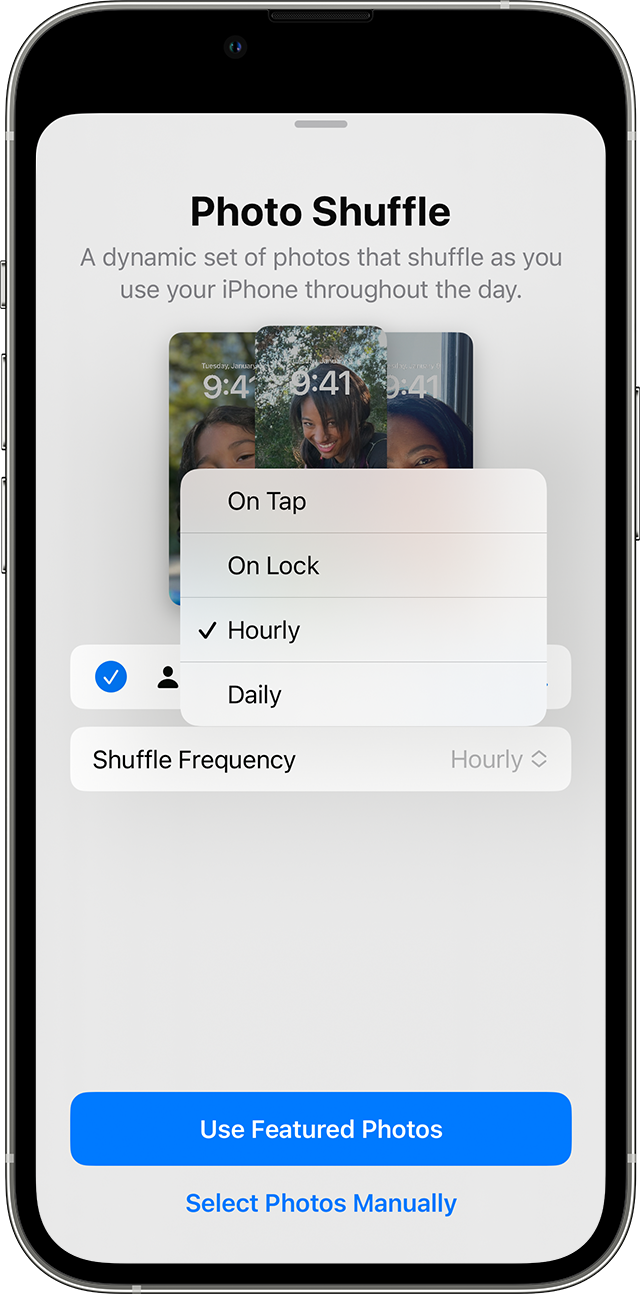
4. On the Photo Shuffle screen, set a frequency (On Tap, On Lock, Hourly, or Daily). Then choose a set of photos that will shuffle as you use your iPhone throughout the day.
Change the wallpaper on your iPhone - Apple Support
If this is an option you would like to see made available in the future, please leave feedback for Apple here: Product Feedback - Apple
Kindest Regards.
Hey CheddarGuy,
You can choose the photos that you want to shuffle and adjust the frequency wit Photo Shuffle, but you won't be able to determine the order the photos are displayed.
Rotate multiple photos as your Lock Screen wallpaper
1. In the Settings app, tap Wallpaper.
2. Tap Add New Wallpaper.
3. Select Photo Shuffle from the top row of options.
4. On the Photo Shuffle screen, set a frequency (On Tap, On Lock, Hourly, or Daily). Then choose a set of photos that will shuffle as you use your iPhone throughout the day.
Change the wallpaper on your iPhone - Apple Support
If this is an option you would like to see made available in the future, please leave feedback for Apple here: Product Feedback - Apple
Kindest Regards.
Is it possible to have the wallpaper cycle in order rather than just a random shuffle?