Hi sachin2105,
If you haven't done so yet, restart your iPhone. Although simple, this step can help correct some unexpected issues. It's also a good idea to make sure your iPhone is running the latest iOS version, since this can help with overall performance: Update your iPhone or iPad
If an update is available, be sure to create a backup before installing it.
If the issue continues, clearing Safari history and website data may help. Here's how to do that: Clear the history, cache, and cookies from Safari on your iPhone, iPad, or iPod touch
Delete history, cache, and cookies
1. Go to Settings > Safari.
2. Tap Clear History and Website Data.
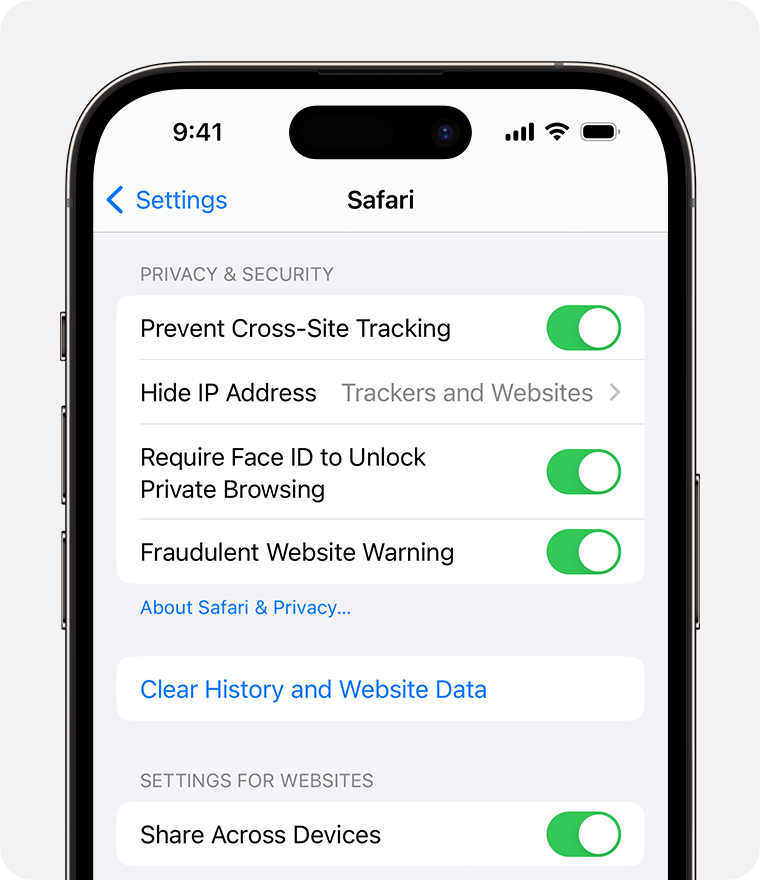
Clearing your history, cookies, and browsing data from Safari won't change your AutoFill information.
When there's no history or website data to clear, the button to clear it turns gray. The button might also be gray if you have web content restrictions set up under Content & Privacy Restrictions in Screen Time.
Regards.


