Running Pages with Sonoma

I cannot generate a Table of Contents. when it does it is not editable. Allthe headings are orange and linkable.

The page numbers are all on the far left of the page. I have tried it two ways...from the side bar and from insert.

This is for a book in Page layout not word processeing.

Mac mini (M2, 2023)

Posted on Oct 16, 2023 10:38 AM

Reply
1 reply
8 replies

Oct 17, 2023 10:14 AM in response to Moncrief

Hi Moncrief,


Thanks for posting in Apple Support Communities.


When creating a table of contents, you will need to choose the paragraph style and then edit it from the sidebar.


You can choose which paragraph styles to include in the table of contents and change the indentation.
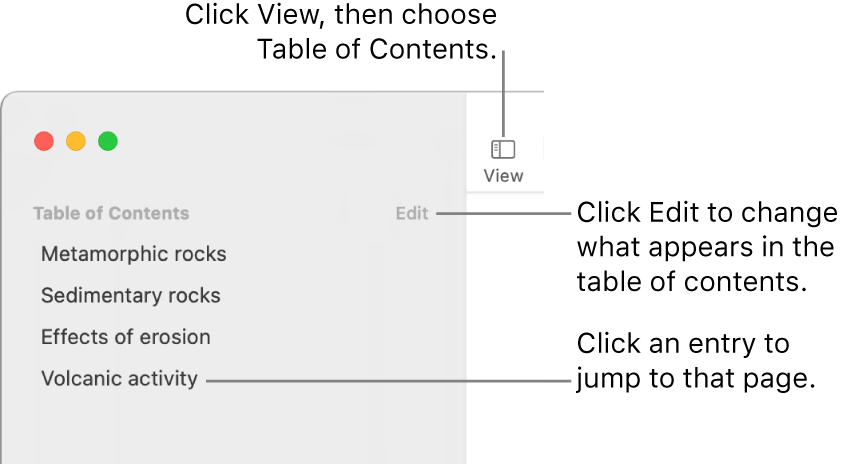
The table of contents on the left side of the Pages window with an Edit button at the top-right corner of the sidebar and table of contents entries in a list.
1. If you haven’t already done so, apply paragraph styles to the text you want to appear in the table of contents.
2. Click the View menu button in the toolbar, then choose Table of Contents.
3. To change the TOC entries, click Edit at the top of the sidebar, then do any of the following:
* Change which paragraph styles are enabled: Select the checkbox next to the paragraph styles you want to include.
* Change the indentation of entries: Click the indent or outdent button to the right of a selected style. If a button is dimmed, you can’t move the entry in that direction.
To change the sidebar view or close the sidebar, click the View menu button, then choose Page Thumbnails or Document Only.

You can find this information and more in Create a table of contents in Pages on Mac - Apple Support.


Regards.


Oct 17, 2023 12:50 PM in response to Moncrief

Hello Moncrief,


Thanks for getting back to us with those additional details. When did you first notice this issue? Are you experiencing this behavior with a specific document or multiple?


Next, let's try testing to see if we can reproduce the behavior in a new user account. That can help isolate whether the issue is system wide, or account specific. 


The following article explains how to set up, and test in a new user: Change Users & Groups settings on Mac


Let us know the results, and we'll go from there. Kind regards.


Oct 17, 2023 3:29 PM in response to Moncrief

Hey Moncrief,


Let's take a step back. Reviewing the guide we shared earlier on creating the table of contents, it says


The TOC is based on paragraph styles used in your document. For example, if you apply the Heading paragraph style to your chapter titles, then enable the Heading style for the TOC, those chapter titles appear in the TOC. As you edit your content, the TOC updates automatically.


Those details can be found in the very first section "Create a table of contents in Pages on Mac". Here's that link, just in case: Create a table of contents in Pages on Mac - Apple Support


So you wouldn't be able to edit the table of contents directly. You'd instead edit the Heading styles as shown in the guide.


We hope this helps.


Take care!


Running Pages with Sonoma

Welcome to Apple Support Community
A forum where Apple customers help each other with their products. Get started with your Apple ID.