“ number not available. Which number would you like to send a message with?”

My primary device is an iPhone 11, but I also use several devices for iMessage, including 11 Macs, 7 iPads, and 2 iPod Touch.


All of those devices send messages just fine except for one iPhone 13 Pro-MAX (which does not have a cellular plan).


I have set it up the same exact way that I have done time and time again for the iPads, and even other iPhones, but when I tried to send messages to non-iPhone users, it tells me number not available and offers to use a “secondary number.”


I don’t have a secondary number, and I’ve never used dual Sim functionality in my life. 🤷🏿‍♂️ maybe some setting is enabled from the previous user?


[Edited by Moderator]

Apple Watch Series 4, watchOS 9

Posted on Oct 16, 2023 1:05 PM

Reply
1 reply

Oct 17, 2023 11:34 AM in response to vam225

Hi vam225,


Please check out this link, which explains the requirements to send SMS/MMS messages, which may be helpful: What is the difference between iMessage and SMS/MMS?


"If you aren’t using iMessage, you can use SMS/MMS. These messages are texts and photos that you send to other cell phones or another iPhone, iPad, or iPod touch. SMS/MMS messages aren't encrypted and appear in green text bubbles on your device.


To use SMS/MMS on an iPhone, you need a text-messaging plan. Contact your wireless carrier for more information. You can also set up your other Apple devices to send and receive messages from any Apple device.

If Wi-Fi is unavailable, iMessages will be sent over cellular data. Cellular data rates might apply."


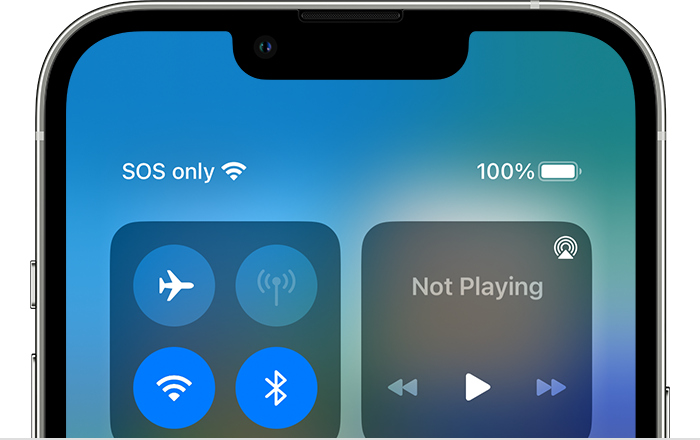
From the screenshot you provided, it appears that your device is showing "SOS." Please check out this link, which explains why that may appear, and how the device can be used when showing "SOS": If you see No Service, Searching, or SOS on your iPhone or iPad


If you see SOS or SOS only

If you see SOS or "SOS only" in the status bar, your device isn't connected to a network, but you can still make emergency calls. This feature is available in Australia, Canada, and the United States.

Top part of iPhone screen showing "SOS only" in status bar


Thanks!

This thread has been closed by the system or the community team. You may vote for any posts you find helpful, or search the Community for additional answers.

“ number not available. Which number would you like to send a message with?”

Welcome to Apple Support Community
A forum where Apple customers help each other with their products. Get started with your Apple Account.