AirPods Max when on call nobody can hear me when I speak

When I'm on a work call I can hear everyone clearly but when I go to speak no one can hear me.

iPhone 13, iOS 16

Posted on Oct 18, 2023 6:11 AM

Reply
Question marked as Top-ranking reply

Posted on Oct 19, 2023 7:11 AM

Hi timcoke,


For help with ensuring others can hear you while using your AirPods Max on a call, test the steps below and be sure you're not muted. You can also find these steps and helpful information here: Make and answer calls with AirPods Max - Apple Support


"Make and answer calls with AirPods Max

  1. Wear your AirPods Max, and make sure they’re connected to your your device.
  2. Do one of the following:
  • Make a call: On an iPhone or iPad (Wi-Fi + Cellular model), say “Hey Siri,” then say something like “Call Eliza’s mobile.” On an iPad without cellular, say something like “Make a FaceTime call,” or press and hold the Digital Crown, wait for a chime, then make your request.
    • You can also make a call on your device, such as in the FaceTime app  or Phone app .
  • Answer a call: Press the Digital Crown.
    • Note: If you turn on announce calls, you can also answer or decline a call using your voice.
    • End a call: Double-click the Digital Crown.

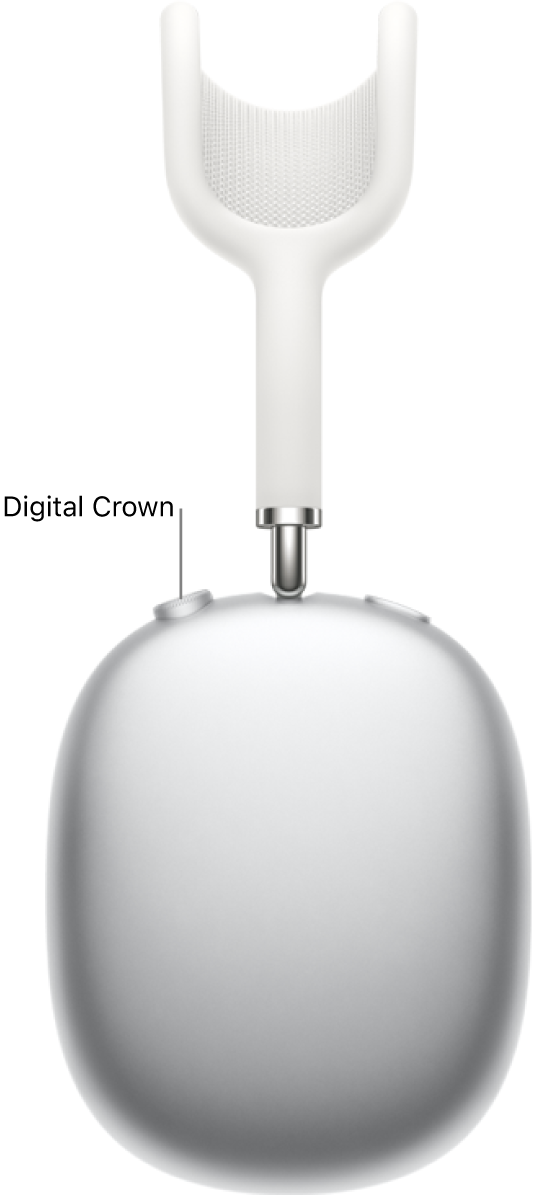
The location of the Digital Crown on the right headphone of AirPods Max.

Note: While on a call, you can turn the Digital Crown to change the volume.


Mute or unmute during a call

  • During a call, press the Digital Crown.
  • In certain apps, like FaceTime, you will hear a sound and see a message telling you whether the microphone is on or off."


There's also helpful information here: Connect and use your AirPods Max - Apple Support


If the issue continues after the steps and reset in the article you started from How to reset your AirPods Max, reach out to Apple to further assist. Get Support


Best.


1 reply
Question marked as Top-ranking reply

Oct 19, 2023 7:11 AM in response to timcoke

Hi timcoke,


For help with ensuring others can hear you while using your AirPods Max on a call, test the steps below and be sure you're not muted. You can also find these steps and helpful information here: Make and answer calls with AirPods Max - Apple Support


"Make and answer calls with AirPods Max

  1. Wear your AirPods Max, and make sure they’re connected to your your device.
  2. Do one of the following:
  • Make a call: On an iPhone or iPad (Wi-Fi + Cellular model), say “Hey Siri,” then say something like “Call Eliza’s mobile.” On an iPad without cellular, say something like “Make a FaceTime call,” or press and hold the Digital Crown, wait for a chime, then make your request.
    • You can also make a call on your device, such as in the FaceTime app  or Phone app .
  • Answer a call: Press the Digital Crown.
    • Note: If you turn on announce calls, you can also answer or decline a call using your voice.
    • End a call: Double-click the Digital Crown.

The location of the Digital Crown on the right headphone of AirPods Max.

Note: While on a call, you can turn the Digital Crown to change the volume.


Mute or unmute during a call

  • During a call, press the Digital Crown.
  • In certain apps, like FaceTime, you will hear a sound and see a message telling you whether the microphone is on or off."


There's also helpful information here: Connect and use your AirPods Max - Apple Support


If the issue continues after the steps and reset in the article you started from How to reset your AirPods Max, reach out to Apple to further assist. Get Support


Best.


This thread has been closed by the system or the community team. You may vote for any posts you find helpful, or search the Community for additional answers.

AirPods Max when on call nobody can hear me when I speak

Welcome to Apple Support Community
A forum where Apple customers help each other with their products. Get started with your Apple Account.