My left iPod isn’t working
No sound comes through the left iPod
iPhone XR, iOS 16
No sound comes through the left iPod
iPhone XR, iOS 16
Hi chirstinardot,
Since you're having audio issues in your left AirPod, we recommend that you try the steps here: If your left or right AirPod isn't working
To perform the recommended troubleshooting steps via the link above, complete the steps in the section titled "If there's no sound in one AirPod."
1. Make sure that your charging case is fully charged.
2. Place both AirPods in your charging case and let them charge for 30 seconds.
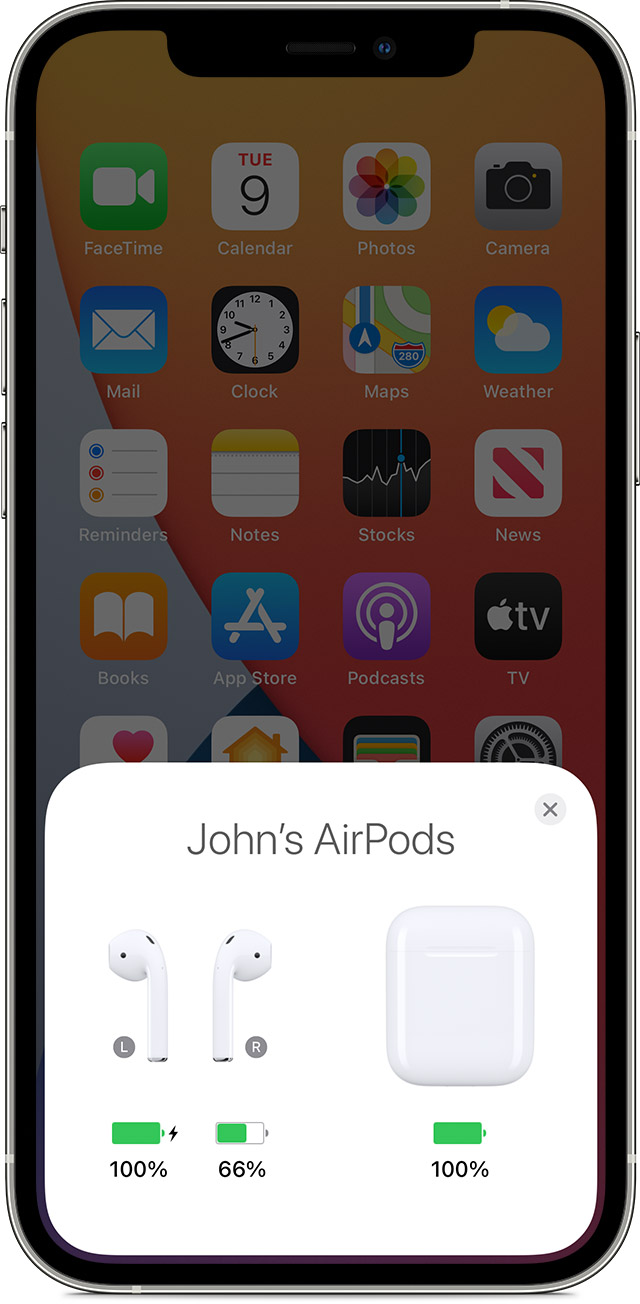
3. Open the charging case near your iPhone or iPad.
4. Check the charge status on your iPhone or iPad to make sure that each AirPod is charging.
5. Put both AirPods in your ears.
6. Play audio to test both AirPods.
We recommend the steps above because they will show you what to do if there's no sound in one AirPod.
If you’re still experiencing the same issue, then we recommend that you contact Apple Support directly so that they can work with you to find a solution. You can reach them by clicking here: Apple Support or calling the most local number in your region: Contact Apple for support and service. Thank you for participating in the Apple Support Communities. Cheers!
Hi chirstinardot,
Since you're having audio issues in your left AirPod, we recommend that you try the steps here: If your left or right AirPod isn't working
To perform the recommended troubleshooting steps via the link above, complete the steps in the section titled "If there's no sound in one AirPod."
1. Make sure that your charging case is fully charged.
2. Place both AirPods in your charging case and let them charge for 30 seconds.
3. Open the charging case near your iPhone or iPad.
4. Check the charge status on your iPhone or iPad to make sure that each AirPod is charging
5. Put both AirPods in your ears.
6. Play audio to test both AirPods.
We recommend the steps above because they will show you what to do if there's no sound in one AirPod.
If you’re still experiencing the same issue, then we recommend that you contact Apple Support directly so that they can work with you to find a solution. You can reach them by clicking here: Apple Support or calling the most local number in your region: Contact Apple for support and service. Thank you for participating in the Apple Support Communities. Cheers!
My left iPod isn’t working