Added mp3 file to my itunes library on PC but it wont show up on my phone's library?

I'm pretty sure I'm just missing something basic here. Please help me get these files on my phone


I am not subscribed to apple music by the way. with the reading ive done on here i see that being subscribed can make this process similarly difficult


I just downloaded all 15 songs i just purchased prior to originally uploading the 2 mp3 files i got on the web and they still wont transfer to my phone. I then bought another song just to see if the mp3 files were being intentionally ignored and yup they were! I've done some reading and it seems my best option is to sync my PC library to my iphones library but when I attempt to it seems I am barred from doing so. My iphone as a device just doesn't appear on my PC under devices and i cant Sync because of that. The weird thing is that when I buy a song off the itunes store on my computer it IMMEDIATELY goes onto my phone so i just have no clue whats going on. Itunes in general has been a very clunky obtuse experience at times. Please send help!!!


EDIT I dont have an iphone six anymore. The post just asked me to choose a device to list as the one im having problems with and all my phones are called the same thing "bob's Iphone" and I cannot seem to alter that now


iPhone 6

Posted on Oct 19, 2023 7:54 PM

Reply
2 replies

Oct 20, 2023 3:08 PM in response to Bobbyliciouz

Hi Bobbyliciouz,


Since you're having difficulty syncing with iTunes, we recommend that you try the steps here: Use iTunes to sync your iPhone, iPad, or iPod with your computer - Apple Support


To perform the recommended troubleshooting steps via the link above, complete the steps in the section titled "Sync or remove content using iTunes."


1. Open iTunes and connect your device to your computer with a USB cable.
2. Click the device icon in the upper-left corner of the iTunes window. Learn what to do if you don't see the icon
The device icon in the upper left corner of the iTunes window.
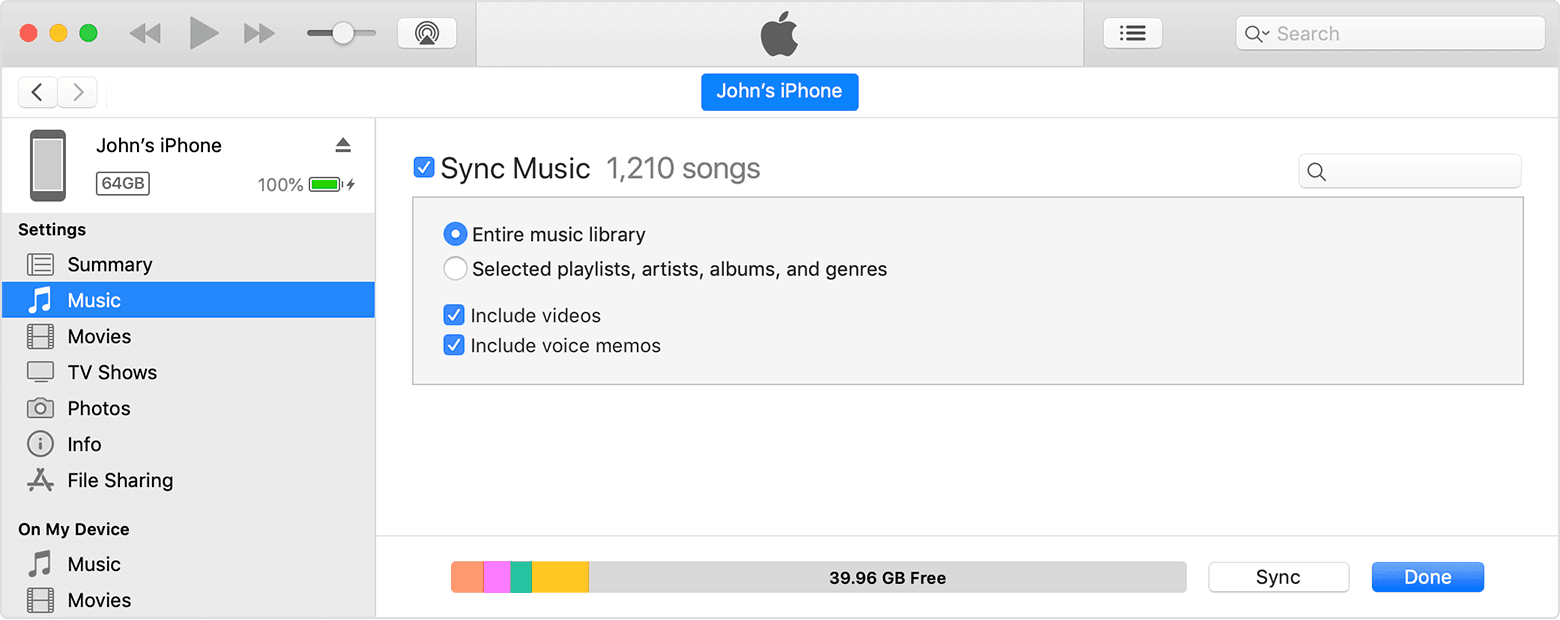
3. From the list under Settings on the left side of the iTunes window, click the type of content that you want to sync or remove.* To turn syncing on for a content type, select the checkbox next to Sync.
The checkbox next to Sync Music in iTunes.
4. Select the checkbox next to each item that you want to sync.
5. Click the Apply button in the lower-right corner of the window. If syncing doesn't start automatically, click the Sync button.
 
* You can only sync your device with one iTunes library at a time. If you see a message that your device is synced with another iTunes library, your device was previously connected to another computer. If you click "Erase and Sync" in that message, all content of the selected type on your device will be erased and replaced with content from this computer.


We recommend the steps above because they will show you how to sync or remove content using iTunes.


If you’re still experiencing the same issue, try the steps here: Sync iTunes content on PC with your devices - Apple Support


Please let us know the outcome after giving the above steps a try.


Thanks for using the Apple Support Communities.


Cheers!

Oct 21, 2023 12:49 AM in response to Bobbyliciouz

If I understand you correctly, you have purchased music from a different source to the iTunes Store (and there's nothing wrong with that), but those songs are not getting onto your phone.


First of all, are the songs in your iTunes Library and do they play in your library? If they don't play, does an exclamation mark appear next to the song's title when you try to play it?


Bobbyliciouz wrote:

I've done some reading and it seems my best option is to sync my PC library to my iphones library but when I attempt to it seems I am barred from doing so.

You are not being "barred" at all. More likely, it sounds as though you may have been using Manually Manage and now when you try to use Sync you see an error message. If so, what does the error message say? This is an important point, please let us know which method you have been using up to now. If you have never used iTunes to manage your iPod (by either method), then we need to know that too.


My iphone as a device just doesn't appear on my PC under devices and i cant Sync because of that.

You use iTunes to synchronise music to your phone, not the PC's File Manager. Concentrate on iTunes. (Your post suggests to me that your phone is seen by iTunes. Is that the case?)


The weird thing is that when I buy a song off the itunes store on my computer it IMMEDIATELY goes onto my phone so i just have no clue whats going on.

That may (possibly) be because the purchases from the iTunes Store are being downloaded directly from the store to your iPhone (using the iPhone's built-in store app). However, to add music that came from other sources, it has to be in your iTunes Library and then copied over to the phone (by iTunes) using either Manually Manage or Sync. Once we know how you've been doing it up to know, then we can advise further.

Added mp3 file to my itunes library on PC but it wont show up on my phone's library?

Welcome to Apple Support Community
A forum where Apple customers help each other with their products. Get started with your Apple ID.