I can’t pair my iPhone 15 with my AirPod 2 generation

Is anybody has fixed this problem? Trying to find out

iPhone 15 Pro, iOS 17

Posted on Oct 22, 2023 7:55 AM

Reply
Question marked as Top-ranking reply

Posted on Oct 23, 2023 9:21 AM

Hi mahieddine35,


It sounds like you're having an issue pairing your new iPhone 15 with your AirPods. If so, be sure you're following the steps outlined below, and found in the article here: Connect your AirPods and AirPods Pro to your iPhone - Apple Support


"If you're setting up your AirPods for the first time, make sure that you have an iPhone with the latest version of iOS. Then follow these steps:
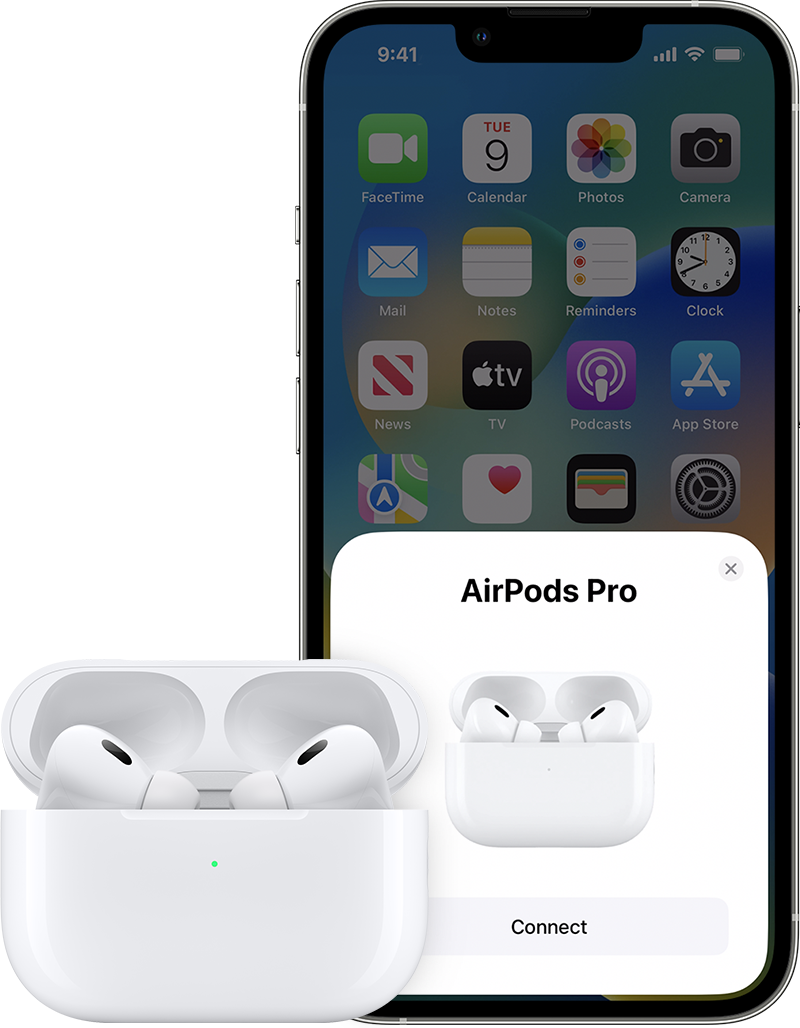
iPhone setup and AirPods 

  1. Go to the Home Screen.
  2. With your AirPods in the charging case, open the charging case, and hold it next to your iPhone. A setup animation appears on your iPhone.
  3. Tap Connect. 
  4. If you have AirPods Pro (1st or 2nd generation) or AirPods (3rd generation), read the next three screens.
  5. If you have AirPods Pro (1st or 2nd generation) or AirPods (2nd or 3rd generation) and you set up Siri on your iPhone already, then Siri is ready to use with your AirPods. If you haven't set up Siri already and you have AirPods Pro (1st or 2nd generation) or AirPods (2nd or 3rd generation), you'll be guided through the setup.
  6. Tap Done.
  7. If you're signed in to iCloud, your AirPods are set up automatically with any of your supported devices that are signed in to iCloud with the same Apple ID."


If you still aren't able to connect test the steps here: If your AirPods or AirPods Pro won't connect - Apple Support You can also test connecting to another device to isolate. If the issue continues, reach out to Apple directly to report it and further assist. Get Support


Cheers.

1 reply
Question marked as Top-ranking reply

Oct 23, 2023 9:21 AM in response to mahieddine35

Hi mahieddine35,


It sounds like you're having an issue pairing your new iPhone 15 with your AirPods. If so, be sure you're following the steps outlined below, and found in the article here: Connect your AirPods and AirPods Pro to your iPhone - Apple Support


"If you're setting up your AirPods for the first time, make sure that you have an iPhone with the latest version of iOS. Then follow these steps:

iPhone setup and AirPods 

  1. Go to the Home Screen.
  2. With your AirPods in the charging case, open the charging case, and hold it next to your iPhone. A setup animation appears on your iPhone.
  3. Tap Connect. 
  4. If you have AirPods Pro (1st or 2nd generation) or AirPods (3rd generation), read the next three screens.
  5. If you have AirPods Pro (1st or 2nd generation) or AirPods (2nd or 3rd generation) and you set up Siri on your iPhone already, then Siri is ready to use with your AirPods. If you haven't set up Siri already and you have AirPods Pro (1st or 2nd generation) or AirPods (2nd or 3rd generation), you'll be guided through the setup.
  6. Tap Done.
  7. If you're signed in to iCloud, your AirPods are set up automatically with any of your supported devices that are signed in to iCloud with the same Apple ID."


If you still aren't able to connect test the steps here: If your AirPods or AirPods Pro won't connect - Apple Support You can also test connecting to another device to isolate. If the issue continues, reach out to Apple directly to report it and further assist. Get Support


Cheers.

This thread has been closed by the system or the community team. You may vote for any posts you find helpful, or search the Community for additional answers.

I can’t pair my iPhone 15 with my AirPod 2 generation

Welcome to Apple Support Community
A forum where Apple customers help each other with their products. Get started with your Apple Account.