Find my friends
I always share my location with one person and now it turns off by itself and this has never happened.I updated my phone and restart the location services.I dont know what to do
iPhone 13 Pro Max, iOS 17
I always share my location with one person and now it turns off by itself and this has never happened.I updated my phone and restart the location services.I dont know what to do
iPhone 13 Pro Max, iOS 17
Hi amylgomezz,
Updating and refreshing Location Services were both excellent troubleshooting steps. If you are sharing through an app like Messages, try sharing directly from Find My with these steps just to see if it helps:
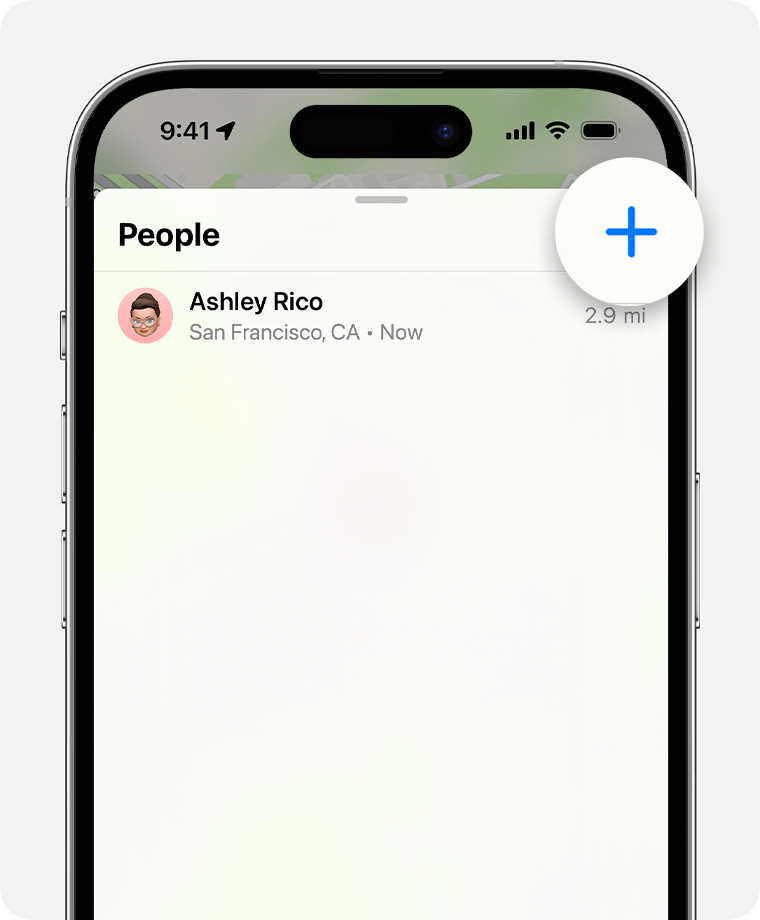
1. Open the Find My app and select the People tab.
2. Tap the Add button.
4. Select Share My Location.
5. Enter the name or phone number of the person that you want to share your location with.
6. Select Send.
7. Choose Share Indefinitely.
Find people and share your location with Find My - Apple Support
You also want to make sure you have the correct settings enabled in Privacy & Security. You will need these to remain enabled to continuously share your location:
• Settings > Privacy & Security > Location Services > System Services > Share My Location
Regards
• Settings > Privacy & Security > Location Services > Find My
• Settings > Privacy & Security > Location Services > Maps
We suggest you set both of these to While Using the App or Widgets with Precise Location enabled.
It's also important to remember that Location Services uses Wi-Fi, Bluetooth, GPS and your cellular connection to triangulate your location. Make sure you keep those settings enabled, too.
Still no joy? Apple Support is your next step. They may have the diagnostic tools to help with more advanced troubleshooting. You can find ways to connect from the the Apple Support app on your iPhone or the Get Support portal in most countries.
Cheers!
Hi amylgomezz,
Updating and refreshing Location Services were both excellent troubleshooting steps. If you are sharing through an app like Messages, try sharing directly from Find My with these steps just to see if it helps:
1. Open the Find My app and select the People tab.
2. Tap the Add button
4. Select Share My Location.
5. Enter the name or phone number of the person that you want to share your location with.
6. Select Send.
7. Choose Share Indefinitely.
Find people and share your location with Find My - Apple Support
You also want to make sure you have the correct settings enabled in Privacy & Security. You will need these to remain enabled to continuously share your location:
• Settings > Privacy & Security > Location Services > System Services > Share My Location
Regards
• Settings > Privacy & Security > Location Services > Find My
• Settings > Privacy & Security > Location Services > Maps
We suggest you set both of these to While Using the App or Widgets with Precise Location enabled.
It's also important to remember that Location Services uses Wi-Fi, Bluetooth, GPS and your cellular connection to triangulate your location. Make sure you keep those settings enabled, too.
Still no joy? Apple Support is your next step. They may have the diagnostic tools to help with more advanced troubleshooting. You can find ways to connect from the the Apple Support app on your iPhone or the Get Support portal in most countries.
Cheers!
Find my friends