Apple Watch excessive battery loss

After installing ios 10.0 and ios 10.0.1 (21R360) excessive battery drainage starts almost immediately. I have wiped the phone clean and did a full factory reset and the problem still exists. Could it be caused by the recent update as well for iphone ios 17?


Can anyone help.

Posted on Oct 25, 2023 7:27 AM

Reply
Question marked as Top-ranking reply

Posted on Oct 26, 2023 8:02 AM

Hello iphone12proissues7,


Let's use the steps below to make sure your Apple Watch is running the latest watchOS 10.1 as it contains improvements and bug fixes:


Get ready to update

Next, check these things:
1. Make sure that your iPhone is updated to the latest version of iOS.
2. Make sure that your Apple Watch is at least 50 percent charged.
3. Make sure that your iPhone is connected to Wi-Fi.

Keep your iPhone near your Apple Watch throughout the update. It could take from several minutes to an hour for the update to complete, so you might want to update overnight or wait until you have time.

Update your Apple Watch using your iPhone

You can wait until Apple Watch notifies you when a new update is available. Tap Update Tonight in the notification, then go to your iPhone to confirm that you want to update overnight. At the end of the day, leave your Apple Watch and iPhone charging overnight so the update can complete.

Or you can update your Apple Watch with your iPhone manually:
1. On your iPhone, open the Apple Watch app, then tap the My Watch tab. 
2. Tap General > Software Update.
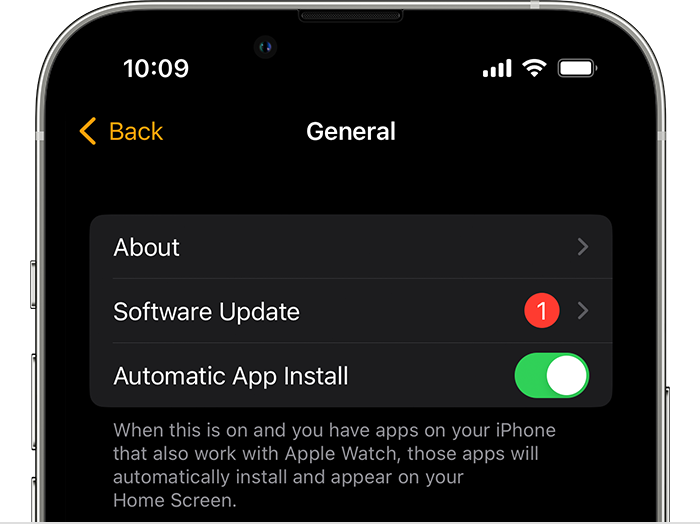
iPhone General Settings screen showing Software Update
3. Download the update. If asked for your iPhone passcode or Apple Watch passcode, enter it. 
4. Wait for the progress wheel to appear on your Apple Watch. It could take from several minutes to an hour for the update to complete. 

Leave your Apple Watch on its charger while the update completes. Don't restart your iPhone or Apple Watch, and don't quit the Apple Watch app. When the update completes, your Apple Watch restarts on its own.


You can also find those steps in this resource: Update your Apple Watch - Apple Support


Should that still persist, approximately how long are you able to use your Apple Watch on a full charge?


Let us know, and we'll keep moving forward from there.

Similar questions

1 reply
Question marked as Top-ranking reply

Oct 26, 2023 8:02 AM in response to iphone12proissues7

Hello iphone12proissues7,


Let's use the steps below to make sure your Apple Watch is running the latest watchOS 10.1 as it contains improvements and bug fixes:


Get ready to update

Next, check these things:
1. Make sure that your iPhone is updated to the latest version of iOS.
2. Make sure that your Apple Watch is at least 50 percent charged.
3. Make sure that your iPhone is connected to Wi-Fi.

Keep your iPhone near your Apple Watch throughout the update. It could take from several minutes to an hour for the update to complete, so you might want to update overnight or wait until you have time.

Update your Apple Watch using your iPhone

You can wait until Apple Watch notifies you when a new update is available. Tap Update Tonight in the notification, then go to your iPhone to confirm that you want to update overnight. At the end of the day, leave your Apple Watch and iPhone charging overnight so the update can complete.

Or you can update your Apple Watch with your iPhone manually:
1. On your iPhone, open the Apple Watch app, then tap the My Watch tab. 
2. Tap General > Software Update.
iPhone General Settings screen showing Software Update
3. Download the update. If asked for your iPhone passcode or Apple Watch passcode, enter it. 
4. Wait for the progress wheel to appear on your Apple Watch. It could take from several minutes to an hour for the update to complete. 

Leave your Apple Watch on its charger while the update completes. Don't restart your iPhone or Apple Watch, and don't quit the Apple Watch app. When the update completes, your Apple Watch restarts on its own.


You can also find those steps in this resource: Update your Apple Watch - Apple Support


Should that still persist, approximately how long are you able to use your Apple Watch on a full charge?


Let us know, and we'll keep moving forward from there.

This thread has been closed by the system or the community team. You may vote for any posts you find helpful, or search the Community for additional answers.

Apple Watch excessive battery loss

Welcome to Apple Support Community
A forum where Apple customers help each other with their products. Get started with your Apple Account.