New AirPod iOS 17 - noise control

I loved how my AirPod Pro 2nd Gen worked previous to today. I could click and hold either stem to switch between noise cancellation and transparency.


This new iOS has given me severe anxiety. I finally turned off all adaptive audio, which throws off my equilibrium as it wanes on and off of noise cancellation. But now… switching between Transparency and Noise Cancellation with the stem is impossible.


Options on my phone give you the option to press and hold individual left and right buds for either Noise Control or Siri. I tried to designate left for Noise Control and right for Siri, and I don’t know if it’s a bug or glitch but neither Siri or Noise Control will switch if they aren’t synced between left and right options in the settings. Once I do designate both left and right as being “Noise Control,” I now have to press and hold both stems to switch between noise control settings for it to work about 70% of the time.


I’ve also experienced my AirPod Pros glitching and having just one on Noise Cancellation and the other Off, which makes me feel nauseous and want to throw my AirPods out a window.


Any advice? Am I setting things up wrong? I just want my iOS 16 back…

iPhone 6, iOS 11

Posted on Oct 25, 2023 7:58 PM

Reply

Similar questions

1 reply

Oct 26, 2023 3:17 PM in response to blastxxit

Hey blastxxit,


We'd recommend reviewing these articles for information that may help to resolve the issue:


AirPods Pro and AirPods Max Active Noise Cancellation and Transparency mode - Apple Support


If Active Noise Cancellation isn't working as expected on your AirPods Pro - Apple Support


"If Active Noise Cancellation isn't working as expected on your AirPods Pro

Follow these steps.


  1. Make sure that you have the latest software on your connected iPhone, iPad, iPod touch, or Mac.
  2. Put both AirPods Pro in your ears and check that Active Noise Cancellation (ANC) is turned on.
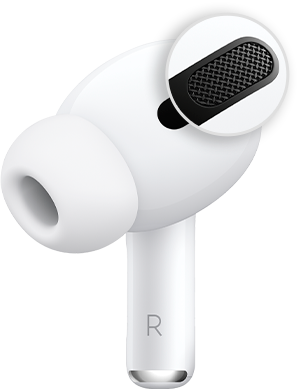
  3. Clean the mesh located on the top of your AirPods Pro. Sometimes Active Noise Cancellation can be affected if debris or earwax builds up in the area shown below.
  4. If this happens, you might experience: 
    • A loss of bass sound
    • An increase in background sounds, such as street or airplane noise

If Active Noise Cancellation still isn't working as expected on your AirPods Pro (1st generation), refer to AirPods Pro Service Program for Sound Issues."


For further assistance, we'd recommend contacting Apple Support here: Get Support


Thanks!


This thread has been closed by the system or the community team. You may vote for any posts you find helpful, or search the Community for additional answers.

New AirPod iOS 17 - noise control

Welcome to Apple Support Community
A forum where Apple customers help each other with their products. Get started with your Apple Account.