Hi ConfusedinGlasgow,
If you want to download an attachment sent to you in an email, please check out this link, which outlines options, and how to manage those settings: Download email attachments in Mail on iPad
Download email attachments in Mail on iPad
In the Mail app  , you can download attachments that are sent to you in email or easily search for emails with attachments in your mailboxes.
Download an attachment sent to you
Touch and hold the attachment, then choose Save Image or Save to Files.
If you choose Save Image, you can find it later in the Photos app. If you choose Save to Files, you can find it later in the Files app.
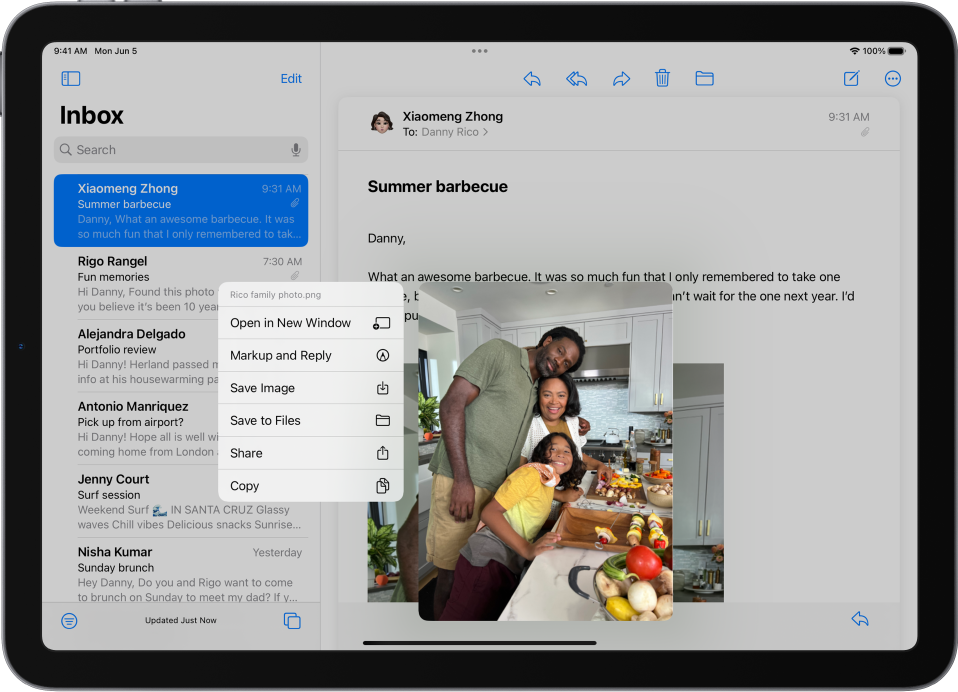
Tip: To open the attachment with another app, tap Share  , then choose the app.
If you continue to experience an issue, please reach out to Apple Support, so they can assist you further. You may be able to reach them here: Get Support
Thanks!


