macOS Sonoma Batteries widget issue

I know, I know, first world problem here, but the Batteries widget for my Logitech MX Keys Mac keyboard shows as a mouse rather than as a keyboard, while it displays as as keyboard in the Bluetooth settings (as it always has). Anyone else notice this issue on their end with macOS Sonoma?


Posted on Oct 27, 2023 4:56 AM

Reply
Question marked as Top-ranking reply

Posted on Dec 25, 2023 5:40 AM

Update: This appears to be an issue related specifically to the Logitech MX Keys Mac keyboard. After going back-and-forth with Logitech trying to find a reason/solution, Logitech sent me an MX Keys S keyboard to see if the problem occurs and it does not with this model of keyboard. The keyboard widget displays as a keyboard as it should.


53 replies
Question marked as Top-ranking reply

Dec 25, 2023 5:40 AM in response to Burgleklutt

Update: This appears to be an issue related specifically to the Logitech MX Keys Mac keyboard. After going back-and-forth with Logitech trying to find a reason/solution, Logitech sent me an MX Keys S keyboard to see if the problem occurs and it does not with this model of keyboard. The keyboard widget displays as a keyboard as it should.


Jan 29, 2024 9:01 AM in response to rebelspawn

The battery widget almost certainly needs to update how it parses Bluetooth metadata or update an out-of-date hardware ID list that should include all major Mac-specific bluetooth keyboards.


Bluetooth identifies it as a keyboard correctly, indicating Logitech's side of this is likely correct. This is most certainly something that should be fixed on the Apple/Widget side of the equation. I am forgetting to recharge my keyboard because only when you use the "large" widget size does it differentiate the keyboard versus the mouse.


I was genuinely surprised that Apple's biggest accessories partner's most popular Mac products aren't properly supported.


Correctly identifies MX Keys Mac keyboard and applies icon.


Incorrectly applies icon despite having different metadata pulled from same source as the bluetooth menu.
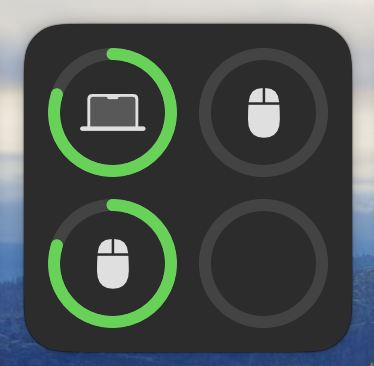


Confuses uses not using a gigantic widget for their devices. I am recharging mine right now because I mistakenly was only recharging my mouse due to this bug.

Dec 11, 2023 4:25 AM in response to dialabrain

I've been going back a fourth with Logitech about this and they're trying to figure it out and correct it. Do you have any more evidence to back up your claim that third party keyboards don't work with the battery widget? You wrote that as though it's something that's deliberate, which would make sense if the same was the case in the macOS Bluetooth settings (which it isn't). It sounds more like a bug on either Apple or companies like Logitech's end that needs to be corrected.

Mar 19, 2024 12:51 PM in response to Burgleklutt

I discovered this thread since I have been having the same problem, and have something to report. A few days ago my MX Keys Mac was lost due to a cat-related coffee spill, so I ordered a MX Mechanical as a replacement. I assumed it would have the same issue in the widget, but I was surprised after connecting it that it correctly displayed as a keyboard.


Unfortunately, I still have an MX Keys Mac at work, so I still have to see the incorrect mouse icon when I'm in the office!

This thread has been closed by the system or the community team. You may vote for any posts you find helpful, or search the Community for additional answers.

macOS Sonoma Batteries widget issue

Welcome to Apple Support Community
A forum where Apple customers help each other with their products. Get started with your Apple Account.
