
How do I remove photos from laptop and maintain I cloud photo libuary
Need to free up space to download latest version
MacBook Air 13″, macOS 10.15
Need to free up space to download latest version
MacBook Air 13″, macOS 10.15
One way to reduce local photos storage is to turn on Optimize Storage in the Photos Preferences. See the following from Set up and use iCloud Photos - Apple Support
iCloud Photos keeps all your photos and videos in their original, high-resolution version. To save storage space on your device, you can turn on Optimize Storage.
If you turn on Optimize Storage, iCloud Photos automatically manages the size of your library on your device. Your original photos and videos are stored in iCloud and space-saving versions are kept on your device. Your library is optimized only when you need space, starting with the photos and videos you access least. You can download the original photos and videos over Wi-Fi or cellular when you need them.
If you turn on Download Originals, iCloud Photos keeps your original, full-resolution photos and videos in iCloud and on your device.
On your iPhone or iPad
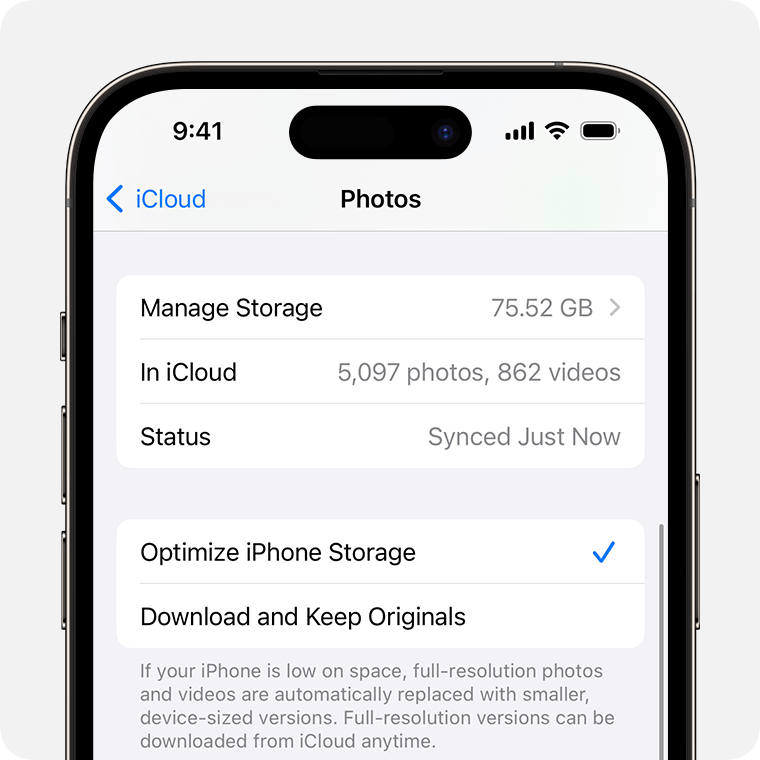
On your Mac
Another option is to move the Photo Library to an external drive. See: Move your Photos library to save space on your Mac - Apple Support
Be aware that iCloud Photos is a syncing service. Any photo you delete from a device where iCloud Photos is turned on will also be deleted from iCloud and from any other device connected to iCloud Photos. You can potentially reduce the storage space required on a device by turning on Optimize Storage. See the following Apple article for more information: Set up and use iCloud Photos - Apple Support
Apple does not currently offer cloud-only storage for photos. If that is what you want or need, you may want to explore 3rd party options such as Google Photos or Dropbox.
One way to reduce local photos storage is to turn on Optimize Storage in the Photos Preferences. See the following from Set up and use iCloud Photos - Apple Support
iCloud Photos keeps all your photos and videos in their original, high-resolution version. To save storage space on your device, you can turn on Optimize Storage.
If you turn on Optimize Storage, iCloud Photos automatically manages the size of your library on your device. Your original photos and videos are stored in iCloud and space-saving versions are kept on your device. Your library is optimized only when you need space, starting with the photos and videos you access least. You can download the original photos and videos over Wi-Fi or cellular when you need them.
If you turn on Download Originals, iCloud Photos keeps your original, full-resolution photos and videos in iCloud and on your device.
On your iPhone or iPad
On your Mac
Another option is to move the Photo Library to an external drive. See: Move your Photos library to save space on your Mac - Apple Support
Be aware that iCloud Photos is a syncing service. Any photo you delete from a device where iCloud Photos is turned on will also be deleted from iCloud and from any other device connected to iCloud Photos. You can potentially reduce the storage space required on a device by turning on Optimize Storage. See the following Apple article for more information: Set up and use iCloud Photos - Apple Support
Apple does not currently offer cloud-only storage for photos. If that is what you want or need, you may want to explore 3rd party options such as Google Photos or Dropbox.
How do I remove photos from laptop and maintain I cloud photo libuary
