Face ID does not work on iPhone 13 mini

I have set up Face ID at least 10 times, following Apple's instructions. But instead of working, every time I unlock my iPhone 13 mini, it immediately asks for my passcode. This will happen 10 times in a row, and Face ID will never show up. What is wrong? Are there any other settings I should be changing?

iPhone 13 mini

Posted on Nov 12, 2023 4:40 PM

Reply
Question marked as Top-ranking reply

Posted on Nov 13, 2023 1:03 AM

If you still need help, reset your Face ID, then set it up again. Go to Settings, tap Face ID & Passcode, then tap Reset Face ID. Next, tap Set up Face ID to set it up again.


If Face ID isn't working on your iPhone or iPad Pro



Parts and service history

With iPhone 12 models and later using iOS 15.2 and later, you can go to Settings > General > About to see the parts and service history of your iPhone and you can see if the camera has been replaced. If the repair was done using genuine Apple parts and processes, you will see "Genuine Apple Part" next to Camera.

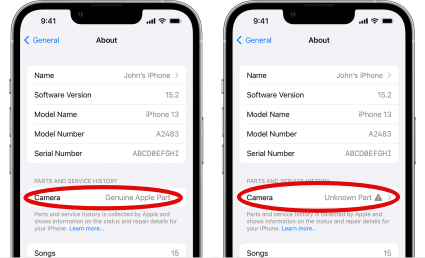


  • You will see an Unknown Part  message if the camera installation is incomplete or if the camera:
  • Was replaced with a nongenuine camera
  • Was already used or installed in another iPhone
  • Isn't functioning as expected

This message doesn't affect your ability to use your iPhone or access your camera.

Learn more about iPhone parts and service history.


If your iPhone's camera has been previously replaced, repaired, or serviced by an unauthorized service provider, it's worth noting that Apple may decline to provide service for your device. The decision to refuse service will depend on the specific components that were affected by the unauthorized service.


Get a Genius Bar Reservation and Apple Support Options - Apple


Contact Genius Bar.

Manage Reservations - My Reservations - Apple


2 replies
Question marked as Top-ranking reply

Nov 13, 2023 1:03 AM in response to frank1461

If you still need help, reset your Face ID, then set it up again. Go to Settings, tap Face ID & Passcode, then tap Reset Face ID. Next, tap Set up Face ID to set it up again.


If Face ID isn't working on your iPhone or iPad Pro


Parts and service history

With iPhone 12 models and later using iOS 15.2 and later, you can go to Settings > General > About to see the parts and service history of your iPhone and you can see if the camera has been replaced. If the repair was done using genuine Apple parts and processes, you will see "Genuine Apple Part" next to Camera.


  • You will see an Unknown Part  message if the camera installation is incomplete or if the camera:
  • Was replaced with a nongenuine camera
  • Was already used or installed in another iPhone
  • Isn't functioning as expected

This message doesn't affect your ability to use your iPhone or access your camera.

Learn more about iPhone parts and service history.


If your iPhone's camera has been previously replaced, repaired, or serviced by an unauthorized service provider, it's worth noting that Apple may decline to provide service for your device. The decision to refuse service will depend on the specific components that were affected by the unauthorized service.


Get a Genius Bar Reservation and Apple Support Options - Apple


Contact Genius Bar.

Manage Reservations - My Reservations - Apple



Nov 13, 2023 9:54 AM in response to SravanKrA

My problem is not that Face ID does not work at all, but that it never comes into play when I attempt to unlock my iPhone 13 mini. Instead, I am always faced with the Passcode prompt--never with Face ID. This constantly forces me to use my passcode, when Face ID should be popping up and recognizing me. I have gone through the Face ID setup at least a dozen times, and every time it has been successful. It is the use, or lack of its use, that troubles me. I don't want to have to tap in a 6-digit number every time I pick up my phone. My previous iPhone, the SE second generation, was so easy to use with the fingerprint activation--no tapping in of a 6-digit code every time I wanted to do something on my phone. It's ridiculous that I have to do this! Instead of Apple making things easier, it's made them more difficult.

This thread has been closed by the system or the community team. You may vote for any posts you find helpful, or search the Community for additional answers.

Face ID does not work on iPhone 13 mini

Welcome to Apple Support Community
A forum where Apple customers help each other with their products. Get started with your Apple Account.
