Outlook keeps asking for password on iPhone and iPad

I keep getting logged off of my Outlook email on both my iPhone and iPad. I re-enter the password and it works for about an hour then it goes back to asking for a password again. I've deleted my email account and re-entered it to see if that fixes the problem, but it just does it all over again.


[Re-Titled by Moderator]


iPhone 14 Pro Max, iOS 17

Posted on Nov 13, 2023 6:54 AM

Reply
Question marked as Top-ranking reply

Posted on Nov 14, 2023 12:42 PM

I found a temporary solution, I deleted the mail and reconfigured but instead of choosing outlook, I chose Microsoft Exchange and entered the information, as now it hasn’t requested reentering the credentials. Let’s see how long it takes

42 replies

Nov 13, 2023 6:57 AM in response to irinas79

Remove your email account and set it up again

Make sure that all of your emails are there or make sure that your email is saved somewhere other than your device. On your device, go to Settings > Mail, then tap Accounts. Tap the email account that you want to remove. Tap Delete Account.


If you can't receive email on your iPhone, iPad, or iPod touch ...



If you can't send an email on your iPhone, iPad or iPod touch

  1. When you make an iOS or iPadOS backup in iCloud or iTunes, it backs up your mail settings, but not your email. ... 
  2. Make sure your device is connected to the Internet.
  3. Check with your email service provider to find out if there's a service outage.

More items...


If you can't send an email on your iPhone, iPad or iPod touch ...


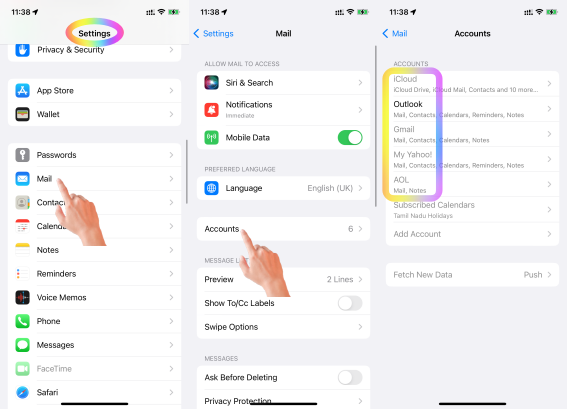
Which email account are you referring to? Google, iCloud, AOL, Exchange, Outlook, Yahoo or any Other (Refer to the pic )below


  1. Is this your corporate iPhone? Then please contact the system administrator of your corporate
  2. If it is your personal device, in that case, do you have any profile installed by your corporate/organisation/enterprise/School Management?
    1. Erase the profile added by you If you have installed a profile on your own --> Install or remove configuration profiles on iPhone - Apple ...
    2. Or please contact the system administrator of the organisation who provided the profile to you


You may have enbled 2-step verification for Outlook --> Manage app passwords for two-step verification



Nov 14, 2023 8:26 PM in response to irinas79

Same problem. Updating iOS did not work. Deleting Outlook email account from Mail and adding the account back did not work. Downloading Edge and signing into my Outlook email account did not work. I gave up and deleted my Outlook email account from Mail and downloaded the Outlook App. My outlook email account worked in that app. In short, I could not fix the problem in Mail.

Nov 15, 2023 8:19 AM in response to Raptorlaw

Mine hasn't asked me for a new password for 24 hours now. I updated to iOS 17 but it was still happening. Then I did a hard reset. For my version of iPhone (XS), the rep told me to press the up button quickly, then the down button, then hold the power button for 10 seconds. That seemed to do the trick. Try using the Apple Support App and texting them. That's how I got mine fixed... for now....

Nov 13, 2023 7:07 AM in response to SravanKrA

I'm referring to Outlook on iOS, it's my personal iPhone and I've never had this issue before. It just recently started doing it. I've already deleted the account and added it again and it just keeps logging me off and asking for my password. I have Yahoo, iCloud, Gmail, and Outlook accounts and it only does it with my Outlook account. I enter my password and it works for a while, then logs me off and asks for my password again. Like I said, it's something that just started happening recently so I don't know if it has anything to do with a recent update.

Nov 18, 2023 12:34 PM in response to Iluvsmini

Oh sorry about it! Haha maybe try to create a new post and not link it to this one.


but hard reset (from the setting-general- reset-reset… it will erase all your settings to the original state. Does not this if you haven’t done a back up


I had done hard reset when I see my hard drive getting full with a lot of memory regarded as system data. I erase and install the iOS again. But before always do a backup to iCloud then configure the iPhone with the backup and everything should be like before. Except for the security things like, facial recognition, wallet and the network settings like WiFi.


next time if is about a different subject try to ask a new question not under the same post

Nov 14, 2023 6:13 AM in response to irinas79

I'm having the same issue. Getting really frustrated. It's happening to a lot of people. There are multiple support posts about it. Many have tried deleting and re-installing their Outlook and it's not working. Would be nice if Apple would actually reply..... There is an Outlook app and there is the email server built into iPhone where you add Outlook. This is happening to me with both of them. Not happy.

Nov 14, 2023 7:17 AM in response to irinas79

Hi

i am having the same issues, I did delete it, configured again, changed passwords in my Microsoft account, and still does the same thing. It works for a while then it happens. There are times that tries to fetch and you see an error in the bottom, you click and resync and everything goes back to normal. Same as the password issue, you acknowledge and there are times that you just closed and it goes back to normal. My opinion it has to do with the increase of security of the Microsoft authentication system as is not like you lose connection, you can even refresh it and come back, but it keep prompting the change the password.

This thread has been closed by the system or the community team. You may vote for any posts you find helpful, or search the Community for additional answers.

Outlook keeps asking for password on iPhone and iPad

Welcome to Apple Support Community
A forum where Apple customers help each other with their products. Get started with your Apple Account.