How can I locate my missing AirPods?

How do I locate my airpods


[Re-Titled by Moderator]

AirPods (2nd generation)

Posted on Nov 20, 2023 2:03 PM

Reply
Question marked as Top-ranking reply

Posted on Dec 5, 2023 11:45 PM

Find your lost AirPods with Find My

Find My can show your AirPods on a map, play a sound to help find them, and even help find their precise location when they're nearby.
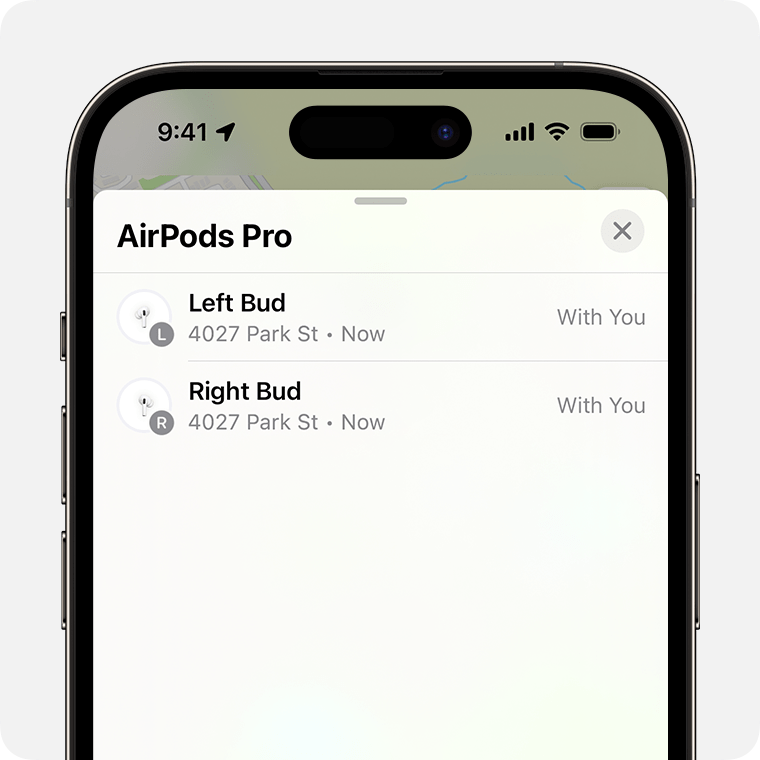
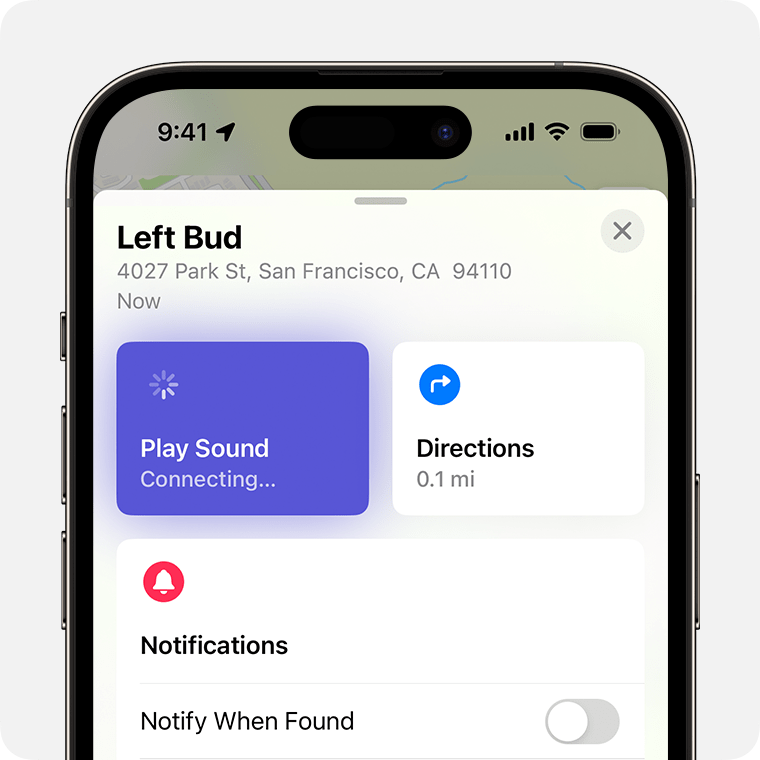
  1. On your iPhone, open Find My.
  2. In Devices, choose your AirPods. If your AirPods are out of the case, you might have to pick the left bud or right bud. With AirPods Pro (2nd generation) or later, you can also pick the case.
  3. Find your AirPods on the map.
    • If they aren't near you, tap Get Directions to open their location in Maps.
    • If you're nearby, tap Play Sound and listen for the series of beeps.
    • Depending on your AirPods and iPhone, you might also see an option to Find Nearby. Tap it, wait for your AirPods to connect to your iPhone, then follow the prompts to find your AirPods.

Your iPhone might take longer than expected to connect to your AirPods to play a sound or find nearby.

If you don't have an iPhone or other Apple device to use Find My, you can also find your AirPods at iCloud.com/find — but the experience might be different and some functionality might not be available.


If your AirPods are "Offline" or show "No location found"

  • If your AirPods are out of range or need to charge, you might see their last known location. You might also see "Offline" or "No location found."
  • You might be able to get directions to their last known location — but you won't be able to play a sound or use Find Nearby.
  • If they come back online, you get a notification on your iPhone (or other Apple device that you use them with).


If you can't find your AirPods

  1. In Find My, choose your AirPods and swipe up.
  2. Under Mark as Lost, tap Activate.
  3. Follow the onscreen steps to display your contact information to someone who finds your AirPods.
  4. Select Activate.


Be ready next time with the Find My network and Notify When Left Behind

Want to help make sure that you find your AirPods next time?

  • The Find My network is an encrypted, anonymous network of hundreds of millions of Apple devices that can help you find your AirPods, even if they're offline. Nearby devices securely send the location of your missing AirPods to iCloud, so that you can find where they are. It's all anonymous and encrypted to protect everyone's privacy. To make sure it's turned on: On iPhone, open Settings > Bluetooth. Tap the More Info button  next to your AirPods, then scroll down to Find My network and make sure that it's turned on.
  • With Notify When Left Behind, your iPhone or Apple Watch can alert you when you leave your supported AirPods at an unknown location.

Learn more about the Find My network and your AirPods

Turn on Notify When Left Behind to get notifications if you leave your AirPods behind

6 replies
Question marked as Top-ranking reply

Dec 5, 2023 11:45 PM in response to tenesha227

Find your lost AirPods with Find My

Find My can show your AirPods on a map, play a sound to help find them, and even help find their precise location when they're nearby.

  1. On your iPhone, open Find My.
  2. In Devices, choose your AirPods. If your AirPods are out of the case, you might have to pick the left bud or right bud. With AirPods Pro (2nd generation) or later, you can also pick the case.
  3. Find your AirPods on the map.
    • If they aren't near you, tap Get Directions to open their location in Maps.
    • If you're nearby, tap Play Sound and listen for the series of beeps.
    • Depending on your AirPods and iPhone, you might also see an option to Find Nearby. Tap it, wait for your AirPods to connect to your iPhone, then follow the prompts to find your AirPods.

Your iPhone might take longer than expected to connect to your AirPods to play a sound or find nearby.

If you don't have an iPhone or other Apple device to use Find My, you can also find your AirPods at iCloud.com/find — but the experience might be different and some functionality might not be available.


If your AirPods are "Offline" or show "No location found"

  • If your AirPods are out of range or need to charge, you might see their last known location. You might also see "Offline" or "No location found."
  • You might be able to get directions to their last known location — but you won't be able to play a sound or use Find Nearby.
  • If they come back online, you get a notification on your iPhone (or other Apple device that you use them with).


If you can't find your AirPods

  1. In Find My, choose your AirPods and swipe up.
  2. Under Mark as Lost, tap Activate.
  3. Follow the onscreen steps to display your contact information to someone who finds your AirPods.
  4. Select Activate.


Be ready next time with the Find My network and Notify When Left Behind

Want to help make sure that you find your AirPods next time?

  • The Find My network is an encrypted, anonymous network of hundreds of millions of Apple devices that can help you find your AirPods, even if they're offline. Nearby devices securely send the location of your missing AirPods to iCloud, so that you can find where they are. It's all anonymous and encrypted to protect everyone's privacy. To make sure it's turned on: On iPhone, open Settings > Bluetooth. Tap the More Info button  next to your AirPods, then scroll down to Find My network and make sure that it's turned on.
  • With Notify When Left Behind, your iPhone or Apple Watch can alert you when you leave your supported AirPods at an unknown location.

Learn more about the Find My network and your AirPods

Turn on Notify When Left Behind to get notifications if you leave your AirPods behind

Dec 5, 2023 11:46 PM in response to iPod_touch_pro

Find your lost AirPods with Find My


Find My can show your AirPods on a map, play a sound to help find them, and even help find their precise location when they're nearby.

  1. On your iPhone, open Find My.
  2. In Devices, choose your AirPods. If your AirPods are out of the case, you might have to pick the left bud or right bud. With AirPods Pro (2nd generation) or later, you can also pick the case.
  3. Find your AirPods on the map.
    • If they aren't near you, tap Get Directions to open their location in Maps.
    • If you're nearby, tap Play Sound and listen for the series of beeps.
    • Depending on your AirPods and iPhone, you might also see an option to Find Nearby. Tap it, wait for your AirPods to connect to your iPhone, then follow the prompts to find your AirPods.

Your iPhone might take longer than expected to connect to your AirPods to play a sound or find nearby.

If you don't have an iPhone or other Apple device to use Find My, you can also find your AirPods at iCloud.com/find — but the experience might be different and some functionality might not be available.


If your AirPods are "Offline" or show "No location found"

  • If your AirPods are out of range or need to charge, you might see their last known location. You might also see "Offline" or "No location found."
  • You might be able to get directions to their last known location — but you won't be able to play a sound or use Find Nearby.
  • If they come back online, you get a notification on your iPhone (or other Apple device that you use them with).


If you can't find your AirPods

  1. In Find My, choose your AirPods and swipe up.
  2. Under Mark as Lost, tap Activate.
  3. Follow the onscreen steps to display your contact information to someone who finds your AirPods.
  4. Select Activate.


Be ready next time with the Find My network and Notify When Left Behind

Want to help make sure that you find your AirPods next time?

  • The Find My network is an encrypted, anonymous network of hundreds of millions of Apple devices that can help you find your AirPods, even if they're offline. Nearby devices securely send the location of your missing AirPods to iCloud, so that you can find where they are. It's all anonymous and encrypted to protect everyone's privacy. To make sure it's turned on: On iPhone, open Settings > Bluetooth. Tap the More Info button  next to your AirPods, then scroll down to Find My network and make sure that it's turned on.
  • With Notify When Left Behind, your iPhone or Apple Watch can alert you when you leave your supported AirPods at an unknown location.

Learn more about the Find My network and your AirPods

Turn on Notify When Left Behind to get notifications if you leave your AirPods behind


iptp

Dec 5, 2023 11:15 PM in response to tenesha227

Here are some steps you can take to locate it:

  1. Retrace your steps: Think about where you last used or saw your iPod. Start by checking the areas you visited and the places it could potentially be.
  2. Check common places: Look around your home, in your bag or backpack, in your car, and in the pockets of your clothes. Often, iPods may be misplaced and end up in areas you frequent regularly.
  3. Use the Find My app (for iOS 13 or later): If you have an iPod touch with the latest operating system, you can use the Find My app. This app allows you to locate and track your iPod's current location as long as it has an internet connection. Open the app on another iOS device or visit iCloud.com and log in with your Apple ID to access the Find My app.
  4. Use Find My iPhone (for older iPod touch models): If you have an older iPod touch, you can use Find My iPhone instead. This service works similarly to the Find My app and allows you to locate your iPod as long as it is connected to the internet. Access Find My iPhone through another iOS device or website and sign in with your Apple ID.
  5. Report the loss: If you have exhausted all possibilities and still can't find your iPod, consider reporting the loss to the relevant authorities, such as the police. It's also a good idea to report it to Apple, especially if you believe it may have been stolen. They can flag your device as missing, making it more difficult for someone to use or sell.
  6. Change your passwords: If you had any sensitive information or accounts linked to your iPod, change the passwords for those accounts to protect your privacy and security.

This thread has been closed by the system or the community team. You may vote for any posts you find helpful, or search the Community for additional answers.

How can I locate my missing AirPods?

Welcome to Apple Support Community
A forum where Apple customers help each other with their products. Get started with your Apple Account.
