Can no longer print from my ipad

I want to print a document from my iPad to my Canon wireless printer. I have done countless times previously. Now, the print form says “no printer selected”, so I select my printer and my selection immediately disappears and says no printer selected.


My iPad mini 6th generation updated to iOS 17.1.1 and that’s the only thing that is different than when it last printed.


my wife’s iPad mini 5th generation with iOS 16.6.1 prints correctly, so I believe it’s an iOS related issue. Problems like this are way too complicated for the average user to troubleshoot or have to troubleshoot.

iPad mini, iOS 9

Posted on Nov 22, 2023 7:31 PM

Reply
Question marked as Top-ranking reply

Posted on Nov 23, 2023 1:49 AM

Do you have any security Apps (such as Norton) or VPN installed on your iPad? If so, these may be interfering with your iPad's internal routing table - and may interfere with AirPrint/AirPlay/WiFi Hotspot or other Apple services. If present, it may be necessary to temporarily remove such Apps from your iPad - and then perform a forced-restart.


If your printer supports AirPrint - is set-up correctly and was working as expected prior to the iPadOS17 update - you may find that restart of your network components will resolve the problem. You’ll need to restart your network devices in the correct order. Assuming that you WiFi Router provides DNS services for your network, restart devices in this order - allowing time for devices to fully boot/restart prior to restarting other devices:


  • WiFi Router
  • Upstream wired Network Switch(es) (if any)
  • WiFi Access Points / Network Extenders
  • Other fixed infrastructure devices - such as Printers
  • Client devices (your iPad)


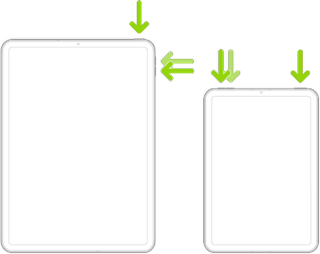
Restarting your iPad, after restarting other devices in the correct sequence, is most simply achieved by a forced-restart of the iPad:


  • On an iPad with a Home button: Press and hold the top button and the Home button at the same time. When the Apple logo appears, release both buttons.



  • On an iPad with Face ID: Press and quickly release the volume up button, press and quickly release the volume down button, then press and hold the top button. When the Apple logo appears, release the button.


If you continue to have difficulties, check to see if your iPad is using the new WiFi Private Address feature. This feature is intended to provide additional privacy and security when using “public” (untrusted) WiFi networks.

Settings > WiFi > [Your WiFi Network / SSID] - tap the “i” icon - Private Address


The Private Address feature is largely unnecessary for your home WiFi network; if enabled, Private Addressing can interfere with anticipated operation of other devices, such as AirPrint/Airplay. In such circumstances, you may need to disable this feature - and can be enabled or disabled for each individual network.


Use private Wi-Fi addresses in iOS 14, iPadOS 14, and watchOS 7 - Apple Support

5 replies
Question marked as Top-ranking reply

Nov 23, 2023 1:49 AM in response to RWS-1835

Do you have any security Apps (such as Norton) or VPN installed on your iPad? If so, these may be interfering with your iPad's internal routing table - and may interfere with AirPrint/AirPlay/WiFi Hotspot or other Apple services. If present, it may be necessary to temporarily remove such Apps from your iPad - and then perform a forced-restart.


If your printer supports AirPrint - is set-up correctly and was working as expected prior to the iPadOS17 update - you may find that restart of your network components will resolve the problem. You’ll need to restart your network devices in the correct order. Assuming that you WiFi Router provides DNS services for your network, restart devices in this order - allowing time for devices to fully boot/restart prior to restarting other devices:


  • WiFi Router
  • Upstream wired Network Switch(es) (if any)
  • WiFi Access Points / Network Extenders
  • Other fixed infrastructure devices - such as Printers
  • Client devices (your iPad)


Restarting your iPad, after restarting other devices in the correct sequence, is most simply achieved by a forced-restart of the iPad:


  • On an iPad with a Home button: Press and hold the top button and the Home button at the same time. When the Apple logo appears, release both buttons.


  • On an iPad with Face ID: Press and quickly release the volume up button, press and quickly release the volume down button, then press and hold the top button. When the Apple logo appears, release the button.


If you continue to have difficulties, check to see if your iPad is using the new WiFi Private Address feature. This feature is intended to provide additional privacy and security when using “public” (untrusted) WiFi networks.

Settings > WiFi > [Your WiFi Network / SSID] - tap the “i” icon - Private Address


The Private Address feature is largely unnecessary for your home WiFi network; if enabled, Private Addressing can interfere with anticipated operation of other devices, such as AirPrint/Airplay. In such circumstances, you may need to disable this feature - and can be enabled or disabled for each individual network.


Use private Wi-Fi addresses in iOS 14, iPadOS 14, and watchOS 7 - Apple Support

Jan 8, 2024 3:31 PM in response to RWS-1835

Same with me in Brisbane Australia. My Windows desktop and laptop are printing to Canon perfectly but our iPads and iPhones fail as described. Couldn’t print off info from iPad for important medical appointment. Had to email material to my Outlook address, receive on Windows laptop and then print off, without trouble. Not great from Apple. Why no explanation? Now been around for a while.

Nov 22, 2023 7:59 PM in response to RWS-1835

👋 Hey, I’m Zedairder and I’m looking forward to resolving your issue!


Here’s what we can do.

Restore your iPhone, iPad, or iPod touch from a backup - Apple Support

If you have a backup from before the update to 17.1.1 then you can try to restore it and see if that works. Restoring can cause you to lose some data.


Make sure to report this bug to Apple so that they can get it fixed:

Feedback - iPad - Apple


If you have more questions, don’t hesitate to ask!


This thread has been closed by the system or the community team. You may vote for any posts you find helpful, or search the Community for additional answers.

Can no longer print from my ipad

Welcome to Apple Support Community
A forum where Apple customers help each other with their products. Get started with your Apple Account.
