IOs 17 deleted all my contact Photos. I need them back.

I have visual memory and I am having problems with the IOs 17.1 upgrade that deleted my concta photo info. How can I downgrade to 16? I had 20 years of visual info in my contacts. Can I download it from WhatsApp or Google?

iPhone 13 mini, iOS 17

Posted on Nov 26, 2023 2:45 AM

Reply
4 replies

Nov 26, 2023 4:31 AM in response to Aireazul

When it comes to storing contacts on an iPhone or any other smartphone, you'll discover that they are not directly stored on the device itself or the SIM card. Instead, modern smartphones utilize synchronization with various email accounts to manage and store contact information.


It's important to note that while the contacts themselves are primarily stored on the email server, a local copy is typically maintained on your iPhone for offline access. This allows you to view and modify your contacts even when your device is not connected to the internet. However, the master copy of your contacts resides on the email server, ensuring that changes made on any synchronized device are consistently updated across all devices connected to the same account.


When you add and enable the Contacts feature on your iPhone, it provides you with the ability to sync your contacts with a specific email account. This email account can be from various providers such as Google, iCloud, AOL, Exchange, Outlook, Yahoo or any Other email client server that supports contact synchronization.


The process of syncing contacts involves establishing a connection between your iPhone and the email server associated with the chosen account. This allows the contact information to be seamlessly exchanged between your device and the server. Any changes or updates made to your contacts, whether it's adding a new contact, editing an existing one, or deleting a contact, are reflected both on your iPhone and in the corresponding email account.

By utilizing this synchronization method, you can access and manage your contacts from multiple devices or platforms. For example, if you add a contact on your iPhone and sync it with your Google account, you can then view and access that contact from other devices like a computer or tablet by signing into your Google account.


By syncing your contacts with an email account, you can enjoy the convenience of having your contact information readily available across multiple devices and platforms, ensuring seamless access and management of your contacts wherever you go.


Please see the pic below for a better understanding...
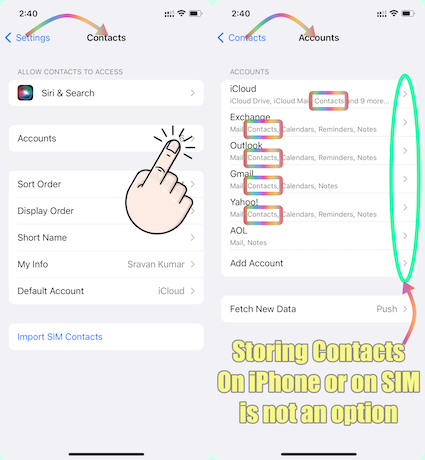


If you are unable to find your contacts which were stored in the email client, then try this --> Restore contacts, calendars, bookmarks, and more using ...


Check if the email account has been removed from the iOS mail app.

Add the email account that stores your contacts in the IOS mail app and enable Contacts.


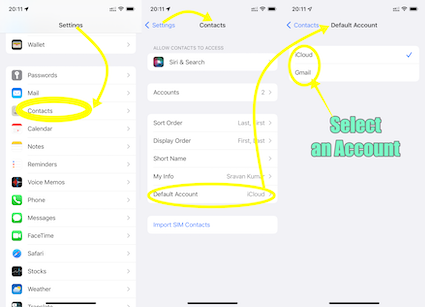
What is your default Contacts account? If none, please add an email account and enable contacts.


See the pic below


Unlike some Android devices, contacts are neither stored locally on an iPhone nor in SIM. They are synced to an email account that you had Google, iCloud, AOL, Exchange, Outlook, Yahoo or any Other


If you have a corporate email account added through a profile on your device, please check with your organization's system administrator.


Nov 26, 2023 4:30 AM in response to Aireazul

Updating iOS on your iPhone should typically not alter the fundamental functionality of the device. It's possible that there were underlying issues before this update, which you might not have been aware of previously or might not have noticed.


In general, iOS updates are designed to enhance the user experience, improve security, and fix bugs, rather than introducing major disruptions to core features. The reported issue of the screen flickering and displaying a white screen after an update is likely caused by factors that are not explicitly mentioned in your post.


iOS updates primarily focus on improving system performance, introducing new features, fixing bugs, and enhancing security. They are designed to preserve your personal data, settings, and information intact.


During an iOS update, your device's operating system is upgraded, but your personal data, such as contacts, photos, messages, and other information, should remain unchanged. However, it's always a good practice to perform a backup of your device before any major update to ensure that your data is safely stored.


It's important to note that while an iOS update itself should not alter personal details, it's possible that certain features or settings may be adjusted or improved with the update. In such cases, you may need to review and adjust specific settings to match your preferences after the update.


Always make sure to read and understand the update details provided by Apple before proceeding with an iOS update, and follow best practices such as backing up your device to minimize any potential risks or complications.


See what each update does: About iOS 17 Updates, About iOS 16 Updates, About iOS 15 Updates, About iOS 14 Updates, About iOS 13 Updates, About iOS 12 Updates, and so on...


Dec 29, 2023 11:20 AM in response to SravanKrA

I talked to Apple support a few days ago and they said essentially the same as you. However, what I'm noticing is that contacts that I attached photos to and information such as birthdays is no longer on my iPhone nor in any of my contacts regardless of mail server (e.g., Yahoo, Gmail). This seems to coincide with the iOS 17x.x.x upgrade. Where would these photos and birthdays have gone?

Jan 15, 2024 12:23 PM in response to Aireazul

I have the same problem. After updating to iOS 17, all my contact photos disappeared. They are still available on my old Android phone, but no longer on my iPhone.


I sync my contacts to my Google account, and iOS is doing the contact syncing except for the photos.


iOS 17 has too many bugs. I never had so many problems with previous iOS versions. Apple iOS is seriously going down in quality to add new features.

This thread has been closed by the system or the community team. You may vote for any posts you find helpful, or search the Community for additional answers.

IOs 17 deleted all my contact Photos. I need them back.

Welcome to Apple Support Community
A forum where Apple customers help each other with their products. Get started with your Apple Account.

