High Band With "idleassetsd" & "nsurlsessiond" back ground process

It has been noticed that all of my data packages "idleassetsd" consumed in one day 60GB first date, 2nd 30 and now running with 14GB, apart from this "nsurlsessiond" also consumes lot of data,

Is there any solution for this? this is very annoying after Sonoma update. altogether 193GB of consumed

iMac 21.5″, macOS 14.1

Posted on Dec 7, 2023 2:06 AM

Reply
Question marked as Top-ranking reply

Posted on Aug 5, 2024 7:30 AM

I had this issue on Sonoma. I used some basic methods to see the unencrypted content, and it was due to screen savers/wallpapers. The thing is, I clicked on them and ultimately did not use them, so it would seem that it triggered a background download of a ton of large high-def video files, regardless of the fact that they are no longer selected (and they continue to download). It doesn't bother me, as it seems to throttle itself down when other traffic starts to show up, so I haven't noticed any slowdown. I can see the video files consuming hard disk space (I took a snapshot, let it sit, took another, and compared the difference (please don't tell me that there are a million better ways of doing that. I was doing it for another issue primarily).


Edit:

I found a SQLite database of what it is downloading. However, I wouldn't mess with that without talking to Apple Support first.


You can run lsof if you are comfortable with the terminal. Here is what mine showed:

user@computer ~ % lsof | grep -i idle
Wallpaper   581 user    4r      REG                1,4  481292429             5366651 /Library/Application Support/com.apple.idleassetsd/Customer/4KSDR240FPS/097CA871-A1C2-40F7-97F0-EFAABF555BBC.mov


If you prefer using a GUI, there is a great free program that basically visualizes the lsof output. The utility is Sloth.

Note that it takes "snapshots" and is not a monitor (although you can have it refresh at certain intervals).


Output From Sloth:
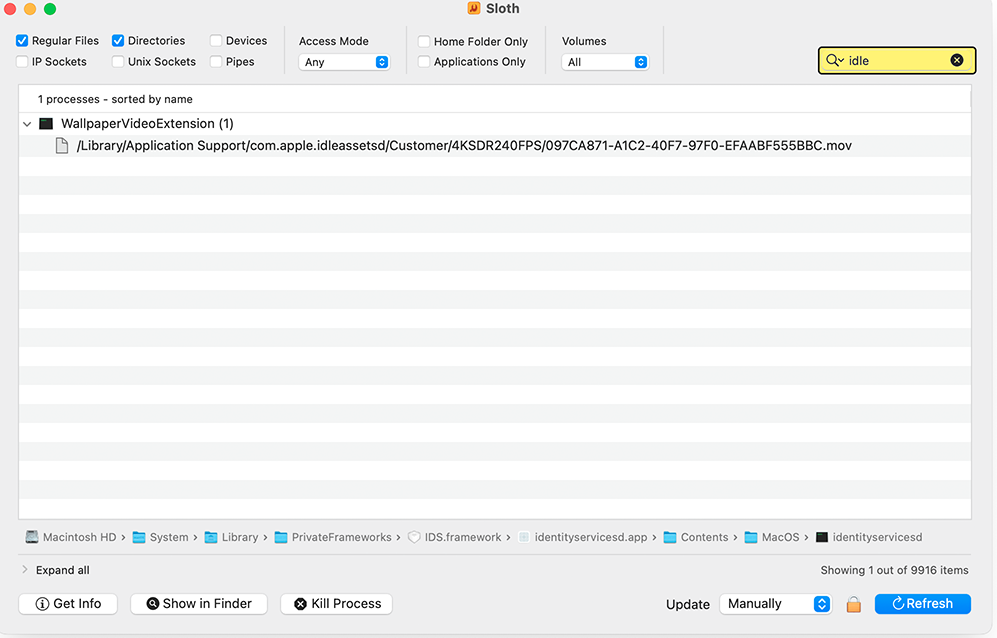

Note that in both cases, the output can be very large, which is why I used "grep -i idle" and searched in Sloth (I highlighted the search box in the top right).


I would not recommend blocking this connection in any way. The OS uses this to download many things. I would figure out exactly what it is downloading and work from there. Otherwise, you may have issues in the future when the OS is trying to download something that you do want, but it is blocked. Additionally, it will continue to try to connect and download and continue to fail, which would be undesirable.


48 replies

Aug 5, 2024 7:31 AM in response to madkrupt

I had this issue on Sonoma. I used some basic methods to see the unencrypted content, and it was due to screen savers/wallpapers. The thing is, I clicked on them and ultimately did not use them, so it would seem that it triggered a background download of a ton of large high-def video files, regardless of the fact that they are no longer selected (and they continue to download). It doesn't bother me, as it seems to throttle itself down when other traffic starts to show up, so I haven't noticed any slowdown. I can see the video files consuming hard disk space (I took a snapshot, let it sit, took another, and compared the difference (please don't tell me that there are a million better ways of doing that. I was doing it for another issue primarily).


You can run lsof if you are comfortable with the terminal. Here is what mine showed:

user@computer ~ % lsof | grep -i idle
Wallpaper   581 user    4r      REG                1,4  481292429             5366651 /Library/Application Support/com.apple.idleassetsd/Customer/4KSDR240FPS/097CA871-A1C2-40F7-97F0-EFAABF555BBC.mov


If you prefer using a GUI, there is a great free program that basically visualizes the lsof output. The utility is Sloth.

Note that it takes "snapshots" and is not a monitor (although you can have it refresh at certain intervals).


Output From Sloth:


Note that in both cases, the output can be very large, which is why I used "grep -i idle" and searched in Sloth (I highlighted the search box in the top right).


I would not recommend blocking this connection in any way. The OS uses this to download many things. I would figure out exactly what it is downloading and work from there. Otherwise, you may have issues in the future when the OS is trying to download something that you do want, but it is blocked. Additionally, it will continue to try to connect and download and continue to fail, which would be undesirable.


Edit:

I found a SQLite database of what it is downloading. However, I wouldn't mess with that without talking to Apple Support first.

This thread has been closed by the system or the community team. You may vote for any posts you find helpful, or search the Community for additional answers.

High Band With "idleassetsd" & "nsurlsessiond" back ground process

Welcome to Apple Support Community
A forum where Apple customers help each other with their products. Get started with your Apple Account.