passwords did Not migrate to new MacBook Pro

Just replaced a nearly ancient MacBook Pro with a new 16 inch version of same. My passwords did not migrate with other data.

I'm now creating new passwords in the new computer and saving to a file in iCloud. It'll take forever to do this with all my accounts.

I've gone back through everything and enabled passwords sync as well as yes or sync on everything I can find in settings. Obviously I'm missing something.

Running 14.1.1 on this new device and the old laptop from 2018 has 10.14.6.

My gratitude to anyone who can tell me what I'm missing.

Thank you,

Louie

Posted on Dec 8, 2023 11:11 AM

Reply
Question marked as Top-ranking reply

Posted on Dec 8, 2023 8:52 PM

louster wrote:

Just replaced a nearly ancient MacBook Pro with a new 16 inch version of same. My passwords did not migrate with other data.
I'm now creating new passwords in the new computer and saving to a file in iCloud. It'll take forever to do this with all my accounts.
I've gone back through everything and enabled passwords sync as well as yes or sync on everything I can find in settings. Obviously I'm missing something.
Running 14.1.1 on this new device and the old laptop from 2018 has 10.14.6.
My gratitude to anyone who can tell me what I'm missing.
Thank you,
Louie


the 2018 MBP was not ancient but the macOS 10.14.6 certainly was outdated in light of the fact it could have been upgrading all along the way to run the current macOS Sonoma. Baby steps along the way make the transition much more palatable compared to a giant leap— in your case 5 operating systems.


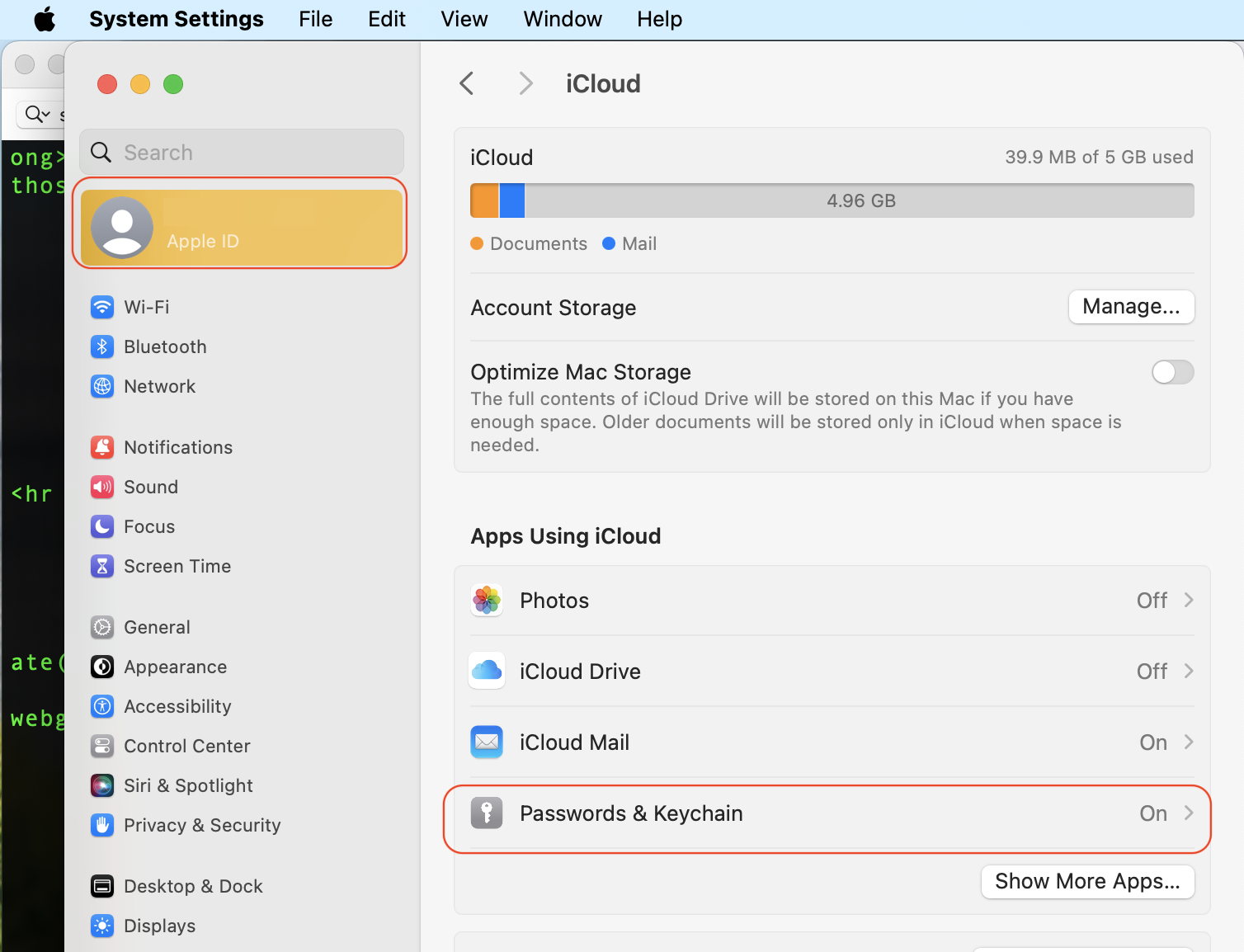
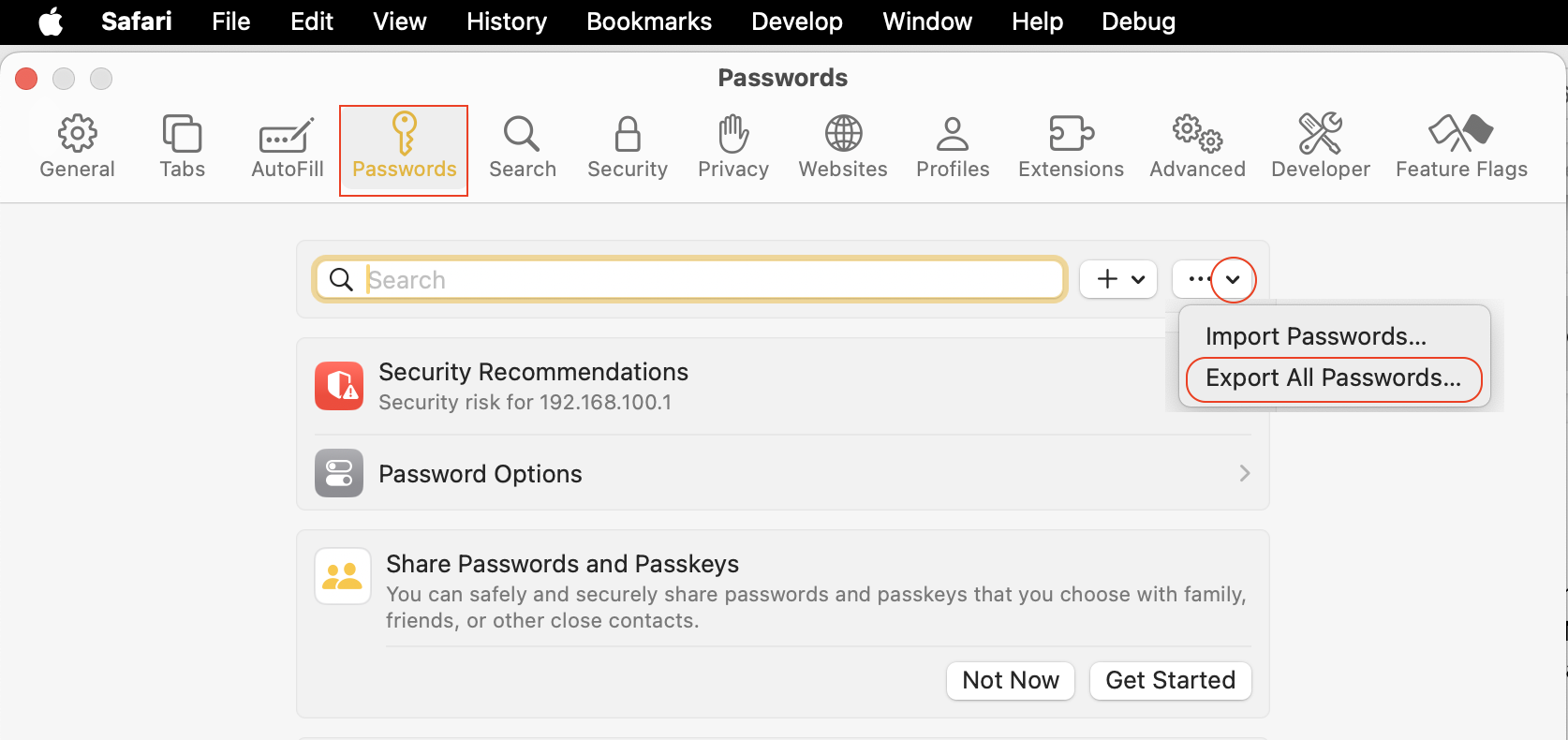
iCloud has Password & Keychain sync across devices if you where using it previously or turn it on now if you still have the machine. You can also use the "export"/import" all passwords from the Keychain Access.app (same as Safari>Settings>Passwords.)


See >AppleID>iCloud>Passwords & keychain


if you are logged into the same AppleID it should populate on the new machine filling your void.


The most trouble free way to move to a new machine, is using the Setup Assistant on the initial boot of a brand new machine— you have one shot here. Set up your MacBook Pro - Apple Support


The second best way is use the Migration Assistant.

How to move your content to a new Mac Transfer to a new Mac with Migration Assistant - Apple Support


ref:


Sign out of AppleID and back in again to jump start the sync if it is not working as of yet.


Similar questions

4 replies
Question marked as Top-ranking reply

Dec 8, 2023 8:52 PM in response to louster

louster wrote:

Just replaced a nearly ancient MacBook Pro with a new 16 inch version of same. My passwords did not migrate with other data.
I'm now creating new passwords in the new computer and saving to a file in iCloud. It'll take forever to do this with all my accounts.
I've gone back through everything and enabled passwords sync as well as yes or sync on everything I can find in settings. Obviously I'm missing something.
Running 14.1.1 on this new device and the old laptop from 2018 has 10.14.6.
My gratitude to anyone who can tell me what I'm missing.
Thank you,
Louie


the 2018 MBP was not ancient but the macOS 10.14.6 certainly was outdated in light of the fact it could have been upgrading all along the way to run the current macOS Sonoma. Baby steps along the way make the transition much more palatable compared to a giant leap— in your case 5 operating systems.


iCloud has Password & Keychain sync across devices if you where using it previously or turn it on now if you still have the machine. You can also use the "export"/import" all passwords from the Keychain Access.app (same as Safari>Settings>Passwords.)


See >AppleID>iCloud>Passwords & keychain


if you are logged into the same AppleID it should populate on the new machine filling your void.


The most trouble free way to move to a new machine, is using the Setup Assistant on the initial boot of a brand new machine— you have one shot here. Set up your MacBook Pro - Apple Support


The second best way is use the Migration Assistant.

How to move your content to a new Mac Transfer to a new Mac with Migration Assistant - Apple Support


ref:


Sign out of AppleID and back in again to jump start the sync if it is not working as of yet.



Dec 9, 2023 10:22 AM in response to louster

As you recall, when you set up the new computer you were required to set ups new user ID and password. Then, later you completed the Migration Assistant transfer.  It should set up the new computer the same as the old one. When that is completed, you should be able to log into the new Mac with the old User Account name and password and delete the brand-new user or leave it in place as a second admin account. If this is not possible it sounds like to Migration Assistant transfer did not fully migrate, very likely because Wi-Fi was used instead of a wired USB cable connection.

I hope this is helpful. Good luck.

Dec 16, 2023 7:29 AM in response to louster

I am going through the exact same thing as you - having to put in passwords for all my accounts after transferring from my ancient MacBook Air to my new one. BUT - even after I manually put in the PW, and then click on SAVE, the next time I go to that site, I have to put my PW in all over again. Then, yet again, it asks if I want to save that PW, and I again click on SAVE, but it still does not save the PW & I have to input manually each time. When I look at Keychain, for apple, for example, it shows about 50 different names with passwords that are not the PW's I set, for example 20 or so named "com.apple.cloudd.deviceidentifier.Production." No idea which one of those names is the account I use to sign on to apple.I have many dozens of PW's for many sites over the past 10 years or so. Having to do this manually for every site doesn't sound reasonable. AND I have to do this on each device - iPhone, iPad & MacBook.

This thread has been closed by the system or the community team. You may vote for any posts you find helpful, or search the Community for additional answers.

passwords did Not migrate to new MacBook Pro

Welcome to Apple Support Community
A forum where Apple customers help each other with their products. Get started with your Apple Account.