How to open .rar files on Mac M2 runing Sonoma 14.2

I just switched from an old MacBook Pro Late 2015 to MacBook Pro M2 two weeks ago. I need some help to open .rar files on my Mac. In the past, I was using the free app SimplyRAR for compressing and decompressing rar files. However, this app no longer works on Sonoma. It says 'The developer of this app needs to update it to work with this version of macOS.'


My question is: what is the best alternative to replace Simply RAR for opening .rar files on my M2 Mac?


Thanks

MacBook Pro (M2 Pro, 2023)

Posted on Dec 19, 2023 11:08 PM

Reply
Question marked as Top-ranking reply

Posted on Dec 21, 2023 2:11 AM

Kariadixon wrote:

Thanks for the suggestion, Rudegar. I can see the Unarchiver app is able to open rar files. I am wondering if it is ok to create new rar file on my Mac?

No, The Unarchiver application cannot create new .rar files on your Mac; it is only designed for opening and extracting existing archive files.

However, if you need to create a new .rar file, there are other applications you can use, such as Keka, WinRAR, or iZip.

6 replies
Question marked as Top-ranking reply

Dec 21, 2023 2:11 AM in response to Kariadixon

Kariadixon wrote:

Thanks for the suggestion, Rudegar. I can see the Unarchiver app is able to open rar files. I am wondering if it is ok to create new rar file on my Mac?

No, The Unarchiver application cannot create new .rar files on your Mac; it is only designed for opening and extracting existing archive files.

However, if you need to create a new .rar file, there are other applications you can use, such as Keka, WinRAR, or iZip.

Dec 26, 2023 11:19 PM in response to Kariadixon

There are many free and paid apps for open rar files on Apple Silicon Mac, such as M1, M2 or M3. However, the option is much less for creating new RAR file on Mac. You can either do this with rar command or third-party app like TunesBro FossZip.


Use command to create a new rar file:


To create a new RAR file on macOS using the Terminal, you'll need to use the rar command-line utility. However, you'll need to install the RAR software first because it's not included with macOS by default.


Open Terminal. and navigate to the folder where the files you want to compress into a RAR archive are located. You can use the cd command to change directories. To create a new RAR archive, use the following command:


rar a -r archive_name.rar file1 file2 file3


Use FossZip app to open and create a new rar file:


FossZip is a popular file compression and archiving utility for Mac-based devices. It can easily extract files and folders from compressed .rar archives. This is handy for opening files that have been shared with you in compressed formats or for accessing older archived data. Here is the tutorial:


https://www.uubyte.com/blog/how-to-extract-rar-files-free-on-mac/
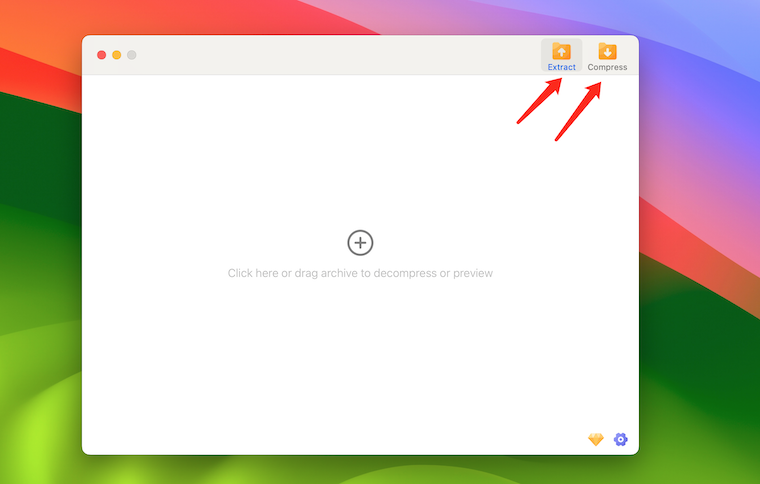


Besides the decompression feature, it can also compress files and folders into various archive formats, with the most common being the RAR and ZIP formats. This compression process reduces the file size, which is particularly useful for transferring files over the internet or saving storage space on your computer.


This thread has been closed by the system or the community team. You may vote for any posts you find helpful, or search the Community for additional answers.

How to open .rar files on Mac M2 runing Sonoma 14.2

Welcome to Apple Support Community
A forum where Apple customers help each other with their products. Get started with your Apple Account.