In Apple Mail, create a new mailbox (Mailbox > New Mailbox). In the resulting dialog box, for Location, select "On My Mac"
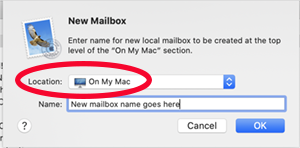
This will create a mailbox folder that resides on your Mac, not on the server. You can then copy emails from your server to this mailbox folder. You can create multiple "On My Mac" mailbox folders (each with a unique name) if you want to organize your emails into separate folders.
For archiving, select one of the "On My Mac" folders and do Mailbox > Export Mailbox. This will create an MBOX file on your drive that contains all the emails that were in the exported mailbox. Note this is a copy process, it does not delete the emails in the exported mailbox. Note also that this does not work on nested folders; make sure that the folder you export does not have any subfolders. You can always re-import MBOX files back into Mail.
MBOX is like a PST in many ways. Unlike PST, however, each MBOX contains the contents of only one folder.


