creating dynamic calendar in Numbers

I'm trying to create a calendar from scratch and watching tutorials, mostly Excel, which have led me here. Excel and Google Sheets have a function for "sequence," but I can't find any videos to help me with the function that I need in numbers to number my calendar from 1-30.

MacBook Pro 13″, macOS 13.0

Posted on Dec 29, 2023 6:21 PM

Reply
Question marked as Top-ranking reply

Posted on Dec 29, 2023 10:26 PM

Not sure what you mean by "dynamic" calendar but if you haven't done so already be sure to have a look at the Calendar template at File > New in your menu. When look beneath the surface and unhide rows in some of the tables there you find unexpected "dynamism" and power in deceptively simple formulas. For example, try clicking the month name upper left and changing it. Then, to see how all this works, click the month name again and choose Table > Unhide all Rows from the menu and have a look at the formulas


Numbers and Excel handle dates differently, so starting from a solution for Excel may be much harder.


SG


8 replies
Question marked as Top-ranking reply

Dec 29, 2023 10:26 PM in response to mojicamc

Not sure what you mean by "dynamic" calendar but if you haven't done so already be sure to have a look at the Calendar template at File > New in your menu. When look beneath the surface and unhide rows in some of the tables there you find unexpected "dynamism" and power in deceptively simple formulas. For example, try clicking the month name upper left and changing it. Then, to see how all this works, click the month name again and choose Table > Unhide all Rows from the menu and have a look at the formulas


Numbers and Excel handle dates differently, so starting from a solution for Excel may be much harder.


SG


Dec 31, 2023 4:44 AM in response to mojicamc

Hi mojicamc,


I do admire whoever created the Numbers Calendar template. It contains very clever formulas, but is easy to use.

The template consists of a single sheet (tab) as an example for one month. It is up to the user to choose the month and year, and then duplicate the sheet for other months.


I assume you are using a Mac.

To explore the Numbers Calendar template, click on each table and in Format Panel > Table > Table Options, click on Title to see the table names.


Now click on the MONTH AND YEAR table and Menu > Table > Un-hide All Rows and Un-hide All Columns.
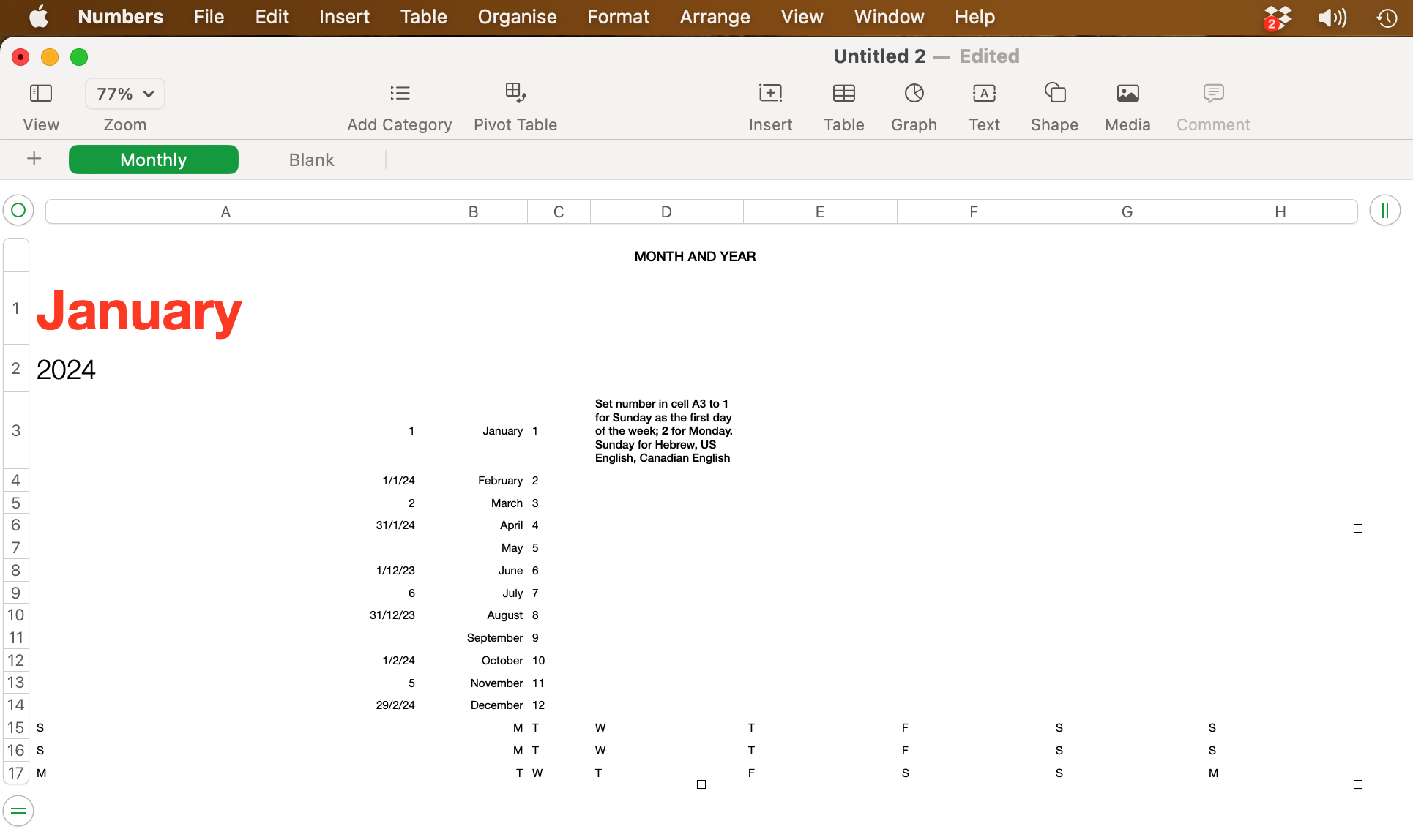


Click on various cells to see the formulas. The formulas are intriguing! Please reply if you need help in understanding a formula.


Regards,

Ian.

Dec 30, 2023 6:51 AM in response to mojicamc

The sequence formula was only introduced around 2021 for excel, we were doing “dynamic calendars” for decades before that (literally, I was doing this in the early nineties). SG’s recommendation of using the template for calendar is perfect for your purposes.

you say you want to do it by hand, but are looking at videos and examples online, this is just using the example built in to numbers.


jason

Dec 30, 2023 11:16 AM in response to SGIII

I have clicked to see what they are using, but how they got there is still unclear. Below is what I am struggling with because I don't know where they started. Maybe they created a whole different calendar to refer from? Or are they referring to another table with month and year? I would gladly take a masterclass, but I don't know where to look, and YouTube doesn't show much for numbers. Everything is all Google Sheets and Excel; unfortunately, there is only so much I can follow due to the functions. Thanks!


Dec 30, 2023 3:16 PM in response to mojicamc

Yes , the first cell in that table uses the month and year choices form the table above.

you can see the table name by Turning on the title choice in the format menu. (Tap and hold the month cell, it will select the cell and highlight the table, then click the paintbrush button, go to table tab, and slide the title slider)


the second cell goes one date after that date.

the next Sunday advances one week from the date above it in the calendar.


Dec 30, 2023 9:20 AM in response to mojicamc

mojicamc wrote:

I don't know what function is being used in numbers to help build it.


Have you had a look at the built-in Calendar template I referred to above and "unhid" the rows in the to table with the big month name to look at the formulas used? Also look at the formulas in the calendar tables. Everything you need is all right there.


SG

This thread has been closed by the system or the community team. You may vote for any posts you find helpful, or search the Community for additional answers.

creating dynamic calendar in Numbers

Welcome to Apple Support Community
A forum where Apple customers help each other with their products. Get started with your Apple Account.
