No, the behavior you're describing is not the intended functionality of iMessage Contact Key Verification. It should be able to maintain verification for multiple contacts simultaneously.

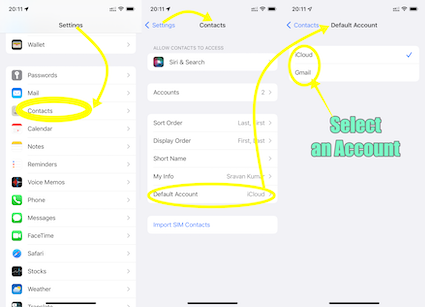
What is your default Contacts account? If none, please add an email account and enable contacts.
See the pic below
Unlike some Android devices, contacts are neither stored locally on an iPhone nor in SIM. They are synced to an email account that you had Google, iCloud, AOL, Exchange, Outlook, Yahoo or any Other
If you have a corporate email account added through a profile on your device, please check with your organization's system administrator.
You can use Contact Key Verification to receive automatic alerts that help verify you're communicating only with the people you intend. You can also generate unique codes that you and your contacts can compare simultaneously in the Messages app to further verify each other's identities.
Use Contact Key Verification on iPhone - Apple Support (IN)![]()

