Itunes not working with Windows 11

I get error messages on windows 11 everytime I try to install iTunes on windows 11. Error message reads "cannot install iTunes previous version has been installed" This is false there is NO OTHER VERSION on the PC. Itunes is incompatible with Windows 11.

iPad, iPadOS 16

Posted on Jan 7, 2024 1:06 PM

Reply
Question marked as Top-ranking reply

Posted on Jan 7, 2024 2:05 PM

emmett122 wrote:

Itunes is incompatible with Windows 11.

As far as I know, that is not the case.


If your computer shows you a message saying that iTunes is already installed on your computer, then presumably, it is. Why do you think that your computer would lie to you?


Do you have more than one Windows user account on your computer? That is, do you have a separate sign-into-Windows on your computer, with its own desktop appearance, that you use, or does anyone else use your computer who has their own Windows user account (with it's own desktop appearance)? If so, is iTunes installed on the other user account? I'm not referring to accounts with Apple, or anyone else, this is purely two accounts on your computer. This is an important question, please let us know the answer.


If your computer does not have more than one Windows user account, then using the screenshot below as your guide, check your Windows Start menu (1.) to see if there is an iTunes folder entry (2.).
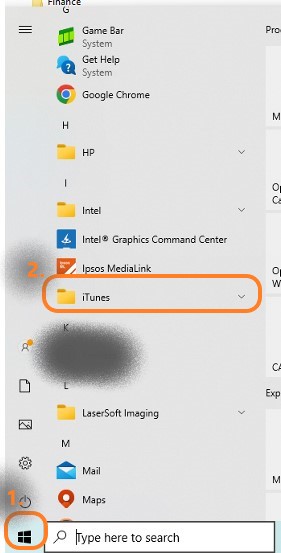


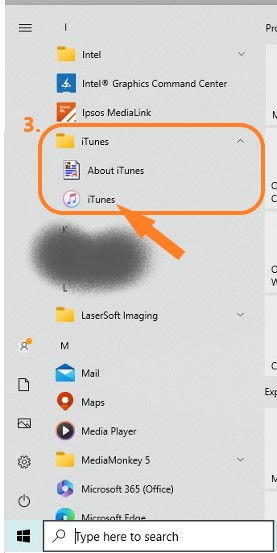
If there is an entry for iTunes (3.) on the Strat menu, tap it to expand the entry which will reveal an About iTunes document and the programme icon. Tapping that icon will start iTunes:

If all else fails, you can look:

    • in your computer's Settings/Apps/Apps & features for an entry referring to iTunes, or
    • via Windows Explorer, on your C:\drive, in both the Program Files and Program Files (x86) folders for an iTunes folder, either of which will suggest that iTunes is installed



6 replies
Question marked as Top-ranking reply

Jan 7, 2024 2:05 PM in response to emmett122

emmett122 wrote:

Itunes is incompatible with Windows 11.

As far as I know, that is not the case.


If your computer shows you a message saying that iTunes is already installed on your computer, then presumably, it is. Why do you think that your computer would lie to you?


Do you have more than one Windows user account on your computer? That is, do you have a separate sign-into-Windows on your computer, with its own desktop appearance, that you use, or does anyone else use your computer who has their own Windows user account (with it's own desktop appearance)? If so, is iTunes installed on the other user account? I'm not referring to accounts with Apple, or anyone else, this is purely two accounts on your computer. This is an important question, please let us know the answer.


If your computer does not have more than one Windows user account, then using the screenshot below as your guide, check your Windows Start menu (1.) to see if there is an iTunes folder entry (2.).


If there is an entry for iTunes (3.) on the Strat menu, tap it to expand the entry which will reveal an About iTunes document and the programme icon. Tapping that icon will start iTunes:


If all else fails, you can look:

    • in your computer's Settings/Apps/Apps & features for an entry referring to iTunes, or
    • via Windows Explorer, on your C:\drive, in both the Program Files and Program Files (x86) folders for an iTunes folder, either of which will suggest that iTunes is installed


Jan 8, 2024 12:04 PM in response to emmett122

emmett122 wrote:

The computer isn't lying there is a glitch in iTunes

It makes no difference. The fact is that the message is there and as a consequence, your computer will not install the item that you are trying to add now.


Have you actually looked at the Start Menu on each user account (as I suggested) and if you did, what did you find? Comparing my screenshots, is there - or is there not, a folder named iTunes (2.), which expands to reveal the Open iTunes entry (3.) on either of there user accounts? You have to check both accounts.


Have you also looked in:

    1. Windows Explorer to see whether or not there is a folder named iTunes in either the Program Files or the Program Files (x86)?
    2. your computer's Settings/Apps/Apps & features for an entry referring to iTunes?

This thread has been closed by the system or the community team. You may vote for any posts you find helpful, or search the Community for additional answers.

Itunes not working with Windows 11

Welcome to Apple Support Community
A forum where Apple customers help each other with their products. Get started with your Apple Account.