Thank you for the continued support HWTech, much appreciated.
I have read the 'Apple Support' file on the link you provided.
The format is 'Mac OS Extended (Journaled)' - is this what you meant by: What file system is on this external drive?
There is no OS system or Time Machine files on the external HD in question.
The external HD, The Folder with the files, and the Original Files on the HD all have Read/write permissions set as follows.

There is no “Ignore ownership on this volume” checkbox on the 'Get Info' for the external HD, the few folders with issues, or the files within the those folders that are having save issues.
Dragging the folders or files that have issues from the external HD to the desktop they continue having the same issue, being unable to save an open file after modification without the admin password. A file after modification can be saved independently to the desktop, but then requires the admin password to replace the original in the folder or independent file from that folder on the desktop.
This issue is currently with only a few folders of 87 folders on the external HD, some 85 folders have no issue opening a file -> Modify the file -> then saving it (overwrite the original).
There seems no difference between the few folders that have issues and the many that don't.
Disk Utility First Aid on the external drive shows:
The following information showed when clicking the "i - info".

After running Disk First Aid the few folders with issues are still asking for a password to duplicate a file, (this is new) to change the file some messages now pops-up:

A text file in the same folder that isn't locked and has all the permissions set to Read/write had the following pop-up when trying to modify it, not even trying to save.

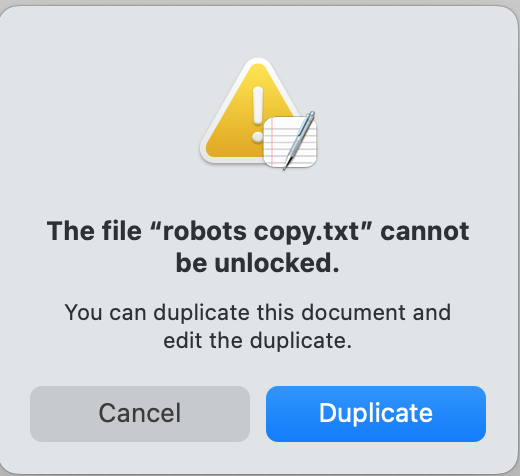
I'm now suitably confused.
Perhaps I need to run 'Restore' within Disk Utility? Well at least drink strong coffee!

