You can not open the same Pages document twice from within the same folder, but you can if the document resides in different filesystem locations. Although Pages does not offer split-screen viewing itself, you can open both documents, each relegated to each half of your screen.
Following the first sentence guideline, with both Pages documents open, click and hold the green traffic light on the first opened document
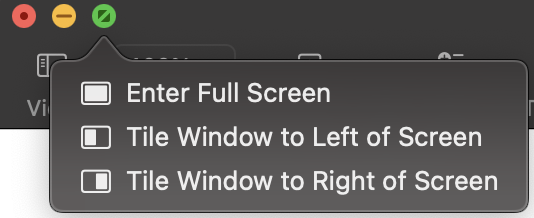
and select Tile Window to Left of Screen. The remaining Pages document will now have a blue border around it. Just click anywhere on the document to cause it to Tile to the Right of Screen. At this point, you have two open Pages documents relegated to each half of your screen.
If you want to temporarily switch away from this split-screen view, press F3 and select the choice that is not your twin Pages document view, such as the following:

When I click on the Desktop icon, the split-screen Pages document view vanishes and I am using a normal Desktop with this browser session open. Pages is still running in the background with both documents still open, and if you want to switch back to split-screen, just click the Pages icon in the Dock. When done, press control+cmd+F to exit full screen view and close your Pages documents and quit the application.

