No way to add a single playlist from iTunes to my iPhone? February 2024

It used to be simple - plug in the iphone to PC and drag the playlist onto the phone using iTunes.

Of course Apple had to make it impossible or difficult. Does someone know a good way to do this?


Windows, Windows 6

Posted on Feb 6, 2024 2:59 PM

Reply
Question marked as Top-ranking reply

Posted on Feb 8, 2024 10:54 AM


mato65 wrote:

Is there some setting somewhere that would cause this?

Yes, using the Sync option (plus something else, that I'll mention in a second).


I know you stated that you don't use Sync, but I suggest that you check to make sure that it hasn't been turned on somehow.


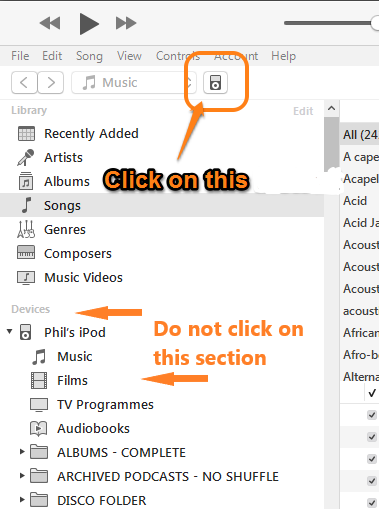
  • tap the device icon towards the top of the iTunes window:


  • that will display the Device/Settings/Summary pane. On that pane, look for the Sync only ticked songs and videos:
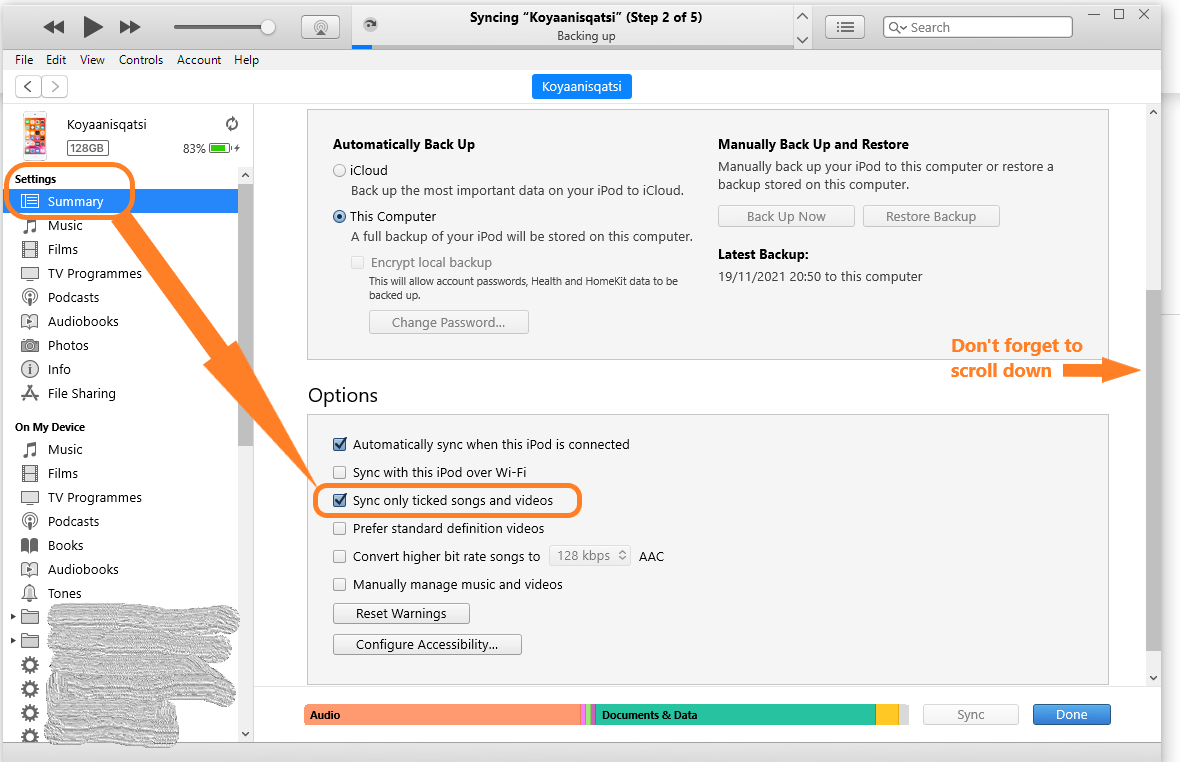


  • if the option is on (ticked, or checked), leave it set like that
  • switch to the Device/Settings/Music pane:
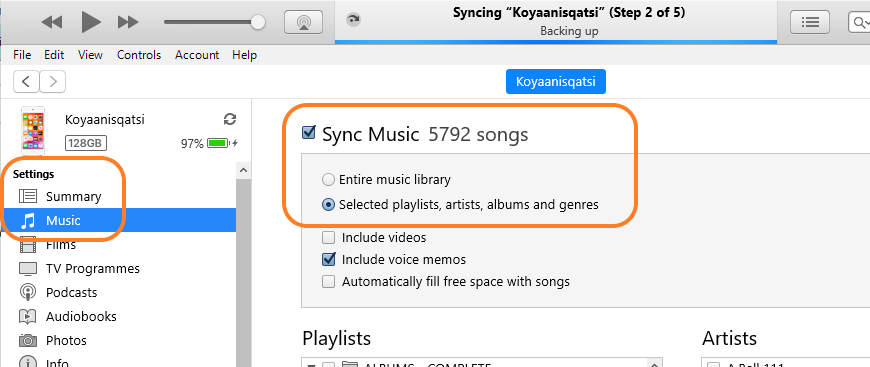


  • if Sync is on and the next option is Selected playlist, artists, albums and genres, then your new playlist must be included in the selection. You can see the Playlists section heading at the bottom of the screenshot.


Returning to the Sync only ticked songs and videos option:

    • if the songs in that playlist are not ticked (not checked), that will prevent them from being added to your decide. Tick the boxes for those songs


The upshot of all this is that it is possible to add one playlist to your iPhone. If my suggestions haven't worked, then we need to consider what else may have happened, although at this time, I don't know what that could be.


6 replies
Question marked as Top-ranking reply

Feb 8, 2024 10:54 AM in response to mato65


mato65 wrote:

Is there some setting somewhere that would cause this?

Yes, using the Sync option (plus something else, that I'll mention in a second).


I know you stated that you don't use Sync, but I suggest that you check to make sure that it hasn't been turned on somehow.


  • tap the device icon towards the top of the iTunes window:


  • that will display the Device/Settings/Summary pane. On that pane, look for the Sync only ticked songs and videos:


  • if the option is on (ticked, or checked), leave it set like that
  • switch to the Device/Settings/Music pane:


  • if Sync is on and the next option is Selected playlist, artists, albums and genres, then your new playlist must be included in the selection. You can see the Playlists section heading at the bottom of the screenshot.


Returning to the Sync only ticked songs and videos option:

    • if the songs in that playlist are not ticked (not checked), that will prevent them from being added to your decide. Tick the boxes for those songs


The upshot of all this is that it is possible to add one playlist to your iPhone. If my suggestions haven't worked, then we need to consider what else may have happened, although at this time, I don't know what that could be.


Feb 7, 2024 10:26 AM in response to mato65

The reason that you cannot drag a playlist to your phone may be because:

  1. you are using Sync to manage your phone, which means that you cannot drag and drop, but instead you let iTunes do the work for you. However, if you are using Sync selected playlists, artists, albums and genres (rather than Sync Entire Library), then you need to select that Playlist as well
  2. you have subscribed to Apple Music


Could it be either of those things?

Feb 7, 2024 1:35 PM in response to mato65

Well if it's not Apple Music and if you do not use iMatch, I suggest that either:

    • the songs are not on your computer. This could be because they are in the cloud or simply still in the iTunes Store and not downloaded
    • the original files for the that playlist are now missing from the location that they were in when you added them to your iTunes Library. Check to see if the songs play in iTunes. If they fail to play and you see a message telling you that the original file could not be found, that is the issue


So, can iTunes play the songs?

This thread has been closed by the system or the community team. You may vote for any posts you find helpful, or search the Community for additional answers.

No way to add a single playlist from iTunes to my iPhone? February 2024

Welcome to Apple Support Community
A forum where Apple customers help each other with their products. Get started with your Apple Account.