I am having trouble getting my apple watch to pair with my new Iphone. I no longer have my old iphone so I can no longer erase it from my old phone.

step by step on how to fix it

iPhone 15 Pro Max, iOS 17

Posted on Feb 22, 2024 5:37 AM

Reply
Question marked as Top-ranking reply

Posted on Feb 22, 2024 5:56 AM

I guess we are going to need to know what steps you are not working. The first thing that needs done is:

How to erase your Apple Watch if you don't have your iPhone
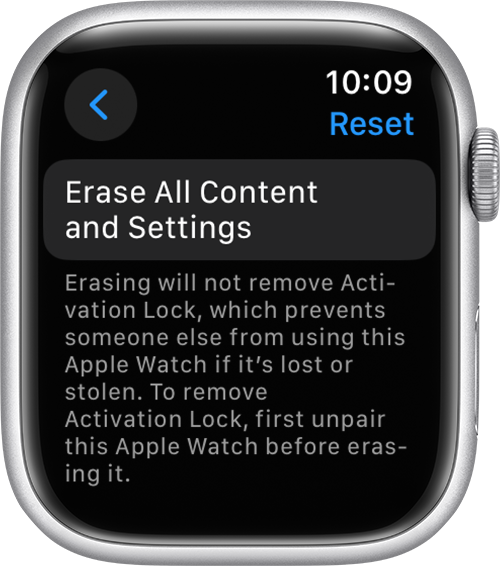
  • On your Apple Watch, tap Settings > General > Reset > Erase All Content and Settings.


  • Type your password if prompted.
  • For GPS + Cellular models, choose to keep or remove your cellular plan.
    • If you want to pair your Apple Watch and iPhone again, keep your plan. 
    • If you don't want to pair your Apple Watch and iPhone again, remove your plan. If you aren't going to pair with a different watch or iPhone, you might need to contact your carrier to cancel your cellular subscription. 
  • Tap Erase All to confirm. This resets your Apple Watch to the factory settings.

Now you can set up your Apple Watch again. You'll need the Apple ID and password associated with the watch turn off Activation Lock.


If you are unable to complete the steps due to no knowing the Apple ID and password, then that is another issue and you will not be able to use the device until that is resolved. Here are the steps to continue if the previous steps worked:

  • Open the Apple Watch app on your new iPhone, then pair your watch with your new iPhone.
  • Try to restore from a backup. Make sure that your iPhone and Apple Watch are up to date; if they're not, you might not see your backup in the list. You will lose Activity, Workouts, or settings on your watch that changed between the last backup and now. If you use iCloud in iOS 11 and later, Health and Activity data is stored in iCloud and automatically kept up to date on devices where you're signed in with the same Apple ID. 
    • If you’re asked to restore from a watch backup, select the most recent backup. 
    • If you don't have a backup, you need to set up your Apple Watch as new. 
  • Follow the onscreen steps to finish setting up.
  • Start using your Apple Watch with your new iPhone. You might need to wait a few days for all your iCloud data to appear.


If these steps did not work, describe what step was giving you trouble.


1 reply
Question marked as Top-ranking reply

Feb 22, 2024 5:56 AM in response to MB_shockerz6

I guess we are going to need to know what steps you are not working. The first thing that needs done is:

How to erase your Apple Watch if you don't have your iPhone

  • On your Apple Watch, tap Settings > General > Reset > Erase All Content and Settings.


  • Type your password if prompted.
  • For GPS + Cellular models, choose to keep or remove your cellular plan.
    • If you want to pair your Apple Watch and iPhone again, keep your plan. 
    • If you don't want to pair your Apple Watch and iPhone again, remove your plan. If you aren't going to pair with a different watch or iPhone, you might need to contact your carrier to cancel your cellular subscription. 
  • Tap Erase All to confirm. This resets your Apple Watch to the factory settings.

Now you can set up your Apple Watch again. You'll need the Apple ID and password associated with the watch turn off Activation Lock.


If you are unable to complete the steps due to no knowing the Apple ID and password, then that is another issue and you will not be able to use the device until that is resolved. Here are the steps to continue if the previous steps worked:

  • Open the Apple Watch app on your new iPhone, then pair your watch with your new iPhone.
  • Try to restore from a backup. Make sure that your iPhone and Apple Watch are up to date; if they're not, you might not see your backup in the list. You will lose Activity, Workouts, or settings on your watch that changed between the last backup and now. If you use iCloud in iOS 11 and later, Health and Activity data is stored in iCloud and automatically kept up to date on devices where you're signed in with the same Apple ID. 
    • If you’re asked to restore from a watch backup, select the most recent backup. 
    • If you don't have a backup, you need to set up your Apple Watch as new. 
  • Follow the onscreen steps to finish setting up.
  • Start using your Apple Watch with your new iPhone. You might need to wait a few days for all your iCloud data to appear.


If these steps did not work, describe what step was giving you trouble.


This thread has been closed by the system or the community team. You may vote for any posts you find helpful, or search the Community for additional answers.

I am having trouble getting my apple watch to pair with my new Iphone. I no longer have my old iphone so I can no longer erase it from my old phone.

Welcome to Apple Support Community
A forum where Apple customers help each other with their products. Get started with your Apple Account.