iOS 17.4 update, image mirroring function lost

I mirror my iPad image and sound to my smart Insignia TV regularly. Well, no more thanks to iOS 17.4! The sound is mirrored, but the image is not.

Also, since installing this update system on my iPad, the iPad has become s l o w. I restarted a few times, to no avail.

Apple, you messed up with this one.

Anyone else found solutions to this, other than hoping for an update that will fix the issues?

I regret taking that update now.

Is it possible to revert to the previous version?

Thanks for any insight.

iPad (7th generation)

Posted on Mar 15, 2024 9:34 AM

Reply
Question marked as Top-ranking reply

Posted on Mar 15, 2024 9:44 AM

Addressing your last question first - you cannot roll-back to an earlier version of iOS/iPadOS.


All System Updates are digitally signed by Apple - and can only be installed whilst the digital signatures remain valid. After release of a new iOS/iPadOS version, the immediately preceding version continues to be digitally signed by Apple - however, usually within a few days, Apple will revoke the digital certificate with which the earlier version is signed. iPadOS 17.3.1 and earlier are no longer digitally signed - and cannot now be installed.


Perhaps consider that iOS/iPadOS updates include both functional and essential security updates. Restoring an earlier version of the OS would undermine the security of your device and your personal data. 


As for your other issue concerning screen mirroring, the nature of your issue isn't entirely clear. Perhaps you can provide more specific description of precisely what you are attempting to achieve - and what happens when you try.


With the benefit of better understanding of your problem, appropriate guidance may be possible.


11 replies
Question marked as Top-ranking reply

Mar 15, 2024 9:44 AM in response to Byblos24

Addressing your last question first - you cannot roll-back to an earlier version of iOS/iPadOS.


All System Updates are digitally signed by Apple - and can only be installed whilst the digital signatures remain valid. After release of a new iOS/iPadOS version, the immediately preceding version continues to be digitally signed by Apple - however, usually within a few days, Apple will revoke the digital certificate with which the earlier version is signed. iPadOS 17.3.1 and earlier are no longer digitally signed - and cannot now be installed.


Perhaps consider that iOS/iPadOS updates include both functional and essential security updates. Restoring an earlier version of the OS would undermine the security of your device and your personal data. 


As for your other issue concerning screen mirroring, the nature of your issue isn't entirely clear. Perhaps you can provide more specific description of precisely what you are attempting to achieve - and what happens when you try.


With the benefit of better understanding of your problem, appropriate guidance may be possible.


Mar 15, 2024 1:27 PM in response to Byblos24

Begin with a forced-restart of your iPad - as this will often clear an isolated software issue:


Force restart iPad (models with Face ID or with Touch ID in the top button)

If your iPad doesn’t have the Home button, do the following:

  1. Press and quickly release the volume button nearest to the top button.
  2. Press and quickly release the volume button farthest from the top button.
  3. Press and hold the top button.
  4. When the Apple logo appears, release the top button.
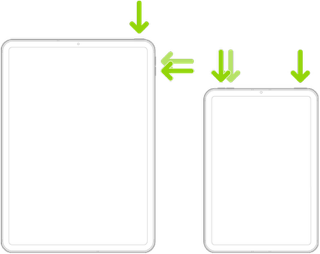


Force restart iPad (models with the Home button)

Press and hold the top button and the Home button at the same time. When the Apple logo appears, release both buttons.



If the problem persists after performing the restart, it may be necessary to reset your iPad settings. While this reset will not cause any loss of data, as a precaution, it is always wise to ensure that you have a current iCloud or iTunes backup before performing the reset:

How to back up your iPhone, iPad, and iPod touch - Apple Support


When you are happy to proceed, you can perform the reset from iPad settings:

Settings > General > Transfer or Reset iPad > Reset > Reset All Settings


If the problem still doesn’t clear, the next step is to reset the iPad to factory settings - after which you'll need to restore your data from your backup:

Restore your iPhone, iPad, or iPod to factory settings - Apple Support


Otherwise, you would be best advised to seek assistance directly from Apple Support. You can contact the Support Team using the Support link at top-right or bottom-left of this page. Alternatively and perhaps easier, you can initiate and manage your support cases using the excellent Apple Support App. If not already installed on your iPad, the App can be downloaded from the App Store:

https://apps.apple.com/app/apple-support/id1130498044


You might also visit the Genius Bar at your local Apple Store or Apple Authorised Service Provider (AASP) - where the technicians will be able to assist:

Genius Bar Reservation and Apple Support Options - Apple


Mar 15, 2024 2:59 PM in response to LotusPilot

Solved! I went through your suggestions, up to the iPad reset. After, when I tried to use AirPlay with the TV, the iPad asked for the number on the screen, as it had the first time I paired the two device. I still had the same issues, so the TV screen was black. That is when I decided to check the setup on my TV, and to try reconfiguring the connection. Under AirPlay, I chose “Configure”, which this time gave me a number to enter in the iPad for AirPlay. And voilà, it works. I am not sure if I needed to reset the iPad at all, but that led me to searching for that code and checking the pairing on the TV. as I type all this, this view and my typing are being mirrored on my TV success!

Conclusion: the device pairing needed to be renewed.


Mar 15, 2024 9:54 AM in response to LotusPilot

Thank you. Not being able to revert to a previous iOS is an Apple flaw, as far as I am concerned. I use my iPad mostly for mirroring on my TV, so there goes the value of the iPad.


I am not sure what more I can say about the mirroring. I use it for Zoom meetings, for YouTube videos, for various other apps, especially TV channel apps (Britbox for e.g. and a few others). I have had zero trouble with mirroring the iPad on my TV since I bought this iPad, and now the sound goes to the TV, but the image is black. It made my TV the equivalent of a radio.


I use the iPad mirroring function, paired with my TV, so no third party technology.


Again, thank you for confirming that one cannot revert to a previous iOS version.


This thread has been closed by the system or the community team. You may vote for any posts you find helpful, or search the Community for additional answers.

iOS 17.4 update, image mirroring function lost

Welcome to Apple Support Community
A forum where Apple customers help each other with their products. Get started with your Apple Account.
