Hi Oscar,
Be wary of changing to US measurements, because US and UK measurements can differ.
Spreadsheets work on the decimal system (base 10) but we can use workarounds to base 12 for feet and inches, or base 14 for stones and lbs. Example to sum feet and inches:

Some rows and columns were hidden to make a neat presentation.
This is what is happening "behind the curtain" when all rows and columns are unhidden:

One Header Row and two Footer Rows.
Enter Feet and Inches in separate columns B and C
Formula in D2 (for humans to read) is B2&"'"&C2&"''" (and Fill down)
Formula in Footer Cell B5 is SUM(B)
Formula in Footer Cell C5 is SUM(C)
Formula in Footer Cell D5 (for humans to confirm) is B5&"'"&C5&"''"
Formula in Footer Cell B6 is B5+INT(B5÷12)
Formula in Footer Cell C6 is MOD(C5,12)
Formula in Footer Cell D6 (for humans to read) is B6&"'"&C6&"''"
For stones and lbs, change 12 (inches in a foot) to 14 (lbs in a stone).
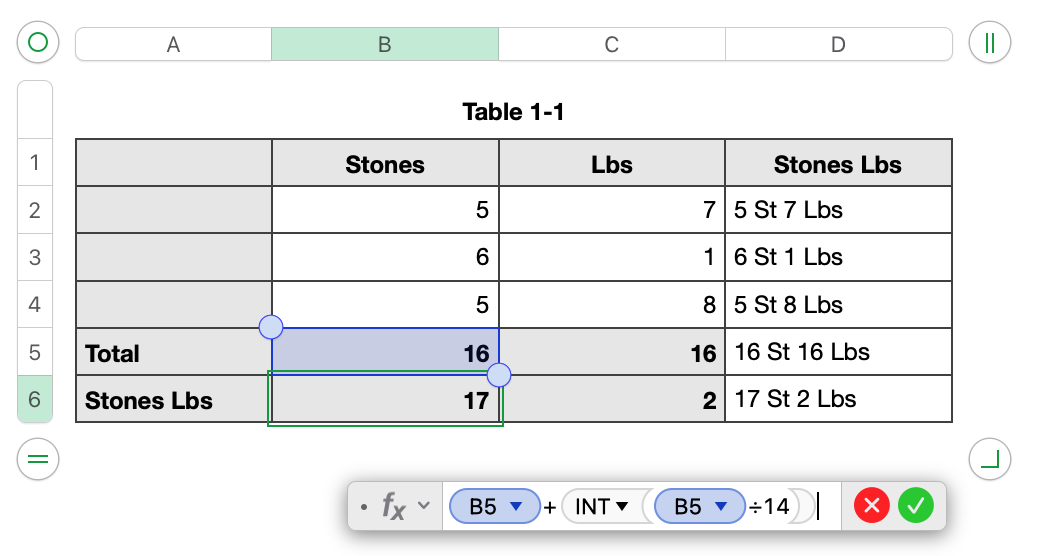
Formula in B6 is now B5+INT(B5÷14)
Formula in C6 is now MOD(C5,14)
Regards,
Ian.


