Request for Exchange of iPhone 15 Pro 256GB Due to Battery Health Issue

I am writing this to express my disappointment regarding my recent purchase of an iPhone 15 Pro 256GB, which I bought three months ago in January 2024 from E-city store in Abu Dhabi Mall. Unfortunately, I have noticed a significant decrease in the battery health of my device, which currently stands at 98%. This decline is concerning to me, especially when comparing it to the experience of a friend who purchased the same model in October 2023 and still maintains a battery health of 100%. Given this discrepancy, I am led to believe that there may be a potential issue with my device or its components. As a loyal customer, I am not satisfied with the performance of this handset and kindly request your assistance in resolving this matter. I would appreciate it if you could investigate the situation further and determine whether there is a product defect or any other underlying issue affecting the battery health of my iPhone 15 Pro. If possible, I would like to request an exchange for a new mobile device to ensure that I can continue to rely on the quality and performance expected from an Apple product.


Thank you for your attention to this matter. I look forward to your

prompt response and resolution of this issue


Sincerely,


AQIB


[Edited by Moderator]

iPhone 15 Pro

Posted on Apr 14, 2024 1:11 AM

Question marked as Top-ranking reply

Posted on Apr 14, 2024 1:31 AM

Prolong and Maximise Battery Performance and maintain Health of the Battery

The measure of battery health deterioration/drainage is subjective and can vary depending on individual usage patterns. There is no universal standard to determine whether the battery health deterioration/drainage is normal or abnormal because it heavily relies on how the battery is used and maintained.



Protect & Prolong the Life of your iPhone's Battery:

  1. About the battery usage on your iPhone, iPad, and iPod touch ...
  2. Batteries - Maximising Performance - Apple (IN)
  3. iPhone Battery and Performance


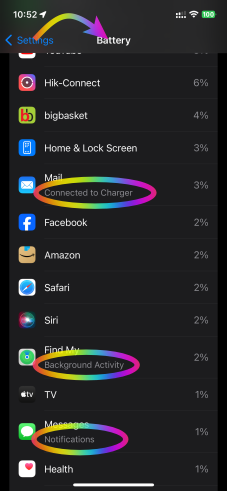
Try to monitor Battery usage by iPhone Activity as shown below


What is shown under battery usage? Checking that would give you an indication of the usage behavior.

  1. Background Activity
  2. Notifications
  3. Connected to Charger
  4. Or any Other


See the pic below (iPhone 12 Pro iOS 17.3.1)

"Show Activity" feature will show you more info see the pic below
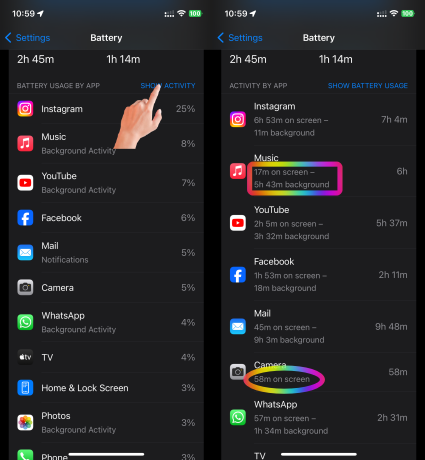


Try some of these options too.

To prolong the life of your iPhone battery, you can follow these tips and best practices:


To prolong the life of your iPhone battery, you can follow these tips and best practices:

  1. Optimize Battery Charging: Enable the "Optimized Battery Charging" feature on your iPhone. It helps reduce the wear on the battery by slowing down the battery aging process. You can find this option in Settings > Battery > Battery Health. About Optimized Battery Charging on your iPhone - Apple Support (IN)
  2. Avoid Extreme Temperatures: Extreme temperatures, both hot and cold, can negatively impact your battery life. Avoid exposing your iPhone to excessive heat or cold, such as leaving it in direct sunlight or in a freezing car.If your iPhone or iPad gets too hot or too cold – Apple Support (UK)
  3. Use Original Chargers and Cables: Always use Apple's original chargers and cables or certified third-party accessories. Low-quality chargers or cables can damage the battery and reduce its lifespan. Identify counterfeit or uncertified Lightning connector accessories - Apple Support (IN)
  4. Avoid Draining the Battery to Zero: Charge it whenever the charge becomes lower than 20%. The rest is up to you when to charge. how long to charge, how often to charge, which adapter to use starting from 5W to 140W USB-C Power Adapter etc.
  5. Optimize Display Settings: Adjust your display settings to optimize battery life. Lower the screen brightness, enable auto-brightness, and use shorter screen timeout durations. Adjust the display and text size on iPhone - Apple Support (IN)
  6. Minimize Background App Refresh: Limit the number of apps allowed to refresh in the background. Go to Settings > General > Background App Refresh and disable it for apps that don't require real-time updates. Switch apps on your iPhone, iPad, or iPod touch - Apple Support (IN)

  7. Disable Push Email: Push email notifications can drain your battery quickly. Instead, set your email accounts to fetch data manually or at longer intervals. You can change this setting in Settings > Mail > Accounts > Fetch New Data.
  8. Disable Unnecessary Notifications: Reduce the number of unnecessary notifications you receive. Go to Settings > Notifications and customize which apps can send you notifications.
  9. Limit Location Services: Some apps use GPS and location services in the background, which can drain your battery. Go to Settings > Privacy > Location Services and disable location access for apps that don't require it.
  10. Update iOS: Keep your iPhone's operating system up to date. Apple regularly releases updates that can include optimizations and improvements for battery life.
    1. Update Over-the-Air (OTA) —> Update your iPhone or iPad - Apple Support (IN)
    2. Update using iTunes/Finder —> Update your iPhone, iPad, or iPod touch - Apple Support (IN)


Similar questions

2 replies
Question marked as Top-ranking reply

Apr 14, 2024 1:31 AM in response to Community User

Prolong and Maximise Battery Performance and maintain Health of the Battery

The measure of battery health deterioration/drainage is subjective and can vary depending on individual usage patterns. There is no universal standard to determine whether the battery health deterioration/drainage is normal or abnormal because it heavily relies on how the battery is used and maintained.


Protect & Prolong the Life of your iPhone's Battery:

  1. About the battery usage on your iPhone, iPad, and iPod touch ...
  2. Batteries - Maximising Performance - Apple (IN)
  3. iPhone Battery and Performance


Try to monitor Battery usage by iPhone Activity as shown below


What is shown under battery usage? Checking that would give you an indication of the usage behavior.

  1. Background Activity
  2. Notifications
  3. Connected to Charger
  4. Or any Other


See the pic below (iPhone 12 Pro iOS 17.3.1)


"Show Activity" feature will show you more info see the pic below


Try some of these options too.

To prolong the life of your iPhone battery, you can follow these tips and best practices:


To prolong the life of your iPhone battery, you can follow these tips and best practices:

  1. Optimize Battery Charging: Enable the "Optimized Battery Charging" feature on your iPhone. It helps reduce the wear on the battery by slowing down the battery aging process. You can find this option in Settings > Battery > Battery Health. About Optimized Battery Charging on your iPhone - Apple Support (IN)
  2. Avoid Extreme Temperatures: Extreme temperatures, both hot and cold, can negatively impact your battery life. Avoid exposing your iPhone to excessive heat or cold, such as leaving it in direct sunlight or in a freezing car.If your iPhone or iPad gets too hot or too cold – Apple Support (UK)
  3. Use Original Chargers and Cables: Always use Apple's original chargers and cables or certified third-party accessories. Low-quality chargers or cables can damage the battery and reduce its lifespan. Identify counterfeit or uncertified Lightning connector accessories - Apple Support (IN)
  4. Avoid Draining the Battery to Zero: Charge it whenever the charge becomes lower than 20%. The rest is up to you when to charge. how long to charge, how often to charge, which adapter to use starting from 5W to 140W USB-C Power Adapter etc.
  5. Optimize Display Settings: Adjust your display settings to optimize battery life. Lower the screen brightness, enable auto-brightness, and use shorter screen timeout durations. Adjust the display and text size on iPhone - Apple Support (IN)
  6. Minimize Background App Refresh: Limit the number of apps allowed to refresh in the background. Go to Settings > General > Background App Refresh and disable it for apps that don't require real-time updates. Switch apps on your iPhone, iPad, or iPod touch - Apple Support (IN)
  7. Disable Push Email: Push email notifications can drain your battery quickly. Instead, set your email accounts to fetch data manually or at longer intervals. You can change this setting in Settings > Mail > Accounts > Fetch New Data.
  8. Disable Unnecessary Notifications: Reduce the number of unnecessary notifications you receive. Go to Settings > Notifications and customize which apps can send you notifications.
  9. Limit Location Services: Some apps use GPS and location services in the background, which can drain your battery. Go to Settings > Privacy > Location Services and disable location access for apps that don't require it.
  10. Update iOS: Keep your iPhone's operating system up to date. Apple regularly releases updates that can include optimizations and improvements for battery life.
    1. Update Over-the-Air (OTA) —> Update your iPhone or iPad - Apple Support (IN)
    2. Update using iTunes/Finder —> Update your iPhone, iPad, or iPod touch - Apple Support (IN)


Apr 14, 2024 1:30 AM in response to Community User

This is a community forum where Apple users come together to share tips on Apple devices and troubleshoot issues within the boundaries of the Apple ecosystem**.


Here, you can:

  • Dive into meaningful discussions: Get insights, share your experiences, and learn from fellow Apple enthusiasts about Apple products
  • Unlock the potential of your devices: Discover hidden features, troubleshoot problems, and get the most out of your iPhone, Mac, or any other Apple product.
  • Tap into a wealth of knowledge: Our community is full of Apple experts who are happy to share their wisdom and help you navigate the Apple ecosystem**.


Apple moderates the forum to ensure a friendly and productive environment, but the real magic happens through user-to-user interaction. So, feel free to explore existing discussions, ask questions, and contribute your own expertise on Apple Products.


** The Apple ecosystem refers to the interconnected world of Apple devices and services. This includes all their hardware, from iPhones and iPads to Macs and Apple Watches, iCloud along with their software and online platforms. You may refer to the list below.


Please note that this is a public forum, so when attaching a screenshot, please avoid including any personal credentials such as IP addresses, card details, email IDs, Apple IDs, IMEI numbers, serial numbers, phone numbers, order IDs, invoices, or any identifiable location information if you are sharing a map.


Hence, some of the following links which are relevant to your query may help you:


  1. Questions directed to Apple Inc - refer to the three links below
    1. Product Feedback - Apple
    2. Feedback - Weather - Apple
    3. Maps Report an Issue & Privacy - Apple Support & Report a problem with Maps on Mac - Apple Support
  2. Hardware repairs & tickets - Apple Authorized Service Provider
  3. Service grievances & questions --> Apple Repair and Repair Status Check - Official Apple Support
  4. Warranty & Apple Care+ issues --> Check Your Service and Support Coverage - Apple Support
  5. Order & Transaction related information -->
    1. Order Status - Shopping Help
    2. Viewing & Changing Orders - Shopping Help
    3. Genius Bar Reservation and Apple Support Options - Apple
  6. Suggestions and Feedback for improvements --> Apple Inc says; "We read all feedback carefully, but we are unable to respond to each submission individually."
    1. Here is how for iPhone · Country or region* Select your country or region. · Feedback Type* Select feedback type. · Comments* Enter a comment.
    2. Feedback - iPhone - Apple
  7. Shipping & Transportation queries - Shipping & Pickup - Shopping Help - Apple
  8. Repair costs or product or prices of part service & replacement -
    1. iPhone Repair and Service - Apple Support (IN)
    2. iPhone Screen Repair & Replacement
    3. iPhone Battery Repair & Replacement
  9. Product & Launch Detail etc.. --> Apple
  10. Third-party apps and their behavior - How to contact an app developer - Apple Support
  11. Any other issue --> Contact – Official Apple Support (IN) & Contact Apple for support and service


This thread has been closed by the system or the community team. You may vote for any posts you find helpful, or search the Community for additional answers.

Request for Exchange of iPhone 15 Pro 256GB Due to Battery Health Issue

Welcome to Apple Support Community
A forum where Apple customers help each other with their products. Get started with your Apple Account.