You see this ...
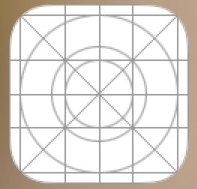
If you have changed any of the following recently.
- Apple ID
- Apple ID Country
- App Store Country
- The app is offloaded and you have downloaded the app and the developer does not provide any more support for the app in the App
- Data transferred from another iPhone. When you transfer between iOS devices only the app data gets transferred the app needs to be downloaded from the App Store.
- The App developer has discontinued the App on the App Store for your Country.
- The App is outdated. Update required
Based on your image posted, the app icon you're seeing on your iPhone with a mesh-like texture may be actually a placeholder icon that appears when the original app icon cannot be displayed properly.
This can happen for a variety of reasons, such as when the app has been removed from the App Store or when the app has lost its connection to the App Library. In some cases, this can also happen when there is a problem with the app's icon file or when the app is no longer supported by the developer.
If you suspect that the app is no longer supported or has been removed from the App Store, you can try searching for the app in the App Store to confirm whether it is still available. If you cannot find the app, the developer may have discontinued support for it.
Finally, the mesh-like icon you're seeing may be related to device compatibility. Some apps may not be optimized for all iPhone models or iOS versions, which can cause them to display incorrectly. If this is the case, you might try contacting the app developer for support or looking for an alternative app that is compatible with your device.
Alternatively, if you believe that the problem is related to a lost link to the App Library, you can try resetting your iPhone's home screen layout. To do this, go to Settings > General > Reset > Reset Home Screen Layout. This will reset your home screen layout to its default settings, which should fix any problems with missing app icons or links to the App Library. However, please note that this will also remove any custom app layouts or folders that you have created on your home screen.

You may also try...
If you can't download, make purchases, or update apps, including free apps, you need to update your payment method or add a new one. If you already verified that a payment method is available in your country or region and you're still having trouble, learn more.

