How to disable volume warning message on my iPhone

I was wondering if the volume warning message can be somehow turned off, since I can’t find anything in settings. I always have my volume all the way up when connected to my car and the message always appears and doesn’t go away, therefore blocking the navigation and I hate having to touch my phone while driving.


[Re-Titled by Moderator]

iPhone 14, iOS 17

Posted on May 18, 2024 12:37 AM

Reply
Question marked as Top-ranking reply

Posted on May 18, 2024 12:42 AM

Your iPhone and the country that you live in protect you with the safety norms. Due to regulations and safety standards, headphone notifications can't be turned off in certain countries or regions.



Reduce loud headphone sounds in Settings · Go to Settings, then tap Sounds & Haptics (iPhone 7 and later) or Sounds (earlier models). · Tap Headphone Safety.


Use headphone audio level features on iPhone - Apple Support


Headphone notifications on your iPhone, iPod touch, or Apple Watch

  1. Open the Settings app on your iPhone or iPod touch.
  2. Tap Sounds & Haptics, then tap Headphone Safety.
  3. Turn Headphone Notifications on or off.

Headphone notifications on your iPhone, iPod touch, or Apple ...


About headphone notifications and volume

Listening to audio on your headphones too loud for too long can damage your hearing. Headphone Notifications let you know if your audio exposure has been loud enough for long enough to affect your hearing—for example, over 80 decibels (dB) for 40 hours total within the last 7 days.

Your iPhone, iPod touch, or Apple Watch can now alert you when you’ve exceeded 100% of the 7-day exposure limit while wearing headphones.* These notifications give you more awareness of your listening habits to help you protect your hearing. When you receive a notification, you’ll hear a chime, and your volume will turn down automatically. You can dismiss the notification and turn your volume back up if you choose.

*The 7-day exposure limit applies only to media audio. Phone calls do not count towards your headphone audio exposure.


Check the Screen Time Restrictions, first, Settings > Screen Time > Content & Privacy Restrictions > Reduce Loud Sounds


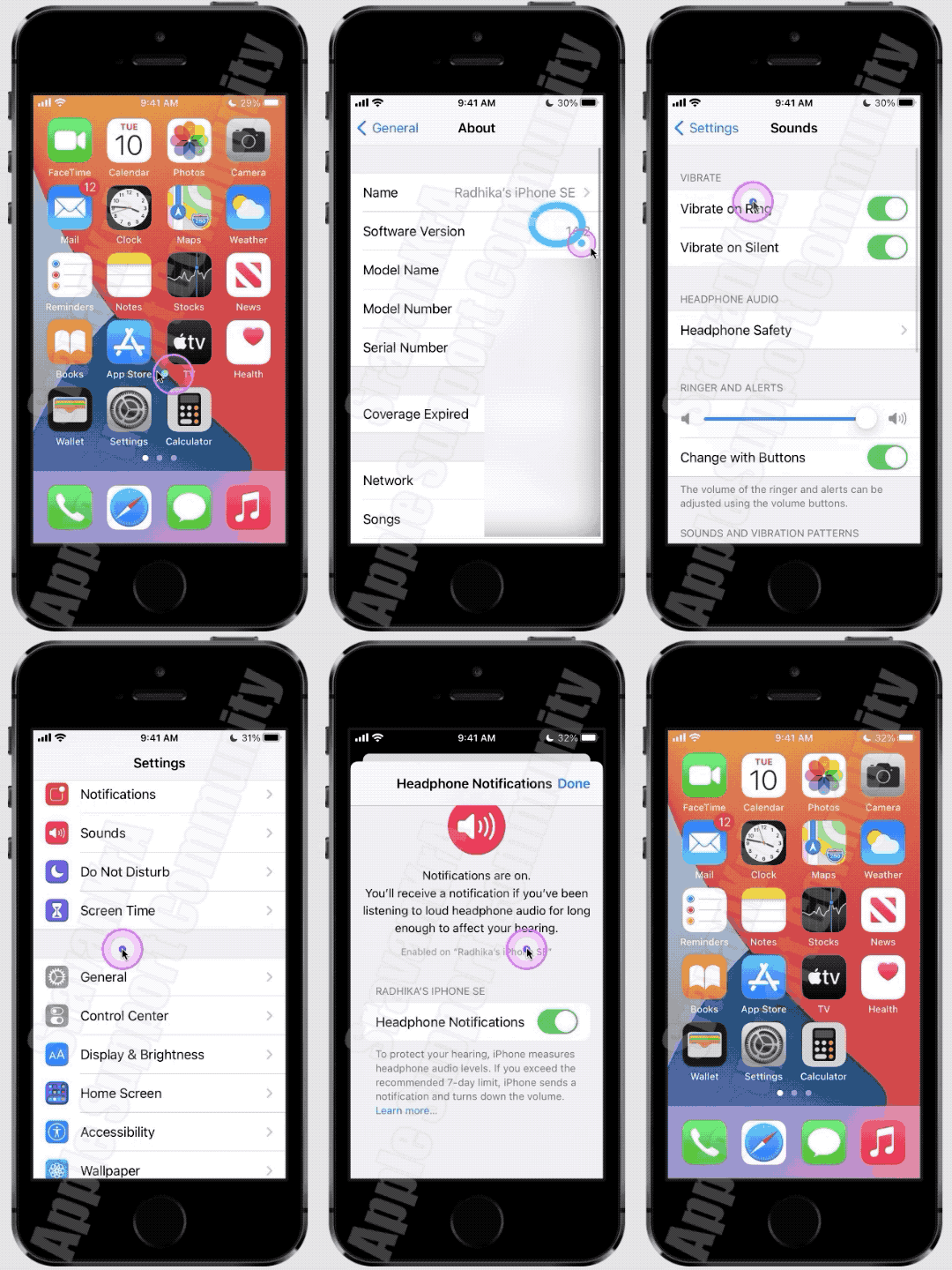
Then watch this GIF made on iPhone SE (1st Gen) iOS 14.2. Watch till the end.

3 replies
Question marked as Top-ranking reply

May 18, 2024 12:42 AM in response to SaraPJM

Your iPhone and the country that you live in protect you with the safety norms. Due to regulations and safety standards, headphone notifications can't be turned off in certain countries or regions.


Reduce loud headphone sounds in Settings · Go to Settings, then tap Sounds & Haptics (iPhone 7 and later) or Sounds (earlier models). · Tap Headphone Safety.


Use headphone audio level features on iPhone - Apple Support


Headphone notifications on your iPhone, iPod touch, or Apple Watch

  1. Open the Settings app on your iPhone or iPod touch.
  2. Tap Sounds & Haptics, then tap Headphone Safety.
  3. Turn Headphone Notifications on or off.

Headphone notifications on your iPhone, iPod touch, or Apple ...


About headphone notifications and volume

Listening to audio on your headphones too loud for too long can damage your hearing. Headphone Notifications let you know if your audio exposure has been loud enough for long enough to affect your hearing—for example, over 80 decibels (dB) for 40 hours total within the last 7 days.

Your iPhone, iPod touch, or Apple Watch can now alert you when you’ve exceeded 100% of the 7-day exposure limit while wearing headphones.* These notifications give you more awareness of your listening habits to help you protect your hearing. When you receive a notification, you’ll hear a chime, and your volume will turn down automatically. You can dismiss the notification and turn your volume back up if you choose.

*The 7-day exposure limit applies only to media audio. Phone calls do not count towards your headphone audio exposure.


Check the Screen Time Restrictions, first, Settings > Screen Time > Content & Privacy Restrictions > Reduce Loud Sounds


Then watch this GIF made on iPhone SE (1st Gen) iOS 14.2. Watch till the end.


Jul 1, 2024 10:01 PM in response to gmein1924

gmein1924 Said:

"Had the same issue with my home stereo system, and I solved it by going to settings>accessibility>audio & visual and turning off headphone notifications. This is on iOS 17.5.1 on an iPhone 15PM. The previously mentioned solution is from iOS 14 and is thus no longer accurate."

-------


Inform Apple of your Solution:

Report this solution to Apple. Doing so, they will know what fixes to issues that come about are out there.

  1. Go Here: Feedback - iPhone - Apple
  2. Select: "Bug Report" for the "Feedback Type"
  3. Comment: on when you came across this issue. Include the URL of this thread.
  4. Proceed from there as necessary

This thread has been closed by the system or the community team. You may vote for any posts you find helpful, or search the Community for additional answers.

How to disable volume warning message on my iPhone

Welcome to Apple Support Community
A forum where Apple customers help each other with their products. Get started with your Apple Account.

