mjuha wrote:
In finder, I always sort my files by name and group by type. However, when I open a finder window from apps, e.g., Word, Photoshop., to insert a file or something, there is no sorting or grouping, only chaos. Any idea on how I can view these Finder-windows as the regular ones?
Have you tried using the toolbar icons to choose how you want these items displayed and grouped?
There is a standard file open dialog that all normal apps use. The specific settings are unique to each app, but they are the same:
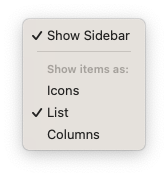
These settings will be persisted between launches.
Note that I did say "normal apps" above. You specifically mentioned two non-normal apps. Word isn't too bad. You just have to disable all the OneDrive junk to get to the standard file dialogs. I have no idea about Adobe. These days Adobe tends to go rogue, so all bets are off there.


