Finder-windows in apps (Word, Chrome, et c.) won't have same view options as regular Finder-windows

In finder, I always sort my files by name and group by type. However, when I open a finder window from apps, e.g., Word, Photoshop., to insert a file or something, there is no sorting or grouping, only chaos. Any idea on how I can view these Finder-windows as the regular ones?

MacBook Pro 13″

Posted on Jun 11, 2024 6:55 AM

Reply
Question marked as Top-ranking reply

Posted on Jun 11, 2024 7:36 AM

mjuha wrote:

In finder, I always sort my files by name and group by type. However, when I open a finder window from apps, e.g., Word, Photoshop., to insert a file or something, there is no sorting or grouping, only chaos. Any idea on how I can view these Finder-windows as the regular ones?

Have you tried using the toolbar icons to choose how you want these items displayed and grouped?


There is a standard file open dialog that all normal apps use. The specific settings are unique to each app, but they are the same:
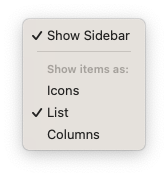

These settings will be persisted between launches.


Note that I did say "normal apps" above. You specifically mentioned two non-normal apps. Word isn't too bad. You just have to disable all the OneDrive junk to get to the standard file dialogs. I have no idea about Adobe. These days Adobe tends to go rogue, so all bets are off there.


3 replies
Question marked as Top-ranking reply

Jun 11, 2024 7:36 AM in response to mjuha

mjuha wrote:

In finder, I always sort my files by name and group by type. However, when I open a finder window from apps, e.g., Word, Photoshop., to insert a file or something, there is no sorting or grouping, only chaos. Any idea on how I can view these Finder-windows as the regular ones?

Have you tried using the toolbar icons to choose how you want these items displayed and grouped?


There is a standard file open dialog that all normal apps use. The specific settings are unique to each app, but they are the same:


These settings will be persisted between launches.


Note that I did say "normal apps" above. You specifically mentioned two non-normal apps. Word isn't too bad. You just have to disable all the OneDrive junk to get to the standard file dialogs. I have no idea about Adobe. These days Adobe tends to go rogue, so all bets are off there.

This thread has been closed by the system or the community team. You may vote for any posts you find helpful, or search the Community for additional answers.

Finder-windows in apps (Word, Chrome, et c.) won't have same view options as regular Finder-windows

Welcome to Apple Support Community
A forum where Apple customers help each other with their products. Get started with your Apple Account.