Apple Cash setup for minor

So I'm still a minor and my dad has been trying to set up Apple Pay for me because we started a Family Group but it won't let him because it says I already have it enabled. I used Apple Pay before they asked for a verification of your identity. But now when I try using it, it says I'm a minor. We don't know what to do. And if I try changing my age it does the whole "organizer approval" situation. And I can't spend or receive money even after the age change. We are not sure how to fix it.

iPhone 11, iOS 17

Posted on Jun 14, 2024 11:28 PM

Reply
1 reply

Jun 15, 2024 4:21 AM in response to Tw1gy

Just so I understand, you were using Apple Cash without verification of identity (including age)? Is that correct?


Is the Family Organizer following the steps in the support article below?


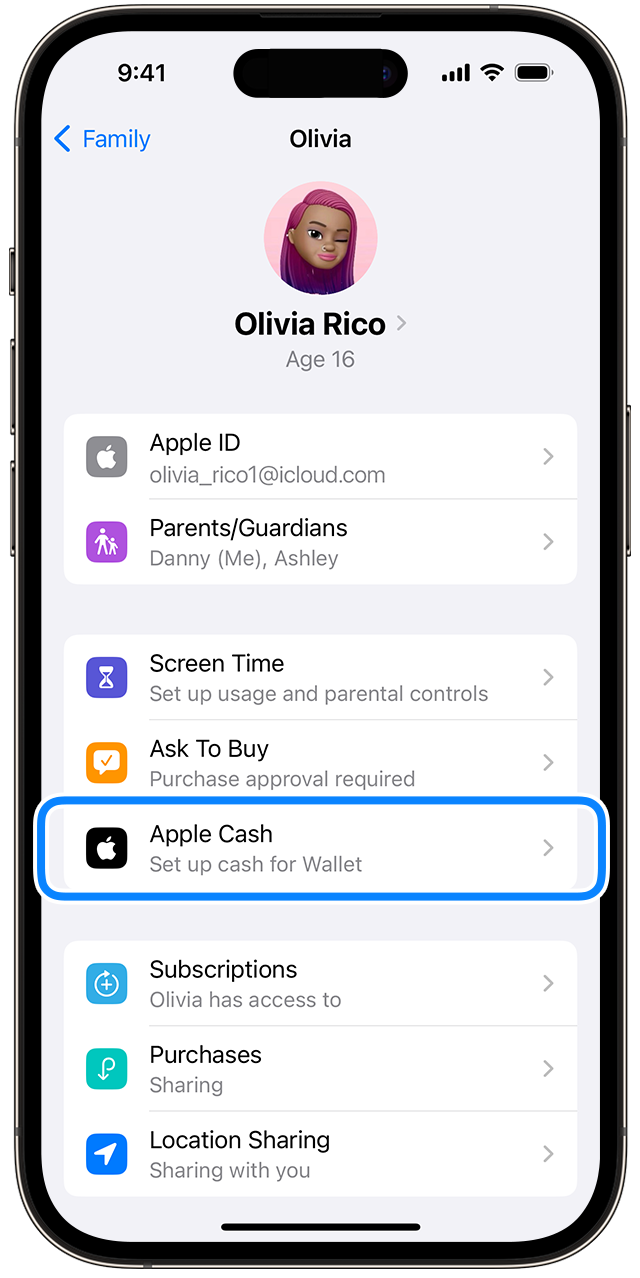
Set up Apple Cash for a child or teen

  1. On the family organizer's iPhone, open the Settings app.
  2. Tap [your name], then tap Family Sharing.
  3. Tap the child or teen that you want to set up Apple Cash for.
  4. Tap Apple Cash, then follow the instructions on your screen to set up their account. You might need to verify your identity. If you see Pending, make sure that your child meets the requirements.


After you complete these steps, you can view and manage the Apple Cash accounts of your children and teens.


How children and teens can use Apple Cash

If your family organizer set up Apple Cash for you, you can use it to make purchases in participating stores, apps, and websites.


You can also use Apple Cash to send and receive money with people you know. If you're under 13 years old, you can't add a debit card to Wallet to use with Apple Cash.


Set up and use Apple Cash Family - Apple Support


This thread has been closed by the system or the community team. You may vote for any posts you find helpful, or search the Community for additional answers.

Apple Cash setup for minor

Welcome to Apple Support Community
A forum where Apple customers help each other with their products. Get started with your Apple Account.