How to use and display captions., titles, locations, time and date stamps,

How can I display some of the meta data when I show my photos. For example I would like to show the date, time, location, place photos were taken. I would like to create an album for my European Vacation in such a way that a user knows that these are the England pictures and also be able to the city, and do the same thing for Italy and France. If I am going to ten cities I don't want to create ten separate albums

Posted on Jun 19, 2024 3:57 PM

Reply
2 replies

Jun 20, 2024 7:27 AM in response to léonie

One more thing - how do you want to show the photos?

As a slideshow? A printed book?

Or do want to share a folder with photos from your trip?


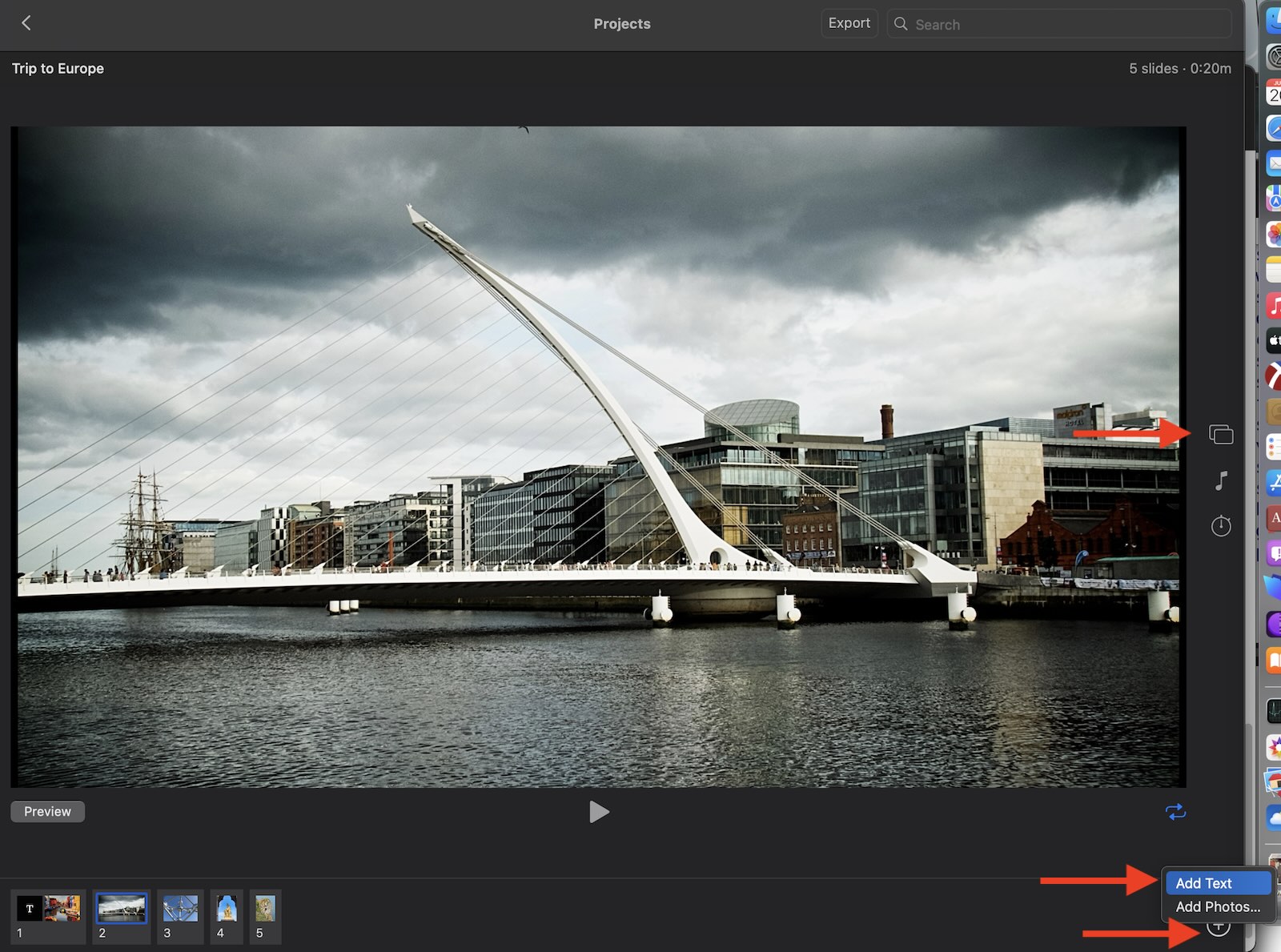
If you create a slideshow project on a Mac, you can add title slides with text between the different parts of the slideshow.

  • Select the photos in your album all at once, then create a slideshow project with "File > Create > Slideshow > Photos.
  • Select a them for the slideshow by clicking the Theme button at the right border.
  • Arrange the photos in the film strip to your liking by dragging them into the sequence you want.
  • To add text overlays to the photos select a photo, then click the "+" button in the lower right corner and click "Text". Now you can write additional information into a text overlay for the selected slide.


It is not possible to use the metadata of the photos automatically. We have to enter all data again manually.

To avoid the additional work to enter all texts again, I have written a very basic AppleScript to present the photos in an album as a slideshow, while displaying the metadata as notifications. It will depend on your system version, if this script will work for you: Script: A Slideshow With Titles and Locations And Dates in Photos



Jun 20, 2024 5:04 AM in response to Danny_527

Are you asking about Photos for Mac or photos on an iPad or iPhone?


On a Mac you can create an index with the metadata of the photos by printing them to PDFin the Contact Sheet layout, Share this PDF file together with your photos.

  • Ceate an album of the photos you want to share.
  • Select all photos in the album with ⌘A
  • Enter the command ⌘P to open a Print dialog
  • Select the layout "Contact Sheet and set the number of columns.
  • Click "Captions and select the metadata you want to share.

Then continue to print this and click the PDF button to print to a PDF file.


For example:

This thread has been closed by the system or the community team. You may vote for any posts you find helpful, or search the Community for additional answers.

How to use and display captions., titles, locations, time and date stamps,

Welcome to Apple Support Community
A forum where Apple customers help each other with their products. Get started with your Apple Account.