Lots of people have this issue, seems like Apple never fixed this. There are numerous diy fixes, which should not be needed, but unfortunately are. In YouTube fullscreen, when the control bars disappear the screen starts flickering. If you move the mouse and the bars come back, flickering disappears. Something with overlays, GUI, I don't know.
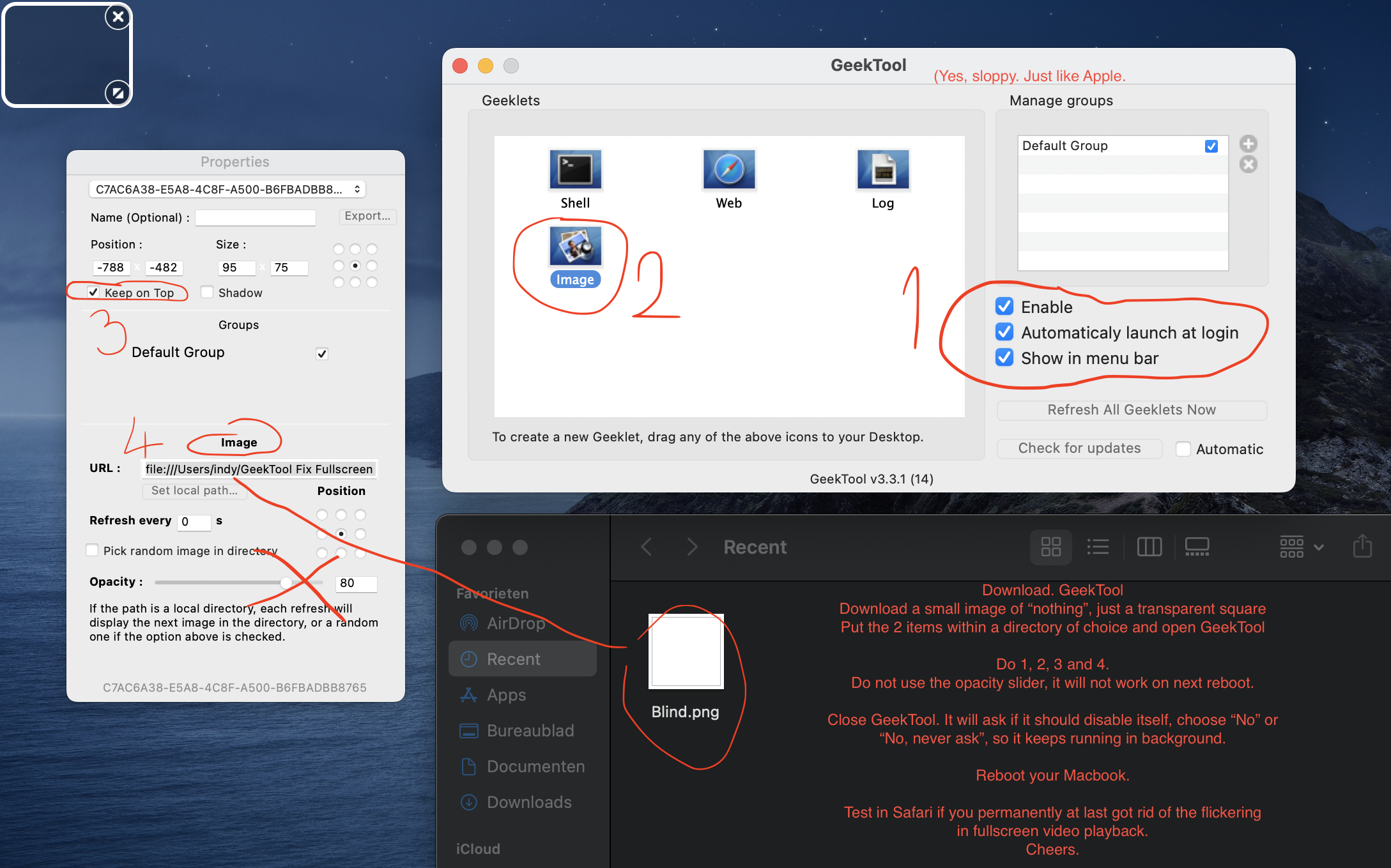
I fixed it myself with an overlay app called GeekTool to always put an overlaying image on the screen. It's a transparent .png image of nothing, so you never see it. Explanation in attached image! This solution fixes it ones and for all. You will need to reboot your Macbook, the first run the image gets behind the video, so it does not work. After reboot the (invisible) image stays on top of your screen. Good luck, hope it works for you out there.
Other fixes on the net (some temporarily or at cost of battery life):
- In preferences make mouse cursor bigger and smaller. Fixes it temporarily.
- Use Firefox. Only Firefox...
- On MacBooks with extra dedicated gfx, in battery management disable Automatic Graphics Switching (takes 30-40% of your battery life).


