Mission control shows tiny windows

At some point, the windows in mission control become small. A couple of times they became so small that it was very difficult to find the windows I needed.


An example of such problem:

Ordinary mission control behavior


unexpected behavior


As you can see, it becomes much more difficult to see what is written in the application windows.

But this size of windows is not the limit. Sometimes they get even smaller.


Rebooting the system solves the problem, but not for long. After some time the windows become like that again. I can't reboot the system too often, because it interferes with my work.


There's screencast of situation when windows are extremely small:


[Edited by Moderator]

MacBook Pro 16″

Posted on Jul 14, 2024 4:57 AM

Reply

Similar questions

6 replies

Jul 14, 2024 9:47 AM in response to wowonline

wowonline wrote:

MacBook Pro 16-inch, 2023; Chip Apple M2 Pro; Memory 32GB; MacOS 13.4 (22F66)

I have experienced this problem many times and it annoys me a lot because I have to reboot macbok often

I'm here to report bug and get a solution ...

[Edited by Moderator]


macOS 13.4 ....(?) from 5/18/2023 I would say you are woefully outdated.


The current stable release of your—

Ventura including bug fixes & security updates is macOS 13.6.7 (May 13, 2024) - I would start there


Keep your Mac up to date - Apple Support  

Keep your Mac up to date - Apple Support


Jul 14, 2024 8:24 AM in response to wowonline

wowonline wrote:

At some point, the windows in mission control become small. A couple of times they became so small that it was very difficult to find the windows I needed.

An example of such problem:
Ordinary mission control behavior
https://discussions.apple.com/content/attachment/e965f619-a5d1-4470-bb4c-66d56aa97653

unexpected behavior
https://discussions.apple.com/content/attachment/c8f6ad86-c3b7-4084-a997-8ee7b41fd4e4

As you can see, it becomes much more difficult to see what is written in the application windows.
But this size of windows is not the limit. Sometimes they get even smaller.

Rebooting the system solves the problem, but not for long. After some time the windows become like that again. I can't reboot the system too often, because it interferes with my work.

There's screencast of situation when windows are extremely small:


[Edited by Moderator]


Please review the function of Mission Control:


"Mission Control shows all of the windows open on the desktop of your Mac, arranged in a single layer so it’s easy to spot the one you need. "


ref: See open windows and spaces in Mission Control on Mac


What exact Mac is this...


What exact macOS is this...


Old issue, new issue, what changed...


This window looks odd to me in your example of "Ordinary mission control behavior:

whats going on here?


Have you quit all apps, shut down and restarted?


Whats on Desktop 2... close all but one Desktop and compare your results...


The more app windows open the smaller they will be displayed in Mission Control—


If you think you have an issue you can try a SafeBoot to sort anomalies(?)


A SafeBoot Use safe mode on your Mac - Apple Support will sort many anomalies


Does a quick disk repair before it fully boots up, and certain system caches get cleared and rebuilt, third party system modifications and system accelerations are disabled temporarily.


Login and test. Reboot as normal and test. Caches get rebuilt automatically.


Jul 14, 2024 8:59 AM in response to leroydouglas

MacBook Pro 16-inch, 2023; Chip Apple M2 Pro; Memory 32GB; MacOS 13.4 (22F66)


I have experienced this problem many times and it annoys me a lot because I have to reboot macbok often


In example of "Ordinary mission control behavior" I showed an example of what a normal sized window looks like. In the "unexpected behavior" example I showed what size the windows are in case of a bug in mission control. Below I have also attached an example of "unexpected behavior 2.0", which is a continuation of "unexpected behavior". To get "unexpected behavior 2.0", I did not do anything on purpose, just after some time the windows decreased in size even further. I didn't reboot my macbook on purpose so they wouldn't go back to normal.


Another example - continuation of unexpected behavior example

unexpected behavior 2.0
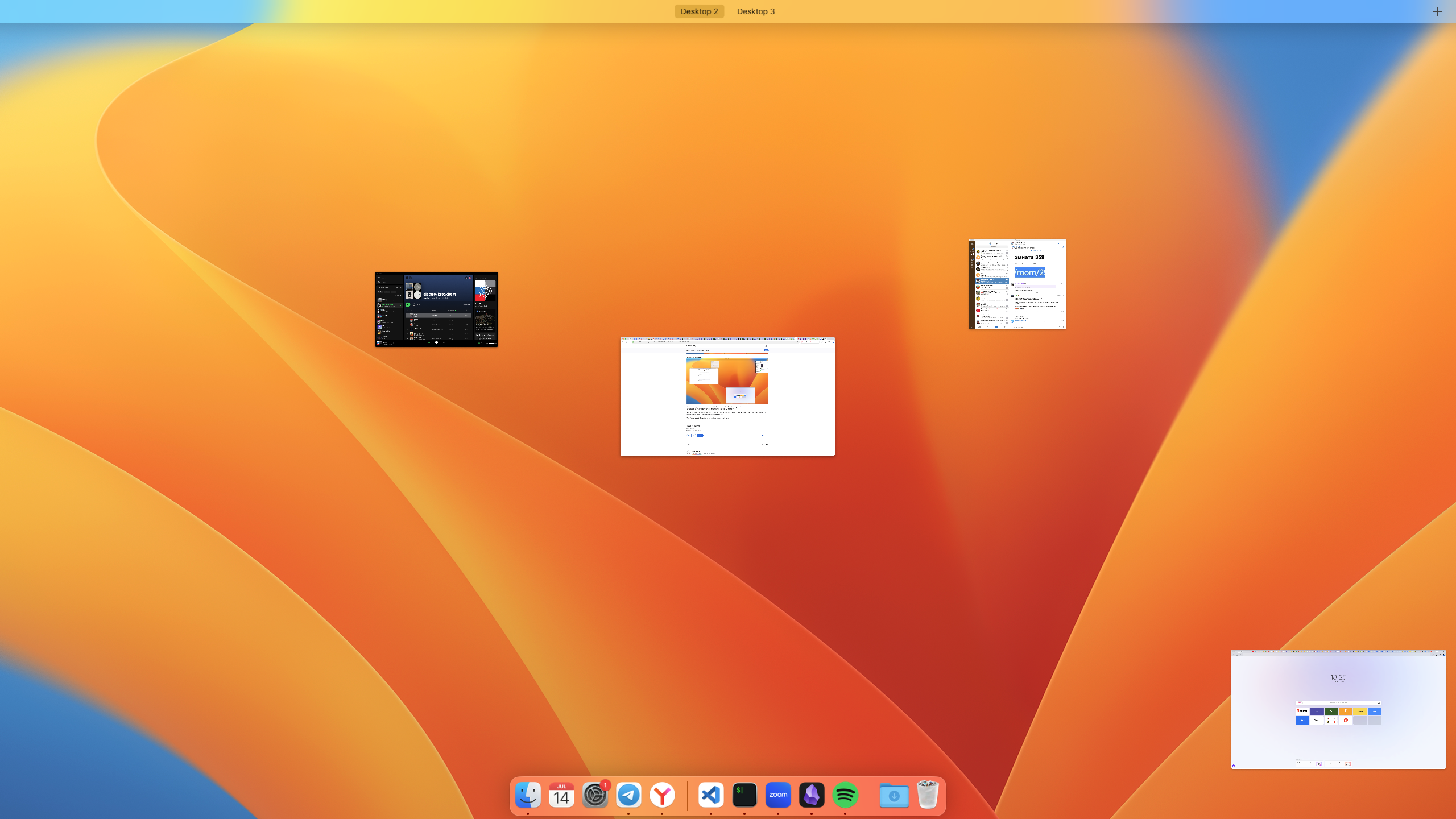

As you can see - the windows have become much smaller. And this is not the limit, after a while they will be even smaller. I can't understand what causes the reduction. For example, repeatedly calling mission control does not change their size.


You're talking about closing all windows and the desktop with the bug - that would solve the problem for a single desktop. But if the problem is also on other desktops, it will stay there until I close them.

The problem is solved by rebooting the macbook, but only temporarily and I'm here to report bug and get a solution as this happens to me all the time and is interfering with my work on my macbook. I can't reboot my macbook all the time


[Edited by Moderator]

This thread has been closed by the system or the community team. You may vote for any posts you find helpful, or search the Community for additional answers.

Mission control shows tiny windows

Welcome to Apple Support Community
A forum where Apple customers help each other with their products. Get started with your Apple Account.
